Notice

The forum is in read only mode.

Support Forum

Welcome! Support Forums have been reactivated
Welcome the Technical Support section. Help us in assisting you by providing us with a concise and descriptive elaboration of your issues. Be specific and if possible, provide us with a step-by-step instruction in replicating your problem.

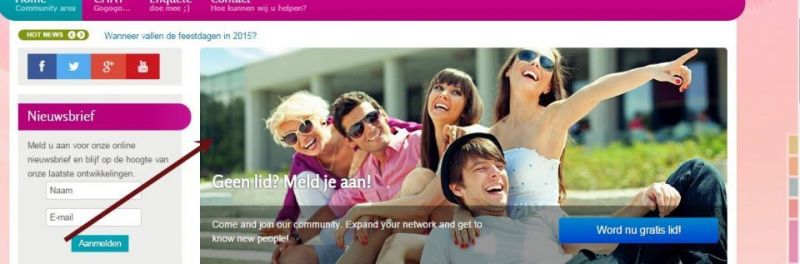
Where can i chance this?

11 years 11 months ago
  • Danny's Avatar
    Topic Author
  • Danny
  • Offline
  • Fresh Boarder
  • Posts: 87
  • Thank you received: 1
Licenses:
JomSocial Active

How can i chance that picture?

Attachments:
11 years 11 months ago
Licenses:

Hi Danny,

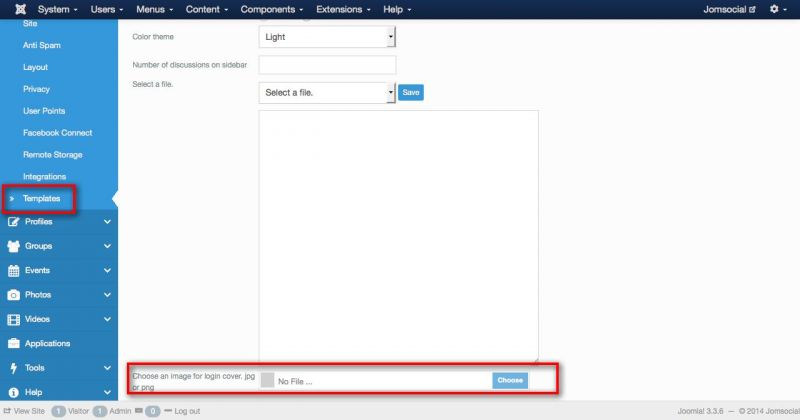
you can changing it from Jomsocial backend > configuration > templates > select "default", you can put the image at Choose an image for login cover. jpg or png.

Regards,
Albert

Attachments:
The following user(s) said Thank You: Danny
11 years 11 months ago
  • Danny's Avatar
    Topic Author
  • Danny
  • Offline
  • Fresh Boarder
  • Posts: 87
  • Thank you received: 1
Licenses:
JomSocial Active

Dont work this way

11 years 11 months ago
Licenses:

Hi Danny,

there is an other solution, please try this:
www.jomsocial.com/forum/photos-videos/18...e-edit-remove-how-to

FYI:
your template location at /templates/it_community2/

if still cant. please provide me FTP access detail by editing your first post at this topic. put it at site info form.

Regards,
Albert

The following user(s) said Thank You: Danny
11 years 11 months ago
  • Danny's Avatar
    Topic Author
  • Danny
  • Offline
  • Fresh Boarder
  • Posts: 87
  • Thank you received: 1
Licenses:
JomSocial Active

Done (FTP access) an thanks Albertus!

11 years 11 months ago
Licenses:

Hi Danny,

seem your provide me wrong FTP password. because I cant access with it. could you please check it again?

Regards,
Albert

The following user(s) said Thank You: Danny
11 years 11 months ago
  • Danny's Avatar
    Topic Author
  • Danny
  • Offline
  • Fresh Boarder
  • Posts: 87
  • Thank you received: 1
Licenses:
JomSocial Active

I changed :) Please help Albert! :)

11 years 10 months ago
Licenses:

Hi Danny,

Please check it, I did this:
www.jomsocial.com/forum/photos-videos/18...e-edit-remove-how-to

but I use images location as path:

$heroImage = JURI::root(true).'/images/cover.jpg';

Regards,
Albert

The following user(s) said Thank You: Danny
11 years 10 months ago
  • Danny's Avatar
    Topic Author
  • Danny
  • Offline
  • Fresh Boarder
  • Posts: 87
  • Thank you received: 1
Licenses:
JomSocial Active

Thank you very much Albert !!! ;)

Moderators: Piotr Garasiński
Powered by Kunena Forum

Join 180,000 websites creating Amazing communities

JomSocial is the most complete, easy-to-use addon that turns Joomla CMS into a
full -fledged, social networking site

TRY NOW BUY NOW