Support Forum
Template Breaks on Group Album Index Page

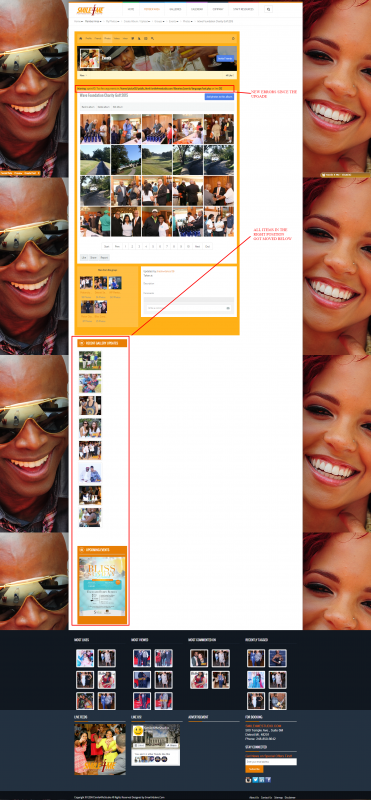
Template is broken and thumbnails aren't clickable sometimes. Sometimes it is, sometime they aren't. It seems to do this on the thumbnail index page for albums. You can see a live view of how it shows up here or any album index page actually:
www.smile4mestudio.com/memberarea/2014-1...bumid=161&groupid=34
Screen shot was included in post will also show that my right position for my template, got pushed down below my lower positions.
HI, Arthur.
That's embarrassing... but this is a bug.
Thank you for reporting it.
I'll pass it to our developers.
- Instead of saying: 'it's not working', explain the problem in detail.
- Screenshots with the URL visible in them and the problem marked are more than welcome.
- Tell us how to replicate the problem, we can't fix it if we can't find it.
- Make sure that your site/server meets JomSocial System Requirements
- Make sure to setup JomSocial Cron Job
- Always provide us with access details to the backend and ftp. We need it to debug problems.
- If you have a similar problem, but a solution you found isn't working, open a new thread instead of 'merging' with an existing one.
- Use the "Thank You" feature on any post that helped you
Any temp fixes for this? Don't wanna surprise my members with this issue if I don't have to. I mean I do have a backup, but that's gonna be a lot of work being I've updated the site with images and have new members.
Hi Arthur.
I'll update you with a fix as soon developer provide it.
- Instead of saying: 'it's not working', explain the problem in detail.
- Screenshots with the URL visible in them and the problem marked are more than welcome.
- Tell us how to replicate the problem, we can't fix it if we can't find it.
- Make sure that your site/server meets JomSocial System Requirements
- Make sure to setup JomSocial Cron Job
- Always provide us with access details to the backend and ftp. We need it to debug problems.
- If you have a similar problem, but a solution you found isn't working, open a new thread instead of 'merging' with an existing one.
- Use the "Thank You" feature on any post that helped you
HI, Arthur.
Please, do a safe copy of this file;
ROOT/components/com_community/templates/jomsocial/layouts/photos/list.php
Then replace original file with patched one.
- Instead of saying: 'it's not working', explain the problem in detail.
- Screenshots with the URL visible in them and the problem marked are more than welcome.
- Tell us how to replicate the problem, we can't fix it if we can't find it.
- Make sure that your site/server meets JomSocial System Requirements
- Make sure to setup JomSocial Cron Job
- Always provide us with access details to the backend and ftp. We need it to debug problems.
- If you have a similar problem, but a solution you found isn't working, open a new thread instead of 'merging' with an existing one.
- Use the "Thank You" feature on any post that helped you
This message has an attachment file.
Please log in or register to see it.
This fixed the layout issue, but not the ability to click a thumbnail to bring up the modal window issue.
It's randomly happening, but its doing it. It feels like its conflicting with something loading on the page. And this is any and every album. Not just one in particular.
Hi, Arthur.
Please, report this in new thread.
- Instead of saying: 'it's not working', explain the problem in detail.
- Screenshots with the URL visible in them and the problem marked are more than welcome.
- Tell us how to replicate the problem, we can't fix it if we can't find it.
- Make sure that your site/server meets JomSocial System Requirements
- Make sure to setup JomSocial Cron Job
- Always provide us with access details to the backend and ftp. We need it to debug problems.
- If you have a similar problem, but a solution you found isn't working, open a new thread instead of 'merging' with an existing one.
- Use the "Thank You" feature on any post that helped you
I've reported this months ago already. This is my second time. Same issue. Same scenario. On a brand new computer with different software and everything.
previous post
Hi, Arthur.
Ah, that issue. No one from us was able to replicate it.
But I noticed that it MAY happen but only if you're on page that is not fully loaded.
Make sure that page is fully loaded - if there is no load indicator.
When page is still loading then not all scripts will work as they wait for browser "signal" that load is ready.
- Instead of saying: 'it's not working', explain the problem in detail.
- Screenshots with the URL visible in them and the problem marked are more than welcome.
- Tell us how to replicate the problem, we can't fix it if we can't find it.
- Make sure that your site/server meets JomSocial System Requirements
- Make sure to setup JomSocial Cron Job
- Always provide us with access details to the backend and ftp. We need it to debug problems.
- If you have a similar problem, but a solution you found isn't working, open a new thread instead of 'merging' with an existing one.
- Use the "Thank You" feature on any post that helped you
The opposite holds true for me. I have to click on the thumbnail before the page loads completely or I won't 'catch it'
If I wait till the entire page loads, its a no go on the thumbnails. Can we do a live view of my site some how so you can see this as its happening?
Hi, Arthur.
I've tried FireFox and Chrome... in both photos are displaying fine.
I'm not able to replicate your issue.
I saw your screencast... but 5 people can't replicate your issue.
Could you ask your friends to test it too?
Please, open new thread with issue summary and your friends results.
- Instead of saying: 'it's not working', explain the problem in detail.
- Screenshots with the URL visible in them and the problem marked are more than welcome.
- Tell us how to replicate the problem, we can't fix it if we can't find it.
- Make sure that your site/server meets JomSocial System Requirements
- Make sure to setup JomSocial Cron Job
- Always provide us with access details to the backend and ftp. We need it to debug problems.
- If you have a similar problem, but a solution you found isn't working, open a new thread instead of 'merging' with an existing one.
- Use the "Thank You" feature on any post that helped you