Support Forum
Video problem

ISSUE SUMMARY:
I could upload a video from computer, but it doesn't show up in only me, public everyone or friends. This was a .flv video I tested with.
STEPS TO REPLICATE:
1
2
3
4
5
RESULT Got a message it was in process, but nothng more happened.
EXPECTED RESULT
BROWSER
Hi Tom,
FFMPEG must installed at your server, and you need to put the path at jomsocial video setting, and need to execute cronjob for trigger video converting process .
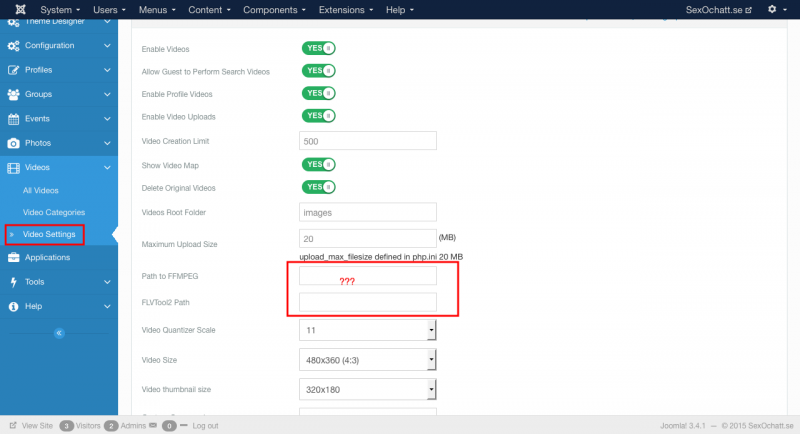
here the doc.
documentation.jomsocial.com/wiki/Video_L..._Upload_Requirements
make sure you using latest FFMPEG version:
www.ffmpeg.org/
you can asking your server support for more assistance about ffmpeg installation
Regards
Hi Albertus,
Yes, I know about that where you put in ??? FFMPEG are installed and I have contacted my host about this. But why are cronjob showing 1500? The url you asked me to look at doesnt' exist. Look at the screenshot.
prntscr.com/72uhwv
Hi Tom,
here the doc page. I use same link from my prev post:
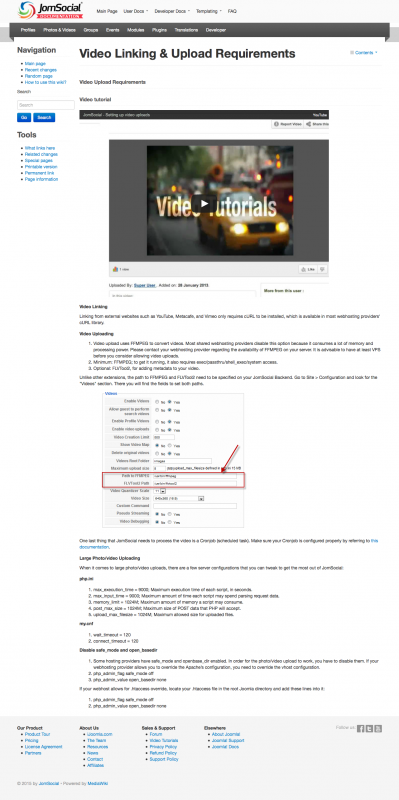
you must put the FFMPEG path first at video setting. if path still empty at video setting. cron job will ignoring the video.
lets do it step by step first, please put FFMPEG path at video setting, you can asking your server support about the correct path.
Regards
Hi Albertus,
I checked up with my host and I Think it should be right from what I got to know from them, but I'll test. Another question is why it send a message to everyone when I did try to upload? I guess it is a setting in profile that each and one have to be set by them self (notifications?)
Hi Albertus,
After I checked with my host, I got the following paths as I wrote in there, and this was:
/usr/bin/ffmpeg
/usr-bin/flvtool2
Thats why I don't understand what I still are doing wrong. Do I need to run Cron from the videosettings/videos in admin? I'm totally lost :)
i noticed videos didn't convert as it should, but just told me I should wait for a message about processing which never came.
Hi Tom,
here about cron job:
documentation.jomsocial.com/wiki/Setting_Up_Cron_Job
btw I cant access administrator page any more. please update the credentials information by editing your first post at this topic.
I need to debugging your site, related with cronjob error.
Regards
Hi Tom,
the FFMPEG version that installed at your server its too old:
FFmpeg version 0.6.5, Copyright (c) 2000-2010
please make sure your server using latest version from:
www.ffmpeg.org/
Regards
Hi Tom,
please check it:
videos converted successfully
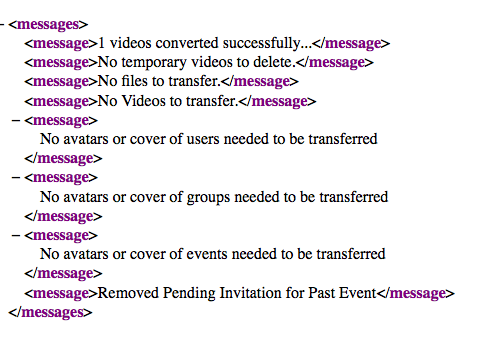
the FFMPEG path changed to /usr/local/bin/ffmpeg
seem your hosting forget to inform it.
and about privacy of Groups, please give the link for that topic.
Regards
Hi Albertus,
I see, but for me it did not convert at all after that my hosting provider installed the latest one. It just said pending for some reason. I just wonder...how could it convert for you?
Regarding to the privacy of Groups, that seem to have been fixed.
Hi Tom.
here the logic:
1. user upload video
2. the video will on pending list
3. must execute cronjob, and videos will be converted at cronjob
4. users can see it at videos list
I uploaded 2 test videos, and all videos converted. you can see it at jomsocial backend > videos > all video
FYI:
documentation.jomsocial.com/wiki/Setting_Up_Cron_Job
Regards