Support Forum
Hello Me - Allows more to attend event than invited ....

..... If accepted from the hello me notification popup.
Hi,
I created an event for a set number of attendees.
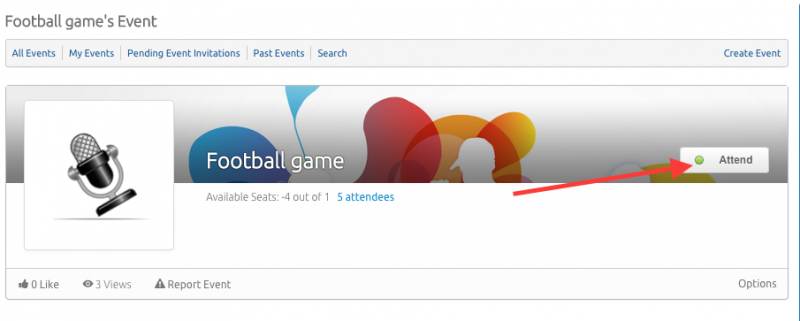
If the invites are accepted from the Hello Me users notification popup by clicking 'accept' then the event can become over attended / subscribed and show a minus (-) figure attending. Please see A1 attached. This is an example of an event set for 2 maximum attending.
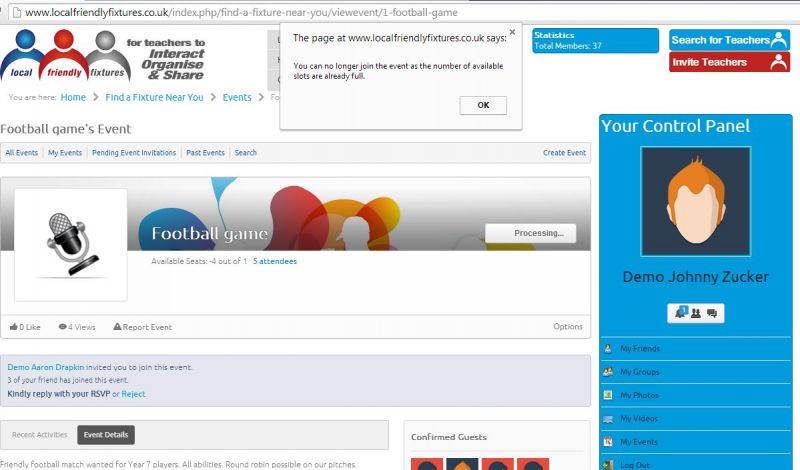
However, if the invites are accepted by going to the event page and then clicking 'response' it will only allow you to attend correctly and tells you when full. Please see A2 attached.
Can you help ?
Thanks
Joel.
Hi, Joel.
I confirm, this is valid bug - already reported, not fixed yet.
For future reference:
www.jomsocial.com/forum/events/23137-event-available-seats
It will be fixed in JomSocial 4.0.
- Instead of saying: 'it's not working', explain the problem in detail.
- Screenshots with the URL visible in them and the problem marked are more than welcome.
- Tell us how to replicate the problem, we can't fix it if we can't find it.
- Make sure that your site/server meets JomSocial System Requirements
- Make sure to setup JomSocial Cron Job
- Always provide us with access details to the backend and ftp. We need it to debug problems.
- If you have a similar problem, but a solution you found isn't working, open a new thread instead of 'merging' with an existing one.
- Use the "Thank You" feature on any post that helped you
Hi,
Ok, can you help me to delete on an override for the html folder (until we upgrade to Jomsocial 4) the option to accept or decline from within the hello me popup.
I would rather this not be there as an option and it force users to then click on the event which works correctly.
Thanks
Joel.
Hi, Joel.
There is no need to create overrides. Just edit group and opt-out "Allow guest to invite."
This will remove "Invite friends" under Confirmed guest box.
- Instead of saying: 'it's not working', explain the problem in detail.
- Screenshots with the URL visible in them and the problem marked are more than welcome.
- Tell us how to replicate the problem, we can't fix it if we can't find it.
- Make sure that your site/server meets JomSocial System Requirements
- Make sure to setup JomSocial Cron Job
- Always provide us with access details to the backend and ftp. We need it to debug problems.
- If you have a similar problem, but a solution you found isn't working, open a new thread instead of 'merging' with an existing one.
- Use the "Thank You" feature on any post that helped you
Hi,
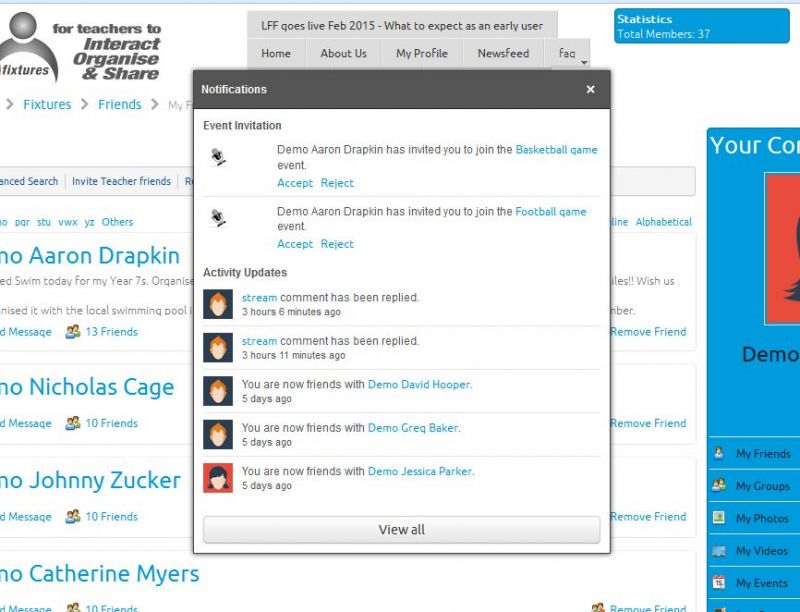
Maybe we weren't clear - Allowing guests to invite isn't the issue - I want to disable the ability to 'accept' or 'decline' the invitation from within the notifications popup box of the Hello Me module. To avoid (-) attendees I need to force the user to go to the event or group page and click 'response' there.
I've attached an image.
Thanks,
Joel.
Hi, Joel.
Ok, then copy this file:
ROOT/components/com_community/templates/default/notification.event.invitations.php
to:
ROOT/templates/your-template/html/com_community (if you don't have "html" or "com_community" folders, feel free to create them)
Edit file and remove that part from file:
<div id="noti-answer-event-<?php echo $row->id; ?>" class="cStream-Actions">
				<a class="action" style="text-indent:0;margin-right:5px;" href="javascript:void(0);" onclick="joms.jQuery('#noti-answer-event-<?php echo $row->id; ?>').remove(); jax.call('community' , 'notification,ajaxJoinInvitation' , '<?php echo $row->id; ?>', '<?php echo $row->eventid ?>');">
					    <?php echo JText::_('COM_COMMUNITY_EVENTS_ACCEPT'); ?>
				</a>
				<a class="action" style="text-indent: 0;" href="javascript:void(0);" onclick="joms.jQuery('#noti-answer-event-<?php echo $row->id; ?>').remove(); jax.call('community','notification,ajaxRejectInvitation','<?php echo $row->id; ?>', '<?php echo $row->eventid ?>');">
					    <?php echo JText::_('COM_COMMUNITY_EVENTS_REJECT'); ?>
				</a>
			</div>
This will remove "Accept" and "Reject" options.
- Instead of saying: 'it's not working', explain the problem in detail.
- Screenshots with the URL visible in them and the problem marked are more than welcome.
- Tell us how to replicate the problem, we can't fix it if we can't find it.
- Make sure that your site/server meets JomSocial System Requirements
- Make sure to setup JomSocial Cron Job
- Always provide us with access details to the backend and ftp. We need it to debug problems.
- If you have a similar problem, but a solution you found isn't working, open a new thread instead of 'merging' with an existing one.
- Use the "Thank You" feature on any post that helped you