Support Forum
Members module
Hi, Luis.
I assign another support member to this thread, so he'll check your issue.
- Instead of saying: 'it's not working', explain the problem in detail.
- Screenshots with the URL visible in them and the problem marked are more than welcome.
- Tell us how to replicate the problem, we can't fix it if we can't find it.
- Make sure that your site/server meets JomSocial System Requirements
- Make sure to setup JomSocial Cron Job
- Always provide us with access details to the backend and ftp. We need it to debug problems.
- If you have a similar problem, but a solution you found isn't working, open a new thread instead of 'merging' with an existing one.
- Use the "Thank You" feature on any post that helped you
-

- Dimas Tekad Santosa
- Visitor
- Thank you received: 0
Licenses:
Hi Luis,
I tried this in my end by using Mac and Chrome and everything is working fine...
I think this issue caused by your chrome extension which the extension break the jomsocial code ( sometimes this is happening )
Look at my video here
screencast.com/t/onQA8v2oatS
, and try to debug your issue with chrome developer tools, I gave you how to debug it in the end of the video.
thank you
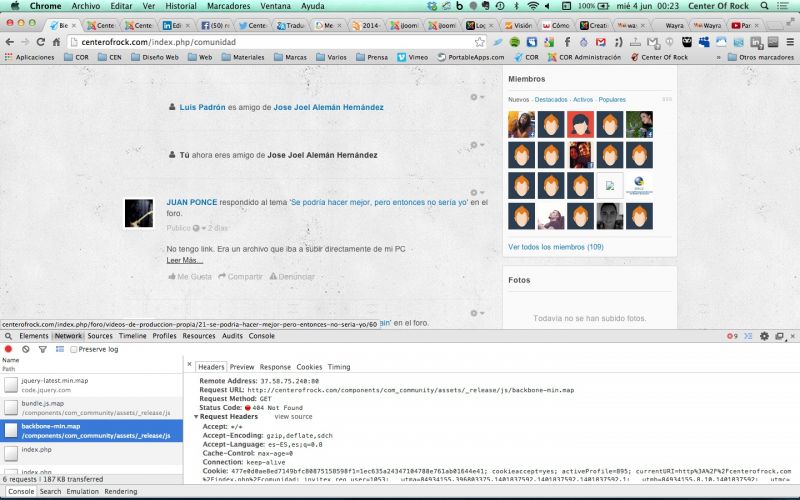
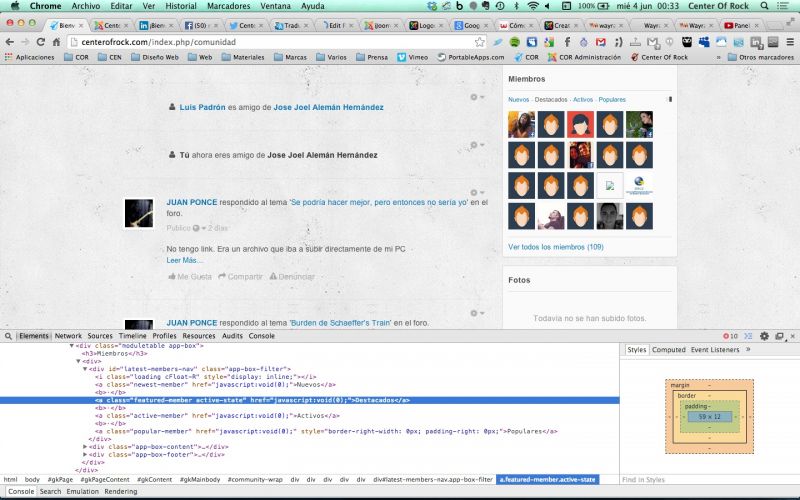
-
- Dimas Tekad Santosa
- Visitor
- Thank you received: 0
Licenses:
I see you are install lot of chrome extensions, please you disabled all and try again..
-
- Dimas Tekad Santosa
- Visitor
- Thank you received: 0
Licenses:
Hi Luis,
I cant see that video.. it shows "Permission Denied"
Thank you
-
- Dimas Tekad Santosa
- Visitor
- Thank you received: 0
Licenses:
Hi Luis,
I tried again in safari and still this is working fine, look the video here
screencast.com/t/hys9VRZTzVM
I tried this with different browser, operating system and different laptop/PC and all fine.
To be honest, we want to help you, but since we cant replicate this hard for us to solve this issue.
Thank you
The problem must be in the language, I tested on a PC with explorer and the same thing happens, the problem should be as tamper-profile as if you are using the Spanish language, whenever I update jomsocial, I find it impossible to edit the profile user, and I do what puts this ticket: www.jomsocial.com/forum/technical-issues...4-profile-error-save
-
- Dimas Tekad Santosa
- Visitor
- Thank you received: 0
Licenses:
Hi Luis,
in my video I was trying with spanish language, do you mean language on the PC itself or on website?
-
- Dimas Tekad Santosa
- Visitor
- Thank you received: 0
Licenses:
Hi Luis,
Just tried as your recommened and still working fine for me
screencast.com/t/INkVUQfu
Please you debug it, I already gave you the steps how to debug in that video.
Anyway.. I disabled the chat plugin, so you can debug it easily.
thank you
I tried on 4 computers, 3 of them and one PC Mac with Safari and Google Chrome and not funicona, remember that in the early versions of Jomsocial installed if it worked (I speak 5 months ago). I have cleaned browser cache and joomla, and follow all the same.
-
- Dimas Tekad Santosa
- Visitor
- Thank you received: 0
Licenses:
Hi Luis,
Can you provide me the teamviewer access, please? so I can debug it directly on your end.
thank you