Support Forum
JomSocial backend layout scrumbled

ISSUE SUMMARY:
dear Support,
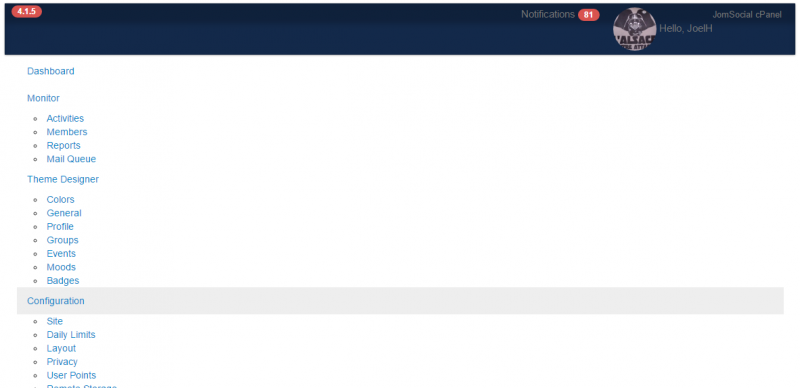
After upgrading to JS 4.1.3, the JS admin panel lost its layout and appears now on 1 column.
Upgraded today to 4.1.5 expecting a fix, but it is still the same.
Can you please help ?
Thank you.
STEPS TO REPLICATE:
1 Login on backend
2 Select Components->Jomsocial
3 Have a look at the layout
4
5
RESULT - See attached
EXPECTED RESULT
BROWSER : ALL Browsers
Hi.
For some reason css files weren't loaded by ISIS template.
So I added them into index.php file.
Now JomSocial beckend is loaded correctly.
- Instead of saying: 'it's not working', explain the problem in detail.
- Screenshots with the URL visible in them and the problem marked are more than welcome.
- Tell us how to replicate the problem, we can't fix it if we can't find it.
- Make sure that your site/server meets JomSocial System Requirements
- Make sure to setup JomSocial Cron Job
- Always provide us with access details to the backend and ftp. We need it to debug problems.
- If you have a similar problem, but a solution you found isn't working, open a new thread instead of 'merging' with an existing one.
- Use the "Thank You" feature on any post that helped you
HI.
This is Isis template issue in general. It looks like template is corrupted.
I compared it with clean installation and it looks a bit different.
Changes I've applied to the template have nothing to do with it.
Did you upgraded your Joomla! recently from 2.5?
- Instead of saying: 'it's not working', explain the problem in detail.
- Screenshots with the URL visible in them and the problem marked are more than welcome.
- Tell us how to replicate the problem, we can't fix it if we can't find it.
- Make sure that your site/server meets JomSocial System Requirements
- Make sure to setup JomSocial Cron Job
- Always provide us with access details to the backend and ftp. We need it to debug problems.
- If you have a similar problem, but a solution you found isn't working, open a new thread instead of 'merging' with an existing one.
- Use the "Thank You" feature on any post that helped you
No, I did not upgrade joomla recently. The problem did not occured whenI upgraded joomla, but it occurred first when I upgraded to Jomsocial 4.1.3, 2 months and 2 weeks ago.
See my related post on the JomSocial forum:
www.jomsocial.com/forum/profile-universa...ry-produce-no-result
HI.
Ok, I assign developer to take a look.
- Instead of saying: 'it's not working', explain the problem in detail.
- Screenshots with the URL visible in them and the problem marked are more than welcome.
- Tell us how to replicate the problem, we can't fix it if we can't find it.
- Make sure that your site/server meets JomSocial System Requirements
- Make sure to setup JomSocial Cron Job
- Always provide us with access details to the backend and ftp. We need it to debug problems.
- If you have a similar problem, but a solution you found isn't working, open a new thread instead of 'merging' with an existing one.
- Use the "Thank You" feature on any post that helped you
Sorry for the late answer.
By policy we do not allow sftp access from outside onto our Jomsocial platform. We only allow administrator web access to the jomsocial platform to external users.
Is there an alternative ? I can reinstall the ISIS admin template from a fresh Joomla source.
Hi,
here the alternative:
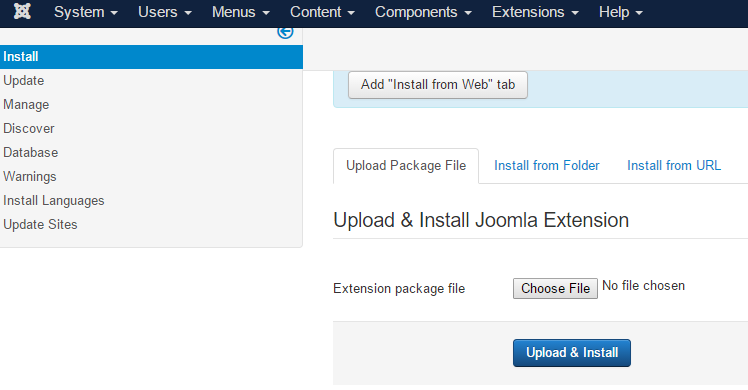
install new joomla at your local, after that upload ISIS template to your live site
or
re-install your joomla. without need uninstall anything. upload joomla package from joomla extensions manager.
Regards