Support Forum
Automatic prompt to login
-

Topic Author - Toumilovitch
- Offline
- Fresh Boarder
- Posts: 17
- Thank you received: 1
Licenses:
JomSocial Expired Socialize Expired
Hello,
I have exactly the same problem as this topic :
www.jomsocial.com/forum/installation/247...atic-prompt-to-login
Best regards
-
- Dimas
- Visitor
- Thank you received: 0
Licenses:
Hi,
I just checked it by a guest, and I dont see any popup login on your community site.
thank you
-
Topic Author - Toumilovitch
- Offline
- Fresh Boarder
- Posts: 17
- Thank you received: 1
Licenses:
JomSocial Expired Socialize ExpiredVery strange this problem... It's exactly the same thing as the other post if you look at his video. The proble not appears each time. I don't know why :-/
-
- Dimas
- Visitor
- Thank you received: 0
Licenses:
I think this is caused by cache.. clear the cache will fix it.
-
Topic Author - Toumilovitch
- Offline
- Fresh Boarder
- Posts: 17
- Thank you received: 1
Licenses:
JomSocial Expired Socialize ExpiredI did it many times... the problem come always back..
-
- Dimas
- Visitor
- Thank you received: 0
Licenses:
Please check my video here screencast.com/t/PLjyk0e2 , I refreshed over and over, and working fine
-
Topic Author - Toumilovitch
- Offline
- Fresh Boarder
- Posts: 17
- Thank you received: 1
Licenses:
JomSocial Expired Socialize Expired
Hello,
This problem continue and is real ! I have it almost each time... Please consider it ?
Best regards,
Mickaël
Hi.
I disabled cache on your site. Does this issue still happens?
- Instead of saying: 'it's not working', explain the problem in detail.
- Screenshots with the URL visible in them and the problem marked are more than welcome.
- Tell us how to replicate the problem, we can't fix it if we can't find it.
- Make sure that your site/server meets JomSocial System Requirements
- Make sure to setup JomSocial Cron Job
- Always provide us with access details to the backend and ftp. We need it to debug problems.
- If you have a similar problem, but a solution you found isn't working, open a new thread instead of 'merging' with an existing one.
- Use the "Thank You" feature on any post that helped you
-
Topic Author - Toumilovitch
- Offline
- Fresh Boarder
- Posts: 17
- Thank you received: 1
Licenses:
JomSocial Expired Socialize ExpiredNo it doesn't... What does it mean ?
-
- Dimas
- Visitor
- Thank you received: 0
Licenses:
Your Jomsocial home page is set for registered only right? you should make it for public..
-
Topic Author - Toumilovitch
- Offline
- Fresh Boarder
- Posts: 17
- Thank you received: 1
Licenses:
JomSocial Expired Socialize Expired
Yes it's public.Dimas wrote: Your Jomsocial home page is set for registered only right? you should make it for public..
I have doubts with my plugin JCH Optimize...
-
Topic Author - Toumilovitch
- Offline
- Fresh Boarder
- Posts: 17
- Thank you received: 1
Licenses:
JomSocial Expired Socialize Expired
Toumilovitch wrote: I have doubts with my plugin JCH Optimize...
No it's not that... I deactivated JCH Optimize, clean my cache and I have the same problem :-(
If you don't see this effect, you can see it when you analyse www.gymlike.net with GTMetrix ( gtmetrix.com/ ). The analyse shows the same screen I have...
Thanks by advance. This problem begins to be such a pain...
-
- Dimas
- Visitor
- Thank you received: 0
Licenses:
Hi,
This issue caused by this ajax action "ajaxGetRecentActivitiesCount", maybe your cache system call the cache from that ajax function,
yesterday at the first test I got the popup,then I refreshed and cleared the cache, and I don't get that popup anymore, i tried again this issue just now, and the popup is never coming again.
But well, please you try this solution
www.jomsocial.com/forum/technical-issues...r-hits-the-home-page
, that is different issue, but I hope it will help your issue.
thank you
-
Topic Author - Toumilovitch
- Offline
- Fresh Boarder
- Posts: 17
- Thank you received: 1
Licenses:
JomSocial Expired Socialize Expired
Hello,
I tried the solution you had given me : idem, the popup appears again...
Like you said, if I deactivate cache plugin, it doesn't appear.
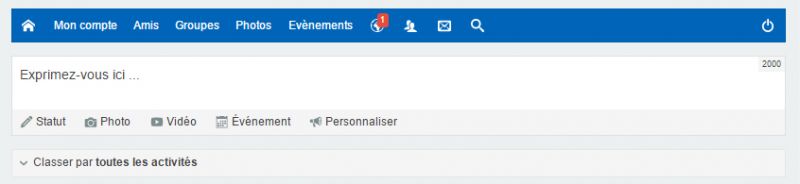
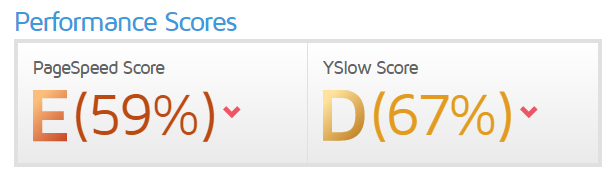
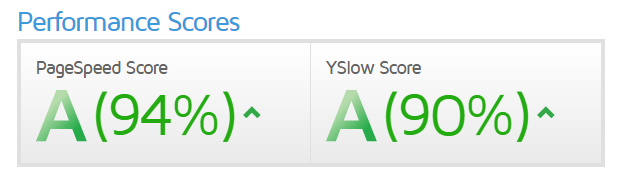
I can deactivate joomla cache plugin and use JCH Optimize only. I saw that my page is more fast but I loose write area in jomsocial when I active "Combine JavaScript files"...
Without Combine JavaScript files :
With Combine JavaScript files :

Really, I don't knows What I can do !!