Support Forum
Upgrade - unable to save Less > CSS
ISSUE SUMMARY:
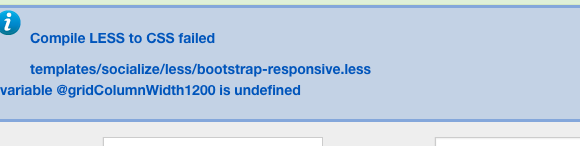
I installed the new socialize template upgrade. First step calls for clicking on Less > CSS. When I did that the attached error comes up. I also tried to adjust the template to match our theme and it doesn't save or apply to the site.
We've been trying to resolve the invalid token issue and updated everything. We also moved the site to its own cPanel, thus the URL is now
www.adamasoffice.com
and not social.adamasoffice.com. Same site, though. I tried to change the registration, but didn't manage it successfully. Please login under the
www.adamasoffice.com
domain
STEPS TO REPLICATE:
1
2
3
4
5
RESULT
EXPECTED RESULT
BROWSER
-

- Dimas
- Visitor
- Thank you received: 0
Licenses:
Hi,
I cant access your site, seems your site in unavailable, can you provide me the correct one please?
thank you!
I explained above, the site had to be moved to its own cPanel and we put it under www.adamasoffice.com . I think I finally fixed it in the account information for JomSocial, but don't know for sure. The login information is all the same.
Hi, Tom.
No, your supported domain is still: social.adamasoffice.com
Please, post a supported domain change request here:
www.jomsocial.com/forum/billing-issues
After request will be accepted, please, update this thread and make sure that post status is "Pending Support" above upper right corner of forum table.
- Instead of saying: 'it's not working', explain the problem in detail.
- Screenshots with the URL visible in them and the problem marked are more than welcome.
- Tell us how to replicate the problem, we can't fix it if we can't find it.
- Make sure that your site/server meets JomSocial System Requirements
- Make sure to setup JomSocial Cron Job
- Always provide us with access details to the backend and ftp. We need it to debug problems.
- If you have a similar problem, but a solution you found isn't working, open a new thread instead of 'merging' with an existing one.
- Use the "Thank You" feature on any post that helped you
Hi, Tom.
How did you upgraded Socialize? Just installing new version on older one?
I saw that you have custom theme.
Was it created before upgrade?
- Instead of saying: 'it's not working', explain the problem in detail.
- Screenshots with the URL visible in them and the problem marked are more than welcome.
- Tell us how to replicate the problem, we can't fix it if we can't find it.
- Make sure that your site/server meets JomSocial System Requirements
- Make sure to setup JomSocial Cron Job
- Always provide us with access details to the backend and ftp. We need it to debug problems.
- If you have a similar problem, but a solution you found isn't working, open a new thread instead of 'merging' with an existing one.
- Use the "Thank You" feature on any post that helped you
HI, Tom.
Please, make safe copy of your site.
Then remove Socialize template and Socialzie Toolbar for JomSocial module.
Make sure there no template files remain in ROOT/templates.
Then install Socialize again and try to compile theme.
- Instead of saying: 'it's not working', explain the problem in detail.
- Screenshots with the URL visible in them and the problem marked are more than welcome.
- Tell us how to replicate the problem, we can't fix it if we can't find it.
- Make sure that your site/server meets JomSocial System Requirements
- Make sure to setup JomSocial Cron Job
- Always provide us with access details to the backend and ftp. We need it to debug problems.
- If you have a similar problem, but a solution you found isn't working, open a new thread instead of 'merging' with an existing one.
- Use the "Thank You" feature on any post that helped you
HI, Tom.
I'm sorry but no.
Your previous customization used old set of variables - they ware updated by T3 developers.
Unfortunately our template is dependent on 3rd party framework.
- Instead of saying: 'it's not working', explain the problem in detail.
- Screenshots with the URL visible in them and the problem marked are more than welcome.
- Tell us how to replicate the problem, we can't fix it if we can't find it.
- Make sure that your site/server meets JomSocial System Requirements
- Make sure to setup JomSocial Cron Job
- Always provide us with access details to the backend and ftp. We need it to debug problems.
- If you have a similar problem, but a solution you found isn't working, open a new thread instead of 'merging' with an existing one.
- Use the "Thank You" feature on any post that helped you
I'm okay with rebuilding, but I think that my paths are not working right after having moved the site to the root. Is there something that can be done to correct the path to the root for the site?
HI, Tom.
What "path" do you mean?
- Instead of saying: 'it's not working', explain the problem in detail.
- Screenshots with the URL visible in them and the problem marked are more than welcome.
- Tell us how to replicate the problem, we can't fix it if we can't find it.
- Make sure that your site/server meets JomSocial System Requirements
- Make sure to setup JomSocial Cron Job
- Always provide us with access details to the backend and ftp. We need it to debug problems.
- If you have a similar problem, but a solution you found isn't working, open a new thread instead of 'merging' with an existing one.
- Use the "Thank You" feature on any post that helped you
To be blunt, if you follow the thread here, we had to move our domain from social.adamasoffice.com to the root
www.adamasoffice.com
. We had to change our account support to reflect that
www.adamasoffice.com
was going to be the supported domain. We have a redirect in place, but that does not appear to be enough. When we try to post things, it does not post.
User feedback:
When we try to "like" a comment or make a comment on someones post.......the "like" button is dead and when putting in a comment I get "undefined error"
In the "say what's on your mind" when I tried to post something to my page it simply doesn't works.....write letters in and push return it just go back to a blank screen....Additionally here.....I have NOT tried to upload pictures or videos whoever I did try the "event" and it doesn't work
HI, Tom.
This issue is not related with domain change or template.
There is something different.
Please, open new thread with that issue and I'll assign it to one of our developers for further investigation.
- Instead of saying: 'it's not working', explain the problem in detail.
- Screenshots with the URL visible in them and the problem marked are more than welcome.
- Tell us how to replicate the problem, we can't fix it if we can't find it.
- Make sure that your site/server meets JomSocial System Requirements
- Make sure to setup JomSocial Cron Job
- Always provide us with access details to the backend and ftp. We need it to debug problems.
- If you have a similar problem, but a solution you found isn't working, open a new thread instead of 'merging' with an existing one.
- Use the "Thank You" feature on any post that helped you