Support Forum
JS Login Redirect Plugin + Logo Redirect

Hey,
A week or so ago I asked you guys about fixing login redirect issue with JS Hello Me module on my site that would login redirect users to that random profile details page.
I was told to either use JS Login Redirect plugin or wait for hot fix.
When using JS Login Redirect plugin I was excited to learn I could make two new custom pages for failed login attempt and logout.
JS native already has a system to deal with failed login attempt so I do not need to make a custom page for this, however, would not mind making a custom page thanking my visitors for visiting my website.
When testing out this plugin I DID NOT like the unnecessary green login successful message when redirecting to JS Frontpage.
I tried to get rid of field by not entering anything and it did not let me and reverted back to text you guys have native there.
Is there a way to get rid of successful logout and login notification message?
I do not mind yellow notification for unsuccessful login attempt as native system is already set up to do so, however, I do NOT want this unnecessary notification for login and logout.
It does not look good.
Is there a way to get rid of login and logout message notification and keep the unsuccessful login attempt the same as native???
Perhaps provide the target url for the unsuccessful login attempt page?
Would this even work properly?
Do you guys understand my concern?
Would this break behavior with native login gateway system when not using JS Login Redirect plugin?
And if using this plugin how do you set up same unsuccessful login page?
Thank you.
And regarding Logo Redirect I noticed all other JA templates that use T3 have option in back-end of template to allow for setting a custom target page for clicking on logo action.
Your guys' Socialize template does not have this option :(
I found this plugin on techjoomla:
techjoomla.com/free-downloads/logged-in-home-page
Once user is logged in my website it redirects to JS Frontpage which I want it to, but if user clicks on my logo it redirects back to my home landing page.
I want my home landing page to just be used as a login/register gateway and after successful login do not want clicking on logo to redirect to home landing page.
I want logo click to just redirect back to JS Frontpage which is same behavior if you click on home button in community toolbar module.
Would this plugin work to do this or would it be better to just set this behavior in JS code?
Also, I noticed that on website when using desktop and laptop redirect to JS Frontpage works properly (not using JS Hello Me), but on mobile browser login redirects back to my home landing page. (Not using JS login redirect plugin)
Thanks.
Hi, Alex.
I would still advise to use JomSocial Redirect plugin. It allows you to redirect to any menu item you create (or already created).
Few days ago another user also requested removal of login/logout notification.
Here I provided a fix for this:
www.jomsocial.com/forum/socialize-templa...lize-template#151320
- Instead of saying: 'it's not working', explain the problem in detail.
- Screenshots with the URL visible in them and the problem marked are more than welcome.
- Tell us how to replicate the problem, we can't fix it if we can't find it.
- Make sure that your site/server meets JomSocial System Requirements
- Make sure to setup JomSocial Cron Job
- Always provide us with access details to the backend and ftp. We need it to debug problems.
- If you have a similar problem, but a solution you found isn't working, open a new thread instead of 'merging' with an existing one.
- Use the "Thank You" feature on any post that helped you
Funny that another user requested the same thing, but seriously, it looks bad :P
Now as for my question about the unsuccessful login attempt page how do I set this to native page?
My home landing page and future logout page can be a hidden menu item with no megamenu, but what about unsuccessful login attempt page?
Testing out this plugin from my custom home landing page I have redirect to JS Frontpage (with annoying green notification :P) and then for now logout goes back to home landing page before I make a simple thank you for visiting page, but the function and behavior for failed logged in attempt is all messed up now!!!! :(
Before without plugin it would bring you to a simple page with login/register form displayed again minus fbconnect button at bottom which in my opinion should be there again :P
But anyway, like I was saying in my original post how do I point to this same page for now?
This page is not an option in plugin settings for it is not a menu item.
Is this page somewhere in your JS code?
Is there a way to make this page a menu item?
I see there is a page under community for "registration" and then under users there is option for registration again login form and a few others maybe one of these will work I'll have to check.
Thanks.
Update: Under Users I see menu item for login form page and it is the same page you guys use in native unsuccessful login attempt.
Where is the fbconnect button at bottom?! :P
I actually like option to set your own page because now I can use custom Socialize template style I made and get rid of megamenu access ;)
Also, if I want I can use blank component and publish instance of SCLogin module if I want that actually supports multiple Slogins ;P
And make page look fancy and custom :)
Thanks for help and yes I would like to remove annoying notifications and add my own text or even better graphics and make it look fancy ;)
I set status to fixed, but I actually realized I still have problem with clicking on logo redirects to home landing page :(
I am not sure if that plugin by techjoomla would work either :(
I still need to try it to be sure, but is there an easy way to change target of logo redirect in Socialize code somewhere?
That or I can get rid of my logo header area and use social style, but I kind of like the logo header and think it adds a nice look and feel to my site.
I will have to test out new look and see if I like it, but for now is this an easy enough redirect in Socialize code somewhere?
And also real quick question about which block I need to put back into my custom Socialize template code for unsuccessful login page I just made to publish properly :P
For my home landing page I got rid of EVERY block except for "top-header" for community toolbar module and "home-wide".
I did this because I am using JA ACM for my home landing page and "home-wide" is a full width module position perfect for publishing multiple instances of JA ACM's.
But now the login form won't display properly :P
I can try to publish instance of SCLogin module and see how that looks, but suppose I will have to make a new custom style for my failed login attempt page and logout page anyway.
Besides adding bottom header again what block is responsible for the main content/component to allow login form to publish?
I can try playing around with adding certain blocks again until it works, but just figured I'd ask to be sure I'm doing it right :P
Thanks.
Thanks.
I set status to fixed, but I actually realized I still have problem with clicking on logo redirects to home landing page :(
I am not sure if that plugin by techjoomla would work either :(
I still need to try it to be sure, but is there an easy way to change target of logo redirect in Socialize code somewhere?
That or I can get rid of my logo header area and use social style, but I kind of like the logo header and think it adds a nice look and feel to my site.
I will have to test out new look and see if I like it, but for now is this an easy enough redirect in Socialize code somewhere?
And also real quick question about which block I need to put back into my custom Socialize template code for unsuccessful login page I just made to publish properly :P
For my home landing page I got rid of EVERY block except for "top-header" for community toolbar module and "home-wide".
I did this because I am using JA ACM for my home landing page and "home-wide" is a full width module position perfect for publishing multiple instances of JA ACM's.
But now the login form won't display properly :P
I can try to publish instance of SCLogin module and see how that looks, but suppose I will have to make a new custom style for my failed login attempt page and logout page anyway.
Besides adding bottom header again what block is responsible for the main content/component to allow login form to publish?
I can try playing around with adding certain blocks again until it works, but just figured I'd ask to be sure I'm doing it right :P
Thanks.
Okay figured out which blocks I needed to add.
I just ended up making new style based off of home-2 style which already has auto message and component blocks included that way I can leave the custom style for my home lading page as is.
I can also use this same style for logout if I want or use new custom home-2 that I just made for log out and fail login.
When testing out this new style that I just made and getting rid of main-nav and header blocks I do not like that there is a ton of generated white space at bottom.
I like the look of not having main-nav and header, but would like to figure out why page can't generate page load to eliminate white space at bottom.
I'll attach screen shots to show you what I'm talking about.
Thanks.
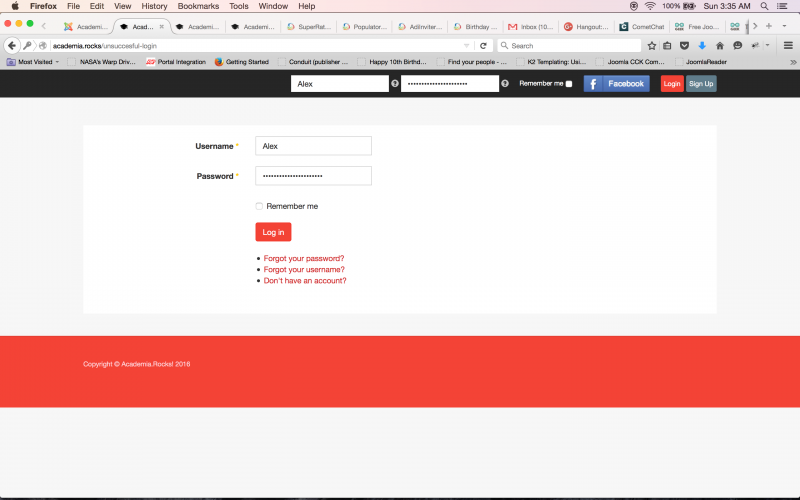
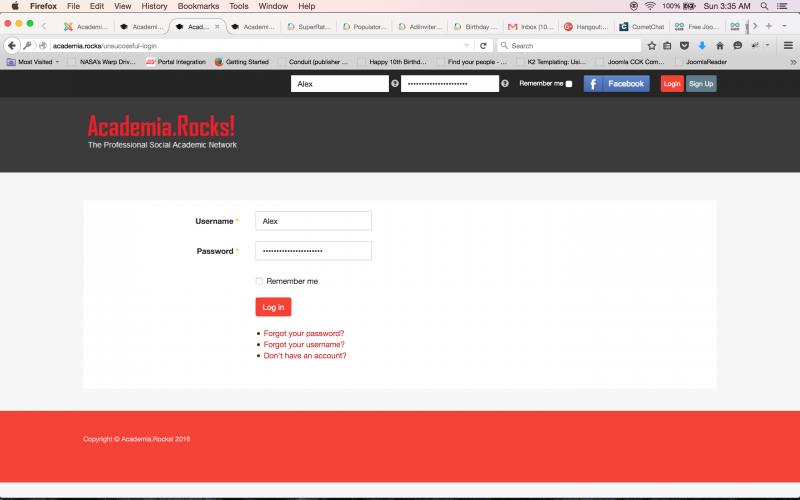
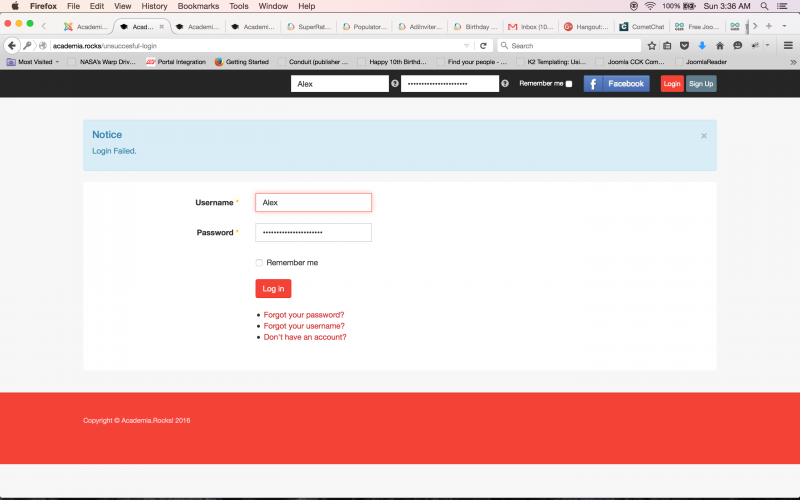
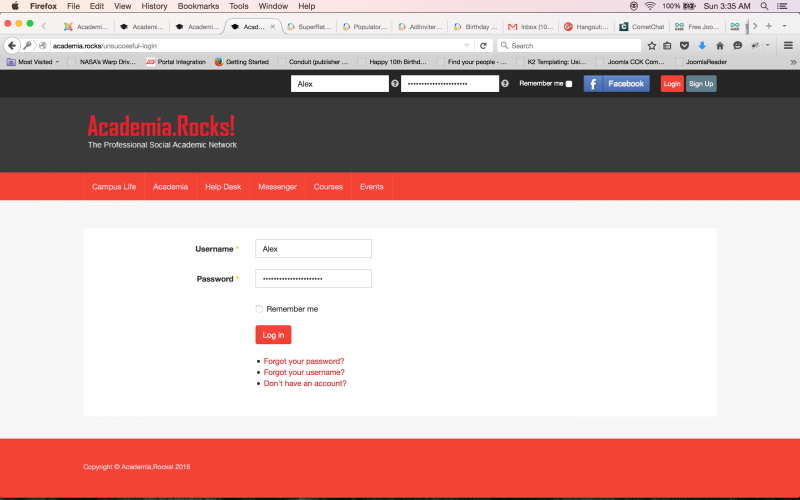
Last picture is default style with or without using JS redirect plugin, but as you can see there is a lot of generated white space at bottom without notification message and even if leaving logo header and getting rid of main-nav there is still a lot of white space.
How would I fix this?
Probably not a good idea to use a bunch of lines breaks <br> to increase the gap between lines of text, but how would I add the use of CSS margin property or the <p> element in html to make things look good?
If in CSS what should I add to file custom.css that I already made in template when fixing the line break text view overlap in status and making event that I fixed earlier.
Thanks.
Hi, Alex.
You should have more patience :)
Solution for this is really simple.
Here is what I would do on your place:
1. Create an article
2. Inside article add line like this {loadposition failedlogin}
3. You may switch your editor to HTML mode and wrapp it in some dive or add dive block using editor panel.
4. Save article in e.g Uncategorised articles category
5. browse to modules and create new Hell Me module
6. Assign it to "failedlogin" module position - you'll need to type module position manually as it will be NOT listed
7. Save module.
8. Browse to menu and create new menu item in hidden menu (menu that is not displayed on your site)
9. Link this menu item to your article crated in step 1.
10. Set this menu item to Public
So now you have page with login form and all JomSocial buttons (you won't find Facebook login button on Joomla! default login page as this is com_users and JomSocial related FB button will appear only in extensions related with JS).
11. Now browse to plugin and set your new item in "Failed login" field.
White space at the bottom is displayed because page content is just short and on bigger screen everything + white background is displayed. Notice that on your page there is no header. So this is default display...
- Instead of saying: 'it's not working', explain the problem in detail.
- Screenshots with the URL visible in them and the problem marked are more than welcome.
- Tell us how to replicate the problem, we can't fix it if we can't find it.
- Make sure that your site/server meets JomSocial System Requirements
- Make sure to setup JomSocial Cron Job
- Always provide us with access details to the backend and ftp. We need it to debug problems.
- If you have a similar problem, but a solution you found isn't working, open a new thread instead of 'merging' with an existing one.
- Use the "Thank You" feature on any post that helped you
Thank you.
Yes, using JS Hello Me module on this failed login page would be a good idea :)
I am not sure why I was thinking to play around with native Joomla! login form so much because you are right it is basic and does not support other JS JFBconnect features and integrations.
For some reason I wanted to test out SCLogin module provided by JFBconnect component because I feel as though JS Hello Me Module serves a different purpose on my site other than login gateway, but yes I suppose you are right this would be the best option for now to achieve all the features I want.
Plus, I can always test out both and see which one looks better :P
But for now I am going with JS Hello me ;)
Interesting what you just taught me - I was unaware you could just load a module into an article like that.
I was thinking to use blank component to do this.
It is hard to find good articles/tutorials in Joomla! on how to do stuff :P
JA Uber supports a special article type blank article for just publishing modules similar to function of blank component, but cool to know the method you just described would also work and would be easy to add custom text/pictures before or after loading of module as well.
The only question I would have is how would module be centered and formatted if just loading into an article and not block layout position in template style?
I remember seeing a plugin on JED by nonumbers for add module anywhere or load module in article or something like that, but did not bother to look into it because I did not think this was the proper way to do things.
What do you think is better - use blank component/special article blank content or just load module into an article?
I like the idea of being able to load a module into an article and format and set up wrapper or div tag, but did not even realize this would be possible :P
I have had bad luck using custom html module to do certain things and have experimented with this native Joomla! feature, but will admit I have very little experience using articles to build website pages and combine modules with native article features.
Is there a website or tutorial you would recommend checking out to learn more about doing this?
That or I can just use custom html module version of JSN Page Builder component that works pretty well for simple stuff and looks better than native article :P
That or instances of other modules especially JA ACM.
I remember reading a Joomla! article around NYE about how to make a good landing page and they talked about just using native joomla! article editor and couldn't believe they were actually being serious.
I have tested out page builder components and JA ACM which is what JA uses in all modern T3 templates, but have not thought to use native joomla! articles to make simple pages.
I suppose it is a good idea for some pages such as this where you are not trying to make an impressive landing page.
So for failed login page and log out page maybe using native Joomla! article will be easy, simple, quick solution.
I will look into this method and try to figure out how to do what you just described, but in the meantime can you give me more details on how to create this div block in html editor?
I get the line {loadposition "... "} and manually assign JS Hello Me to this position by manually typing in position, but need more details on how to set up the div block in html editor to wrap the module and format it in article so it is centered and looks good etc.
Thanks!
Hi, Alex.
Joomla! offers a lot of features :) They are well described in the web - just need to look for them :)
This feature not only allows you to create module position in article but also load certain module.
Take a look here:
www.ostraining.com/blog/joomla/loadposition-loadmodule/
This is quite good page to read ;)
It also describes styling ;)
Yes, I saw that many users use some components to achieve really simple things e.g landing page. I always use featured articles page but set number of displayed articles to 0. Then I'm free to build frontpage using modules. But other prefer to use "lank component" :) My motto is "the less the merrier" :) It's better to use what Joomla! offers by customizing it (alternative layout or layout override).
- Instead of saying: 'it's not working', explain the problem in detail.
- Screenshots with the URL visible in them and the problem marked are more than welcome.
- Tell us how to replicate the problem, we can't fix it if we can't find it.
- Make sure that your site/server meets JomSocial System Requirements
- Make sure to setup JomSocial Cron Job
- Always provide us with access details to the backend and ftp. We need it to debug problems.
- If you have a similar problem, but a solution you found isn't working, open a new thread instead of 'merging' with an existing one.
- Use the "Thank You" feature on any post that helped you
Hmmm maybe you are right "the less is merrier" ;)
I read an article somewhere and in reviews for blank component on JED people talk about how you can achieve the same thing via your method, but sometimes you run into annoying problems I found when trying to do stuffs in native Joomla! articles, which leads me to this next question for you :P
My first attempt at trying to make a good landing home page was using JSN PB component.
I was able to publish JS Hello Me on top of a parallax image with animated header text JS HM module included which looked cool when I had a slider above it, but it just felt a little cheesy so I abandoned it in favor of JA ACM Hero Style 4 module with background video which looks a LOT better :)
Anyway, when using JSN PB you could use it as an article to build page or as a custom html module.
I realized when using article method even if unassigning modules you don't want in article such as commenting at bottom etc there was still no full width and there was always random white space generated between header and footer as if it was an article which lead my to try blank component and assigning custom html module version of JSN PB.
I assigned to home-wide position which was full width and it looked a lot better, but now trying to execute the same thing for this failed login page I am running into same problem of white space between top-header community toolbar module and footer.
I have tried adding "module-no-border" module class suffix making sure to add space via Socialize template documentation thinking this might fix problem and have also tried different module styles and module tags.
But nothing gets rid of white space :(
When using JSN PB blocks there is option to add border with different styles and colors, but I have it set to "0" and can see that it's code to generate border when testing out does not interfere with the white space.
In other words I have made a 25 px solid black border via JSN PB block and it just added to block with white space still there and after setting to zero again it goes away, but white space is still there.
When I published an instance of Smart Slider 3 however there was no white space so it could be JSN PB creating this problem.
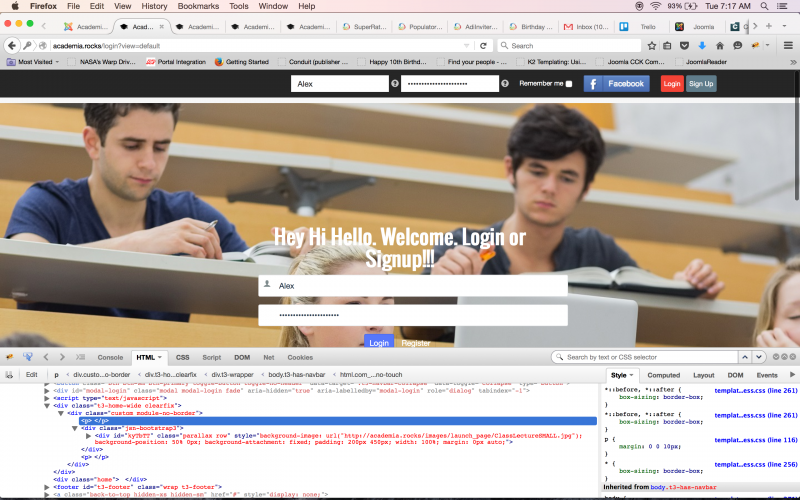
In element inspector using firebug and Firefox between the div tag I see:
<div class="t3-home-wide clearfix">
<div class="custom module-no-border">
<p></p> ***THIS IS CAUSING WHITE SPACE***
<div class="jsn-bootstrap3">
<div id="kyTbTT" class="parallax row" style="background-image: url("
academia.rocks/images/launch_page/ClassLectureSMALL.jpg
"); background-position: 50% 0px; background-attachment: fixed; padding: 200px 450px; width: 100%; margin: 0px auto;">
</div>
<p></p> ***THIS IS CAUSING WHITE SPACE***
</div>
</div>
The <p></p> is creating the white space when page load is generated, but am unsure what is responsible for causing this :(
Maybe somewhere in JSN PB CSS?
Is it problem with Socialize template and module class suffix border style?
Would it be easy to add new rule in custom.css to fix this?
Thanks.