Support Forum
Video upload, Group request, template update
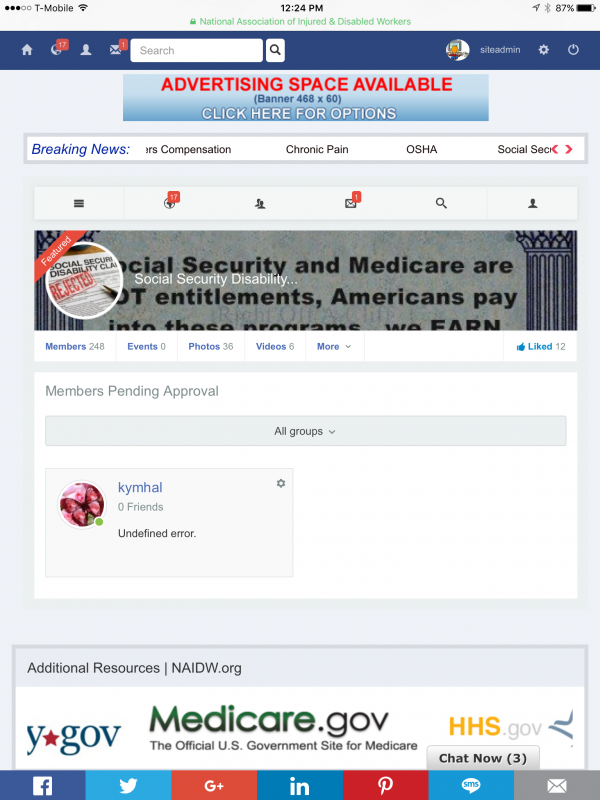
ISSUE SUMMARY: Hi we cant upload videos it says will notify when uploaded but never shows up? Also we have some private groups and when we went to approve requests it gives error see attached image or file. Also cant find the socialize template updater wont let update latest version?
STEPS TO REPLICATE:
1
2
3
4
5
RESULT
EXPECTED RESULT
BROWSER
-

- Dimas
- Visitor
- Thank you received: 0
Licenses:
Hi Jon,
Can you create separate topic on each issue please?
For this topic, lets we discuss the upload video issue. Anyway, have you setup cron job and FFMPEG?
documentation.jomsocial.com/wiki/Video_L..._Upload_Requirements
thank you
Yes cron is configured? It uploads but does not show up? You can see when you go to video s in groups and it says pending but nothing there? and when uploading on activity stream says your video will be ready soon and we will let you know?
-
- Dimas
- Visitor
- Thank you received: 0
Licenses:
Hi Jon,
Can you open the IP from Indonesia? because my IP already blocked.
thank you
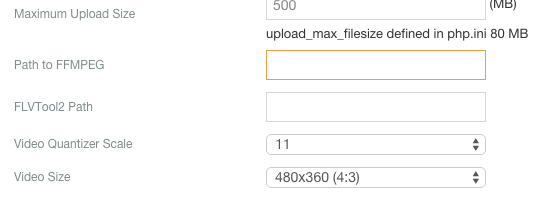
I am not sure what needs to be there as my skills are close to none. Can you give me a basic of what others put there please. And i will add it in the boxes. Thank you in advance.
-
- Dimas
- Visitor
- Thank you received: 0
Licenses:
Hi Jon,
Please you contact your sys-admin to install FFMPEG and set it up, and ask the FFMPEG path, once you get it please put it inside "Path to FFMPEG" config.
thank you!
-
- Dimas
- Visitor
- Thank you received: 0
Licenses:
Hi Jon,
Please you try run this commend via server terminal, what do you get :
/usr/local/bin/ffmpeg -y -i /home/naidw/public_html/images/USER_VIDEOS/originalvideos/1749/lkIhE6GSQOF.MOV -vcodec libx264 -acodec aac -ab 64k -strict -2 -crf 23 -s 480x360 /home/naidw/public_html/images/USER_VIDEOS/videos/1749/Uao3MrbWbzH.mp4thank you!
My host said this?
Hello,
I ran the suggested command, this appears to use a crf flag not recognized by the software, you may want to pass this on to the jomsocial team for best advice. If there's a custom ffmpeg build needed, that can possibly be setup if this is required, or if the jomsocial video upload can be adjusted to use the current version that will likely solve the video upload issue.
I'm checking the cron item now.
root@host2 [261 18:12:43 ~]# /usr/local/bin/ffmpeg -y -i /home/naidw/public_html/images/USER_VIDEOS/originalvideos/1749/lkIhE6GSQOF.MOV -vcodec libx264 -acodec aac -ab 64k -strict -2 -crf 23 -s 480x360 /home/naidw/public_html/images/USER_VIDEOS/videos/1749/Uao3MrbWbzH.mp4
ffmpeg version 2.1.8 Copyright (c) 2000-2015 the FFmpeg developers
built on Dec 18 2015 11:40:22 with gcc 4.4.7 (GCC) 20120313 (Red Hat 4.4.7-16)
configuration:
libavutil 52. 48.101 / 52. 48.101
libavcodec 55. 39.101 / 55. 39.101
libavformat 55. 19.104 / 55. 19.104
libavdevice 55. 5.100 / 55. 5.100
libavfilter 3. 90.100 / 3. 90.100
libswscale 2. 5.101 / 2. 5.101
libswresample 0. 17.104 / 0. 17.104
Unrecognized option 'crf'.
Error splitting the argument list: Option not found
Removing the crf flag gave:
root@host2 [266 18:13:36 ~]# /usr/local/bin/ffmpeg -y -i /home/naidw/public_html/images/USER_VIDEOS/originalvideos/1749/lkIhE6GSQOF.MOV -vcodec libx264 -acodec aac -ab 64k -strict -2 -s 480x360 /home/naidw/public_html/images/USER_VIDEOS/videos/1749/Uao3MrbWbzH.mp4
ffmpeg version 2.1.8 Copyright (c) 2000-2015 the FFmpeg developers
built on Dec 18 2015 11:40:22 with gcc 4.4.7 (GCC) 20120313 (Red Hat 4.4.7-16)
configuration:
libavutil 52. 48.101 / 52. 48.101
libavcodec 55. 39.101 / 55. 39.101
libavformat 55. 19.104 / 55. 19.104
libavdevice 55. 5.100 / 55. 5.100
libavfilter 3. 90.100 / 3. 90.100
libswscale 2. 5.101 / 2. 5.101
libswresample 0. 17.104 / 0. 17.104
Input #0, mov,mp4,m4a,3gp,3g2,mj2, from '/home/naidw/public_html/images/USER_VIDEOS/originalvideos/1749/lkIhE6GSQOF.MOV':
Metadata:
major_brand : qt
minor_version : 0
compatible_brands: qt
creation_time : 2015-12-18 19:02:00
Duration: 00:00:10.41, start: 0.000000, bitrate: 4680 kb/s
Stream #0:0(und): Audio: aac (mp4a / 0x6134706D), 44100 Hz, mono, fltp, 88 kb/s (default)
Metadata:
creation_time : 2015-12-18 19:02:00
handler_name : Core Media Data Handler
Stream #0:1(und): Video: h264 (High) (avc1 / 0x31637661), yuv420p(tv, bt709), 1280x720, 4585 kb/s, 29.98 fps, 29.97 tbr, 600 tbn, 1200 tbc (default)
Metadata:
rotate : 90
creation_time : 2015-12-18 19:02:00
handler_name : Core Media Data Handler
Unknown encoder 'libx264'
Removing the vcodec line succeeded:
frame= 312 fps=0.0 q=24.7 Lsize= 477kB time=00:00:10.47 bitrate= 373.0kbits/s
video:383kB audio:84kB subtitle:0 global headers:0kB muxing overhead 2.137628%
Thanks!
Dan
--
Dan Uber
www.wiredtree.com
Toll Free: +1 866-523-8733
Local: +1 312-447-0510
Fax: +1 312-447-0514
www.facebook.com/WiredTree
www.twitter.com/WiredTree
www.wiredtree.com/Google+
Ticket Details
Ticket ID: ABR-785209
Department: Support
Priority: Medium
Status: Open
Hello,
Okay, as far as the cron setup goes, I see requests to trigger being called, for example in the domain logs this is showing:
24.144.33.236 - - [29/Jan/2016:19:22:39 -0600] "GET /index.php?option=com_payplans&view=cron&task=trigger HTTP/1.1" 200 2829 "
naidw.org/members-lounge/members-lounge/...source=socialnetwork
" "Mozilla/5.0 (iPhone; CPU iPhone OS 9_2_1 like Mac OS X) AppleWebKit/601.1.46 (KHTML, like Gecko) Mobile/13D15 [FBAN/FBIOS;FBAV/47.0.0.43.396;FBBV/20481971;FBDV/iPhone7,1;FBMD/iPhone;FBSN/iPhone OS;FBSV/9.2.1;FBSS/3; FBCR/TFW;FBID/phone;FBLC/en_US;FBOP/5]"
This /index.php?option=com_payplans&view=cron&task=trigger is repeated a number of times in the log files. It looks like to run the cron the following url should be called:
naidw.org/index.php?option=com_community&task=cron
However, that is failing because of the ffmpeg issue, and that comes back to the initial report from their forum post you included.
So the question now is whether the jomsocial component can be adjusted via settings to change the way it's calling ffmpeg, or you need additional options built into ffmpeg to support the jomsocial plugin.
If you can get any details about this, we can make the correct path forward. I would recommend setting the cron task to be loaded once every five to ten minutes, and once the ffmpeg issue is resolved, that should address the remaining scheduled tasks problems.
Thanks!
Dan
--
Dan Uber
www.wiredtree.com
Hi Jon
Thanks. Basically, it boils down to (1) whether the cron should be setup to call that page periodically, which we completely can do, or if that's scheduled internally already, and (2) whether the ffmpeg video arguments can be adjusted in the jomsocial plugin or whether this requires changes to the setup here. If they have a specific list of required version and components for ffmpeg to have that command run correctly, we can work around that for you.
-
- Dimas
- Visitor
- Thank you received: 0
Licenses:
Hi Jon,
1. you should setup cron job manually, you can read the doc here
documentation.jomsocial.com/wiki/Setting_Up_Cron_Job
2. actually you can add new command or remove the FFMPEG convert command, you can modify this file components/com_community/libraries/vidoes.php, and look at this function convertVideo(), there is an array command code $cmd, and if you wanna follow your sys-admin suggestion you can remove this code :
$cmd[] = '-crf 23';I hope it will help
thank you!