Support Forum
How do I change the date format displayed for Events, Groups and Videos
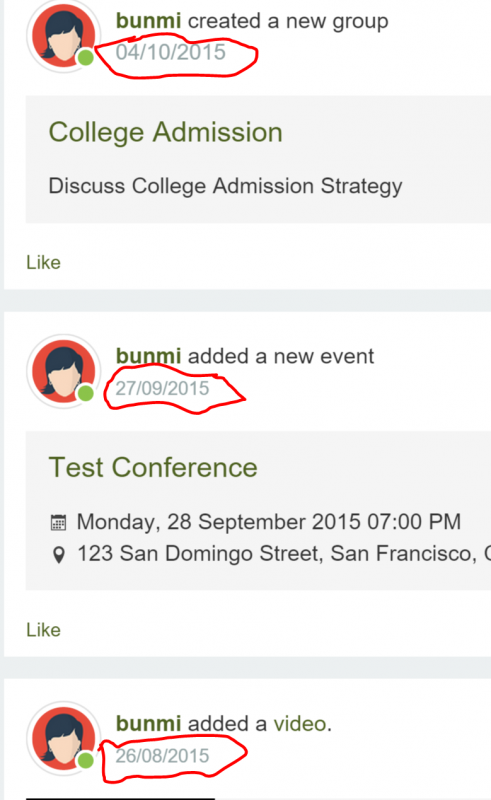
ISSUE SUMMARY: The dates on my site are displayed in the format 06/10/2015, I'd like to change the date format to October 6, 2015 so as to avoid confusion. How do I change the date format displayed (for Events, Groups, Videos etc)?. I created a DATE_FORMAT_LC3 override but that didn't change the format displayed. Please see attached screenshot. Thanks,
STEPS TO REPLICATE:
1 Log in to Site
2 Create a new Group or Event or Upload new video link
3 Click on Profile to see new group created on Activity Stream
4
5
RESULT Group creation date format shows 6/10/2015
EXPECTED RESULT Will like the date format displayed as October 6, 2015
BROWSER Chrome
Hi, Bunmi.
Edit this file: ROOT/administrator/components/com_community/default.ini
Line 53 and 54.
Change date format to whatever you like.
- Instead of saying: 'it's not working', explain the problem in detail.
- Screenshots with the URL visible in them and the problem marked are more than welcome.
- Tell us how to replicate the problem, we can't fix it if we can't find it.
- Make sure that your site/server meets JomSocial System Requirements
- Make sure to setup JomSocial Cron Job
- Always provide us with access details to the backend and ftp. We need it to debug problems.
- If you have a similar problem, but a solution you found isn't working, open a new thread instead of 'merging' with an existing one.
- Use the "Thank You" feature on any post that helped you
Hi Michal,
Thanks for your response. Here are the settings I have on those lines now. I'm not sure what the %I, %M, %p, %b and %d stands for. Were can I find a list of format translations (reference guide) to use. I search the internet and found nothing close.
activitiestimeformat=%I:%M %p
activitiesdayformat=%b %d
Thanks,
Hi, Bunmi.
Try this:
php.net/manual/en/function.date.php
- Instead of saying: 'it's not working', explain the problem in detail.
- Screenshots with the URL visible in them and the problem marked are more than welcome.
- Tell us how to replicate the problem, we can't fix it if we can't find it.
- Make sure that your site/server meets JomSocial System Requirements
- Make sure to setup JomSocial Cron Job
- Always provide us with access details to the backend and ftp. We need it to debug problems.
- If you have a similar problem, but a solution you found isn't working, open a new thread instead of 'merging' with an existing one.
- Use the "Thank You" feature on any post that helped you
I modified the line 54 in my public_html/test/administrator/components/com_community/default.ini
from activitiesdayformat=%b %d
to activitiesdayformat=%M %j, %Y
but that didn't fix the issue. Any assistance will be appreciated.
Hi, Bunmi.
I assign developer to this thread.
- Instead of saying: 'it's not working', explain the problem in detail.
- Screenshots with the URL visible in them and the problem marked are more than welcome.
- Tell us how to replicate the problem, we can't fix it if we can't find it.
- Make sure that your site/server meets JomSocial System Requirements
- Make sure to setup JomSocial Cron Job
- Always provide us with access details to the backend and ftp. We need it to debug problems.
- If you have a similar problem, but a solution you found isn't working, open a new thread instead of 'merging' with an existing one.
- Use the "Thank You" feature on any post that helped you
-

- Dimas
- Visitor
- Thank you received: 0
Licenses:
Hi,
on this file administrator/components/com_community/define.ini,, please change this variable "profileDateFormat"
cheers!
-
- Dimas
- Visitor
- Thank you received: 0
Licenses:
ops, I was mean default.ini :)
Hi,
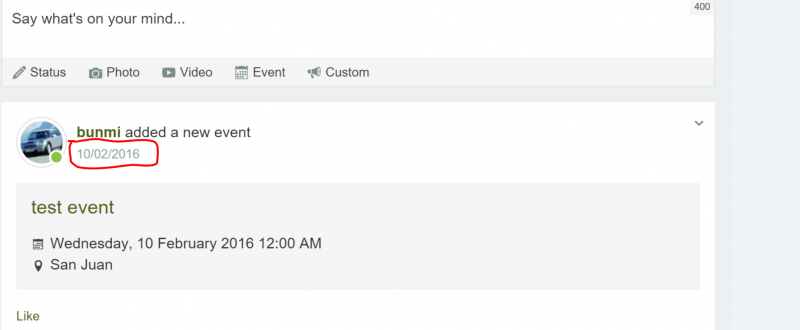
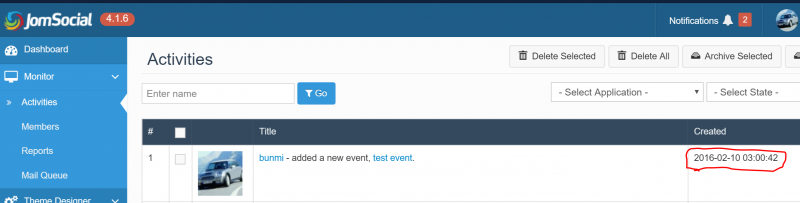
I just upgraded to JomSocial 4.1.6 and noticed that this issue is re-occurring. Please see the attached screenshots of the event stream I created. The event date is correctly displayed but the date on the activity stream (circled in red) is in a different time zone and format. Please see the screenshot from the JoomSocial backend Monitor --> Activities . It shows the date/time as 2016-02-10 03:00:42 instead of 2016-02-09 21:00:42 (my correct time and date).
Your assistance will be appreciated.
Thanks,
-
- Dimas
- Visitor
- Thank you received: 0
Licenses:
Seems your default.ini alraedy replaced with the newest version, please you modify again the default.ini file from administrator/components/com_community
-
- Dimas
- Visitor
- Thank you received: 0
Licenses:
We use own format, if you wanna change with your format simple just modify it.