Support Forum
Welcome! Support Forums have been reactivated
Header height and banners width
11 years 3 months ago
-

Topic Author - Toumilovitch
- Offline
- Fresh Boarder
- Posts: 17
- Thank you received: 1
Licenses:
JomSocial Expired Socialize Expired
11 years 3 months ago
Hi.
To make banner wider you need to modify this file:
ROOT/templates/socialize/tpls/blocks/header.php
in line 23:
$logosize = 'col-sm-4';Change 4 to 8.
And in line 56:
<div class="col-xs-12 col-sm-8">8 to 4.
To remove gap above banner:
.head-search {
margin-top:0 !important;
}
To move logo down:
.logo-image {
padding: 15px 0 0 0;
}
- Instead of saying: 'it's not working', explain the problem in detail.
- Screenshots with the URL visible in them and the problem marked are more than welcome.
- Tell us how to replicate the problem, we can't fix it if we can't find it.
- Make sure that your site/server meets JomSocial System Requirements
- Make sure to setup JomSocial Cron Job
- Always provide us with access details to the backend and ftp. We need it to debug problems.
- If you have a similar problem, but a solution you found isn't working, open a new thread instead of 'merging' with an existing one.
- Use the "Thank You" feature on any post that helped you
11 years 3 months ago
-
Topic Author - Toumilovitch
- Offline
- Fresh Boarder
- Posts: 17
- Thank you received: 1
Licenses:
JomSocial Expired Socialize Expired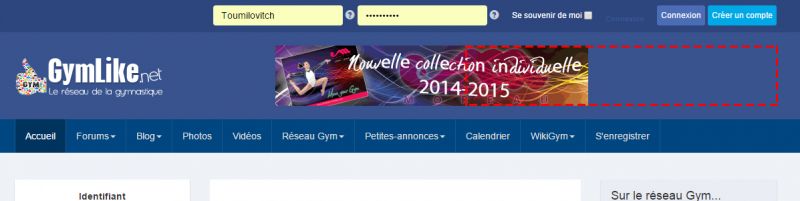
11 years 3 months ago
Hi.
Add to:
.head-search {
margin-top:0 !important;
}
text-align: right;
So you'll have:
.head-search {
margin-top:0 !important;
text-align: right;
}
- Instead of saying: 'it's not working', explain the problem in detail.
- Screenshots with the URL visible in them and the problem marked are more than welcome.
- Tell us how to replicate the problem, we can't fix it if we can't find it.
- Make sure that your site/server meets JomSocial System Requirements
- Make sure to setup JomSocial Cron Job
- Always provide us with access details to the backend and ftp. We need it to debug problems.
- If you have a similar problem, but a solution you found isn't working, open a new thread instead of 'merging' with an existing one.
- Use the "Thank You" feature on any post that helped you
11 years 3 months ago
-
Topic Author - Toumilovitch
- Offline
- Fresh Boarder
- Posts: 17
- Thank you received: 1
Licenses:
JomSocial Expired Socialize Expired
It's perfect !! :-)
Thank you so much !
Moderators: Piotr Garasiński