Support Forum
Thememagic Not Working
ISSUE SUMMARY:
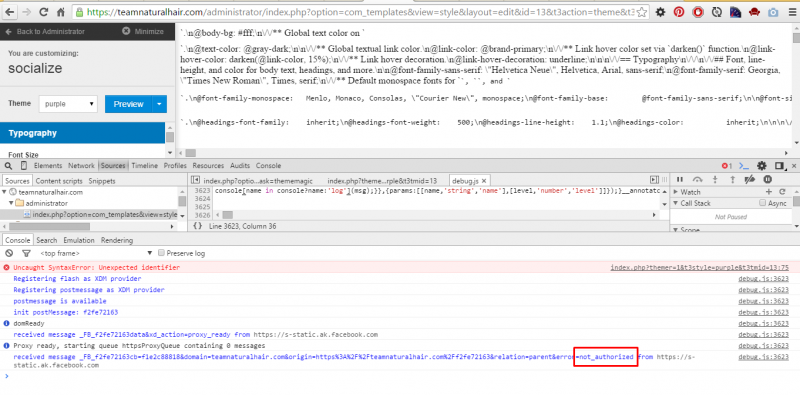
Hi, so I bought socialize template and I have began to configure it. The site is already setup and I wish to make changes to the colors etc. But when I am in thememagic view, when I try to change color, a triangle with an exclamation mark shows and when I click preview, the page shows code and a styleless white page.
STEPS TO REPLICATE:
1.Login to admin
2.Open template manager
3.Open socialize template
4.Click thememagic button
5.Attempt to change any attribute or the color of any element and click preview
RESULT
A triangle with exclamation mark and when preview is clicked, the page is messed up
EXPECTED RESULT
Color or attibute of element being edited to change
BROWSER
Mozilla Firefox and Chrome

-

- Dimas
- Visitor
- Thank you received: 0
Licenses:
Hi,
I just checked it, and its working fine..
thank you
Issue is still there. Try Step-5, I said try change a color and click preview. Try that please and let me know. And also remove the screenshot you posted because it shows my brand publicly and I do not wish that. Thanks
Hi, Nicholas.
Is this a new installation of Socialize or an upgrade?
- Instead of saying: 'it's not working', explain the problem in detail.
- Screenshots with the URL visible in them and the problem marked are more than welcome.
- Tell us how to replicate the problem, we can't fix it if we can't find it.
- Make sure that your site/server meets JomSocial System Requirements
- Make sure to setup JomSocial Cron Job
- Always provide us with access details to the backend and ftp. We need it to debug problems.
- If you have a similar problem, but a solution you found isn't working, open a new thread instead of 'merging' with an existing one.
- Use the "Thank You" feature on any post that helped you
Attachment ScreenShot2015-07-21at2.30.46PM.png not found
Hi, before it was jfbc not allowing it to work. Now i dont know which other component is keeping it from working. Is there a way you can show me to discover which because i have spent hours trying to enable and disable but nothing.

Hi, Nicholas.
I reported this to template developer.
But could you do some tests - disable extensions one by one and that way you'll find extension that make trouble with ThemeMagic... then we'll fix it.
Framework plugin version should not influence this issue.
- Instead of saying: 'it's not working', explain the problem in detail.
- Screenshots with the URL visible in them and the problem marked are more than welcome.
- Tell us how to replicate the problem, we can't fix it if we can't find it.
- Make sure that your site/server meets JomSocial System Requirements
- Make sure to setup JomSocial Cron Job
- Always provide us with access details to the backend and ftp. We need it to debug problems.
- If you have a similar problem, but a solution you found isn't working, open a new thread instead of 'merging' with an existing one.
- Use the "Thank You" feature on any post that helped you
Hi, Nicholas.
It seems that this issue is caused by JFBC. If you disable it temporary, you should be able to use Theme Magic without issues.
Also please, make sure that your FB app configuration is fine:
documentation.jomsocial.com/index.php?ti..._up_Facebook_Connect
- Instead of saying: 'it's not working', explain the problem in detail.
- Screenshots with the URL visible in them and the problem marked are more than welcome.
- Tell us how to replicate the problem, we can't fix it if we can't find it.
- Make sure that your site/server meets JomSocial System Requirements
- Make sure to setup JomSocial Cron Job
- Always provide us with access details to the backend and ftp. We need it to debug problems.
- If you have a similar problem, but a solution you found isn't working, open a new thread instead of 'merging' with an existing one.
- Use the "Thank You" feature on any post that helped you