Support Forum
Group Photo's Not Displaying

Greetings,
On my website,
www.madd-talent.com
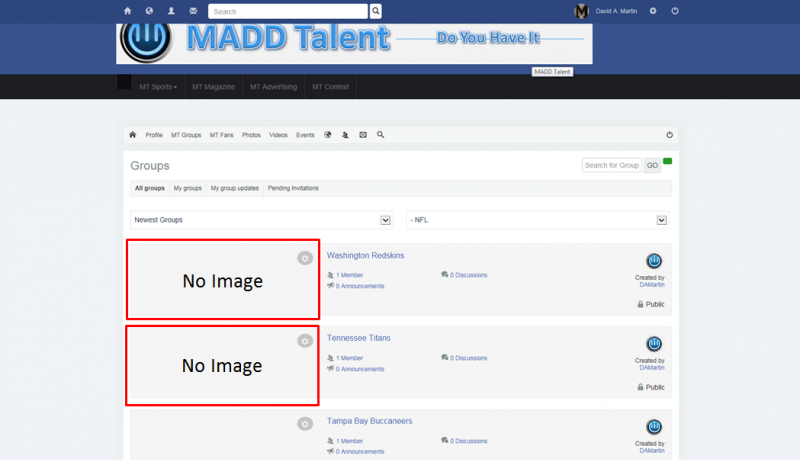
, I have a set of menu's below my logo. One of these is the MT Sports menu and under it is Football -> NFL. When you select this or any of the others, the page displays all the groups in this MADD Talent Category. However, if you go to this page, it's not showing the images. I had this problem a couple days ago and Michal was adddressing this for me. At that time I was using the JSN Air Pro template but just purchased the Socialize Template to fix this issue amongst a couple others. If you look at the screen shot I am attaching, the images are still not showing up even with the Socialize template. Can someone tell me how to correct this.
Michal, from JomSoical, has addressed this issue once with my old template that I have now changed. He sent me a screen shot from his computer where the images were showing up. I have followed his advice and refreshed my cache and it still is not showing up. I have also now loggied into my site with different computers as well and it's not showing up on any of them. Please look into this issue and tell me how to fix this or just fix it for me if it's easier for you.
Thanks,
David Martin
Hi, David.
Groups in that category ware disabled so I enabled them again. Covers are visible for me:
prntscr.com/6h26ht
(FireFox - logged in)
prntscr.com/6h26zn
(Chrome - logged out).
I suspect that this may depends from browser. What browser do you use? What version?
Did you tried on other browsers or computers?
- Instead of saying: 'it's not working', explain the problem in detail.
- Screenshots with the URL visible in them and the problem marked are more than welcome.
- Tell us how to replicate the problem, we can't fix it if we can't find it.
- Make sure that your site/server meets JomSocial System Requirements
- Make sure to setup JomSocial Cron Job
- Always provide us with access details to the backend and ftp. We need it to debug problems.
- If you have a similar problem, but a solution you found isn't working, open a new thread instead of 'merging' with an existing one.
- Use the "Thank You" feature on any post that helped you
Michal,
Good day. How did I know you would get this? LOL! I only have Internet Explorer in my office. I loaded Firefox but for some reason, it will not load or work. I will try again later from my home office. I am using Internet Explore 11. If this is assocaited to the browser that I am using, Internet Explorer V11, than there is an issue that still needs to be looked at. Most of the world does use this browser and its the current version I think. I could be wrong, but it's still heavily used. So, if this is just the browser, and I don't expect you are wrong, why is it now working in this browser?
Thanks,
David
Michal,
You were correct. When I got to my home office, I logged in with Firefox and this issue did not exist. I will have to see if this happens on all IE Versions or just the one I have. This could be a problem as it's very widely used. But, at lease we know my site is fine. You know, I am going to have many more questions. I can set up a super user account for you all at JomSocial if you like.
Thanks Again,
David