Support Forum
Override

Hi,
I read the link
documentation.jomsocial.com/wiki/Customizing_Template
to override the file style.css.
I'm using socialize template as default template (Joomla and Jomsocial) with the dark style (I've made a copy of the style named dark_bl).
I created the folder ROOT/templates/socialize/html/com_community/css and put the attached file inside it, but the changes don't apply.
What am I doing wrong?
Regards
Fernando
This message has an attachment file.
Please log in or register to see it.
Hi Fernando,
I suggest to using custom.css for T3 framework, Because socialize template using that framework.
here the doc:
t3-framework.org/documentation/customization.html
Regards,
Albert
Hi Albert,
What I want to change are some Jomsocial elements from stream, like colors, paddings, margins, etc, not width, height, or columns from the T3 template.
Even to change these items, do I really need create the custom.css instead of modify/override the style.css/style.dark.css files?
Regards
Fernando
Hi Fernando,
I saw your Jomsocial still using old version 2.8.4.2 maybe your site Info not up to date, you can inspect that CSS loaded or not by using Developer Tools from your browser.
Please try using custom.css, that same way with override. If you still don't know how to do it. please provide me your site info that using socialize template.
Regards,
Albert
Hi Albertus,
Yes, my live site still using 2.8.4.2 BUT my development site using 3.2.1.2 and the issues happens in the development site.
I already provided the development site info and credentials in the first post.
Regards
Fernando
Hi Fernando,
in some reason the style.dark.css not loaded at last sequence. I suggest you to using custom.css (my prev reply).
with custom.css it will override everything more easier.
with custom.css you no need include import
@import url("../../../../../components/com_community/templates/default/css/style.dark.css");Regards,
Albert

Hi Fernando,
seem something wrong with socialize template. we still investigating it.
the problem because style.css loaded twite.
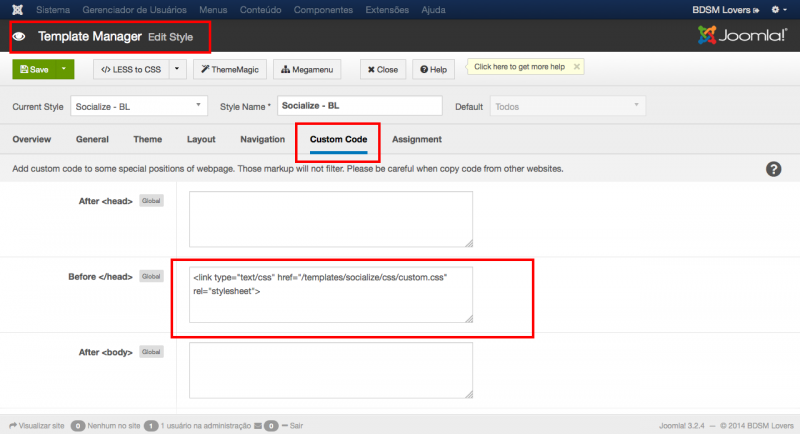
for the fixes I put this code at custom code section at socialize template manager
<link type="text/css" href="/templates/socialize/css/custom.css" rel="stylesheet">Regards,
Albert