Notice

The forum is in read only mode.

Support Forum

Welcome! Support Forums have been reactivated

megamenu icon problem

12 years 3 months ago
  • alfredo's Avatar
    Topic Author
  • alfredo
  • Offline
  • Junior Boarder
  • Posts: 278
  • Thank you received: 4
Licenses:
JomSocial Expired Socialize Expired

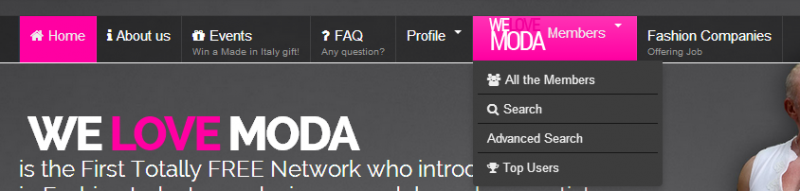
hi, as you can see the menus "menu principale IT" and "menu principale EN" uses fontawesome icons, but in "profile" menu item and its dropdown they doesnt show up.

12 years 3 months ago
Licenses:

Hi, Alfredo.

It seems that icons are not showing on dropdown elements...
But to be sure I assign this thread ot template developer.
He'll be available at Monday.


- Instead of saying: 'it's not working', explain the problem in detail.
- Screenshots with the URL visible in them and the problem marked are more than welcome.
- Tell us how to replicate the problem, we can't fix it if we can't find it.
- Make sure that your site/server meets JomSocial System Requirements
- Make sure to setup JomSocial Cron Job
- Always provide us with access details to the backend and ftp. We need it to debug problems.
- If you have a similar problem, but a solution you found isn't working, open a new thread instead of 'merging' with an existing one.

- Use the "Thank You" feature on any post that helped you
12 years 3 months ago
  • alfredo's Avatar
    Topic Author
  • alfredo
  • Offline
  • Junior Boarder
  • Posts: 278
  • Thank you received: 4
Licenses:
JomSocial Expired Socialize Expired

not just the dropdown, also "profile" menu item.
i think it's about the registered access of "profile" menu item..

12 years 3 months ago
Licenses:

Hi, Alfredo.

Yes, I saw that icon was assigned in Megamenu administration panel.
I meant "dropdown" class ;)
Let's wait till Ashraf take a look here, he designed it ;)


- Instead of saying: 'it's not working', explain the problem in detail.
- Screenshots with the URL visible in them and the problem marked are more than welcome.
- Tell us how to replicate the problem, we can't fix it if we can't find it.
- Make sure that your site/server meets JomSocial System Requirements
- Make sure to setup JomSocial Cron Job
- Always provide us with access details to the backend and ftp. We need it to debug problems.
- If you have a similar problem, but a solution you found isn't working, open a new thread instead of 'merging' with an existing one.

- Use the "Thank You" feature on any post that helped you
12 years 3 months ago
  • alfredo's Avatar
    Topic Author
  • alfredo
  • Offline
  • Junior Boarder
  • Posts: 278
  • Thank you received: 4
Licenses:
JomSocial Expired Socialize Expired

i noticed the users see the icons, but I can't see (even if i login with another admin account i see the icons!)

12 years 3 months ago
Licenses:
JomSocial Expired GURU Expired Publisher Expired AdAgency Expired iSEO Expired Socialize Expired

Hi Alfredo,
It seems the case is not regular and hard to replicate.
I am also seeing fine.
Now I marked the thread as resolved but if you find any process to replicate then
just replied. The thread automatically be opened then.
Thanks

12 years 3 months ago
  • alfredo's Avatar
    Topic Author
  • alfredo
  • Offline
  • Junior Boarder
  • Posts: 278
  • Thank you received: 4
Licenses:
JomSocial Expired Socialize Expired

please see first post notes

12 years 3 months ago
Licenses:
JomSocial Expired GURU Expired Publisher Expired AdAgency Expired iSEO Expired Socialize Expired

Hi Alfredo,
I am here seeing the main menu with font awesome icon as the screenshot.
Thanks
Attachments:
12 years 3 months ago
  • alfredo's Avatar
    Topic Author
  • alfredo
  • Offline
  • Junior Boarder
  • Posts: 278
  • Thank you received: 4
Licenses:
JomSocial Expired Socialize Expired

i said profile menu item

Attachments:
12 years 3 months ago
Licenses:
JomSocial Expired GURU Expired Publisher Expired AdAgency Expired iSEO Expired Socialize Expired

Hi Alfredo,
Sorry for my misunderstanding the requirement.
Now the menu with profile+icon is fixed for English.
All you need to do the below process for Italian language.
1. Make profile and friend menu item as public from menu manager
2. go to template manager > socialize > mega menu
3. set icon for profile and it's sub navigation
4. save the settings
5. check at front site at browser
6. If it is ok then make the menu item registered again
7. check again at browser.
Thanks

12 years 3 months ago
  • alfredo's Avatar
    Topic Author
  • alfredo
  • Offline
  • Junior Boarder
  • Posts: 278
  • Thank you received: 4
Licenses:
JomSocial Expired Socialize Expired

thanks, it works.

i think megamenu still needs work for being a useful and professional tool.

Moderators: Piotr Garasiński
Powered by Kunena Forum

Join 180,000 websites creating Amazing communities

JomSocial is the most complete, easy-to-use addon that turns Joomla CMS into a
full -fledged, social networking site

TRY NOW BUY NOW
