Support Forum
Change height and padding of community toolbar

Hi,
I have created larger icons for my toolbar (for people with visibility problems) but can't get them to display properly in the toolbar - they basically hang below the toolbar.
I have tried altering line height etc. in the Socialize style.css but it doesn't change anything. My question is what file do i edit to change the height of the toolbar, and also the padding around the toolbar icons.
Kind regards
Mel
Hi, Melanie.
Please provide us working administrator credentials.
I can't log in to your site.
Please, edit your first posd and add credentials to coresponding fields.
- Instead of saying: 'it's not working', explain the problem in detail.
- Screenshots with the URL visible in them and the problem marked are more than welcome.
- Tell us how to replicate the problem, we can't fix it if we can't find it.
- Make sure that your site/server meets JomSocial System Requirements
- Make sure to setup JomSocial Cron Job
- Always provide us with access details to the backend and ftp. We need it to debug problems.
- If you have a similar problem, but a solution you found isn't working, open a new thread instead of 'merging' with an existing one.
- Use the "Thank You" feature on any post that helped you
Hi Michal,
i have changed the size of my icons in the community toolbar (Soialize) so now although smaller they at least sit in the toolbar:
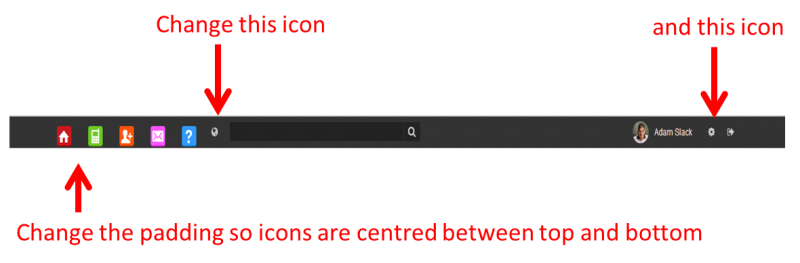
I just need to alter the padding. I also need to change the last two icons for the Global Notifications and the Settings in this toolbar , but unlike the others which I replaced with url links, these are javascript ones. How do I change those last two images without affecting this javascript?
Mel
Hi, Melanie.
You explained well what you want to achieve but...
I need to see it live on your site to provide you accurate code or advise. If I can't login to your site - I can't see it...
So please provide me working credentials.
- Instead of saying: 'it's not working', explain the problem in detail.
- Screenshots with the URL visible in them and the problem marked are more than welcome.
- Tell us how to replicate the problem, we can't fix it if we can't find it.
- Make sure that your site/server meets JomSocial System Requirements
- Make sure to setup JomSocial Cron Job
- Always provide us with access details to the backend and ftp. We need it to debug problems.
- If you have a similar problem, but a solution you found isn't working, open a new thread instead of 'merging' with an existing one.
- Use the "Thank You" feature on any post that helped you
Hi Michal,
all I need now is to know the file location for the global notification icon (the one the arrow points to in the image earlier) so I can replace it with my own. I edited the height of the toolbar so my icons fit better (still not central but can live with it).
Can you tell me where those icons are stored?
Mel
Hi, melanie.
This icon is font based:
prntscr.com/3p9e3s
So in order to change it you'll need to edit this file: ROOT/modules/mod_community_toolbar/tmpl/default.php in line 115.
Copy file to ROOT/templates/socialize/html/mod_community_toolbar (if you don't have "html" or "mod_community_toolbar" folders, feel free to create them).
- Instead of saying: 'it's not working', explain the problem in detail.
- Screenshots with the URL visible in them and the problem marked are more than welcome.
- Tell us how to replicate the problem, we can't fix it if we can't find it.
- Make sure that your site/server meets JomSocial System Requirements
- Make sure to setup JomSocial Cron Job
- Always provide us with access details to the backend and ftp. We need it to debug problems.
- If you have a similar problem, but a solution you found isn't working, open a new thread instead of 'merging' with an existing one.
- Use the "Thank You" feature on any post that helped you