Notice

The forum is in read only mode.

Support Forum

Welcome! Support Forums have been reactivated

toolbar questions

12 years 6 months ago
  • Jodi's Avatar
    Topic Author
  • Jodi
  • Offline
  • Fresh Boarder
  • Posts: 8
  • Thank you received: 0
Licenses:
JomSocial Active Socialize Expired

hello, I have a weird issue and a few dumb questions I couldn't find answers to…
problem:
after adding logo, search bar is now below toolbar. can it be removed completely? if not, how do I get it back on toolbar?
questions:
can the icons and the notification color be changed?
can a menu item, for maqma, be added to the toolbar?
how do I remove banner?

Attachment joomla.png not found

Attachments:
12 years 6 months ago
Licenses:
JomSocial Expired GURU Expired Publisher Expired AdAgency Expired iSEO Expired Socialize Expired

Hi Jodi,
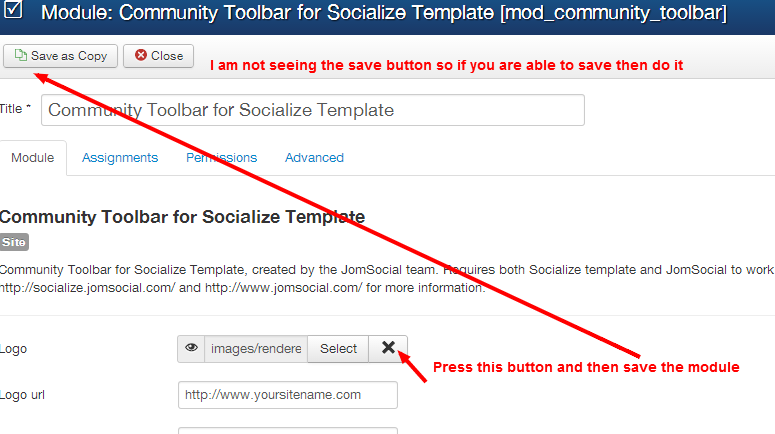
I have checked the community toolbar module and try to clear the logo and save but failed so please take the action as the screenshot.
Once it is done, let me know. I will be back to you for others.
Thanks
Attachments:
12 years 6 months ago
  • Jodi's Avatar
    Topic Author
  • Jodi
  • Offline
  • Fresh Boarder
  • Posts: 8
  • Thank you received: 0
Licenses:
JomSocial Active Socialize Expired

sorry, I wasn't clear, I meant can the search bar be removed completely? if not, can I get the search bar back on the toolbar somehow, and still keep the logo there?
thanks

12 years 6 months ago
Licenses:
JomSocial Expired GURU Expired Publisher Expired AdAgency Expired iSEO Expired Socialize Expired

Hi Jodi,
I have cleared the logo field and it is now ok.
Please check the site frontend.
Thanks

12 years 6 months ago
  • Jodi's Avatar
    Topic Author
  • Jodi
  • Offline
  • Fresh Boarder
  • Posts: 8
  • Thank you received: 0
Licenses:
JomSocial Active Socialize Expired

Hi Ashraf,
I really appreciate the help, but that's not what I was trying to do. Since Socialize is a Joomla template, not a Jomsocial template, I figured I could easily create an override to make these changes to the toolbar... but I'm not sure that's true or which file(s) I need to override to do it.

12 years 6 months ago
  • Jodi's Avatar
    Topic Author
  • Jodi
  • Offline
  • Fresh Boarder
  • Posts: 8
  • Thank you received: 0
Licenses:
JomSocial Active Socialize Expired

I have found everything to customize toolbar, change icons, change notification color, and widen containers to fit both logo and searchbar, so that is all fixed.

I still can't get rid of that area below toolbar and above main nav!

Attachment js.png not found


can you tell me where/how to do that??

Attachments:
12 years 6 months ago
Licenses:
JomSocial Expired GURU Expired Publisher Expired AdAgency Expired iSEO Expired Socialize Expired

Hi Jodi,
I have customize the template and now it is as you expected.
What i have removed all code at the file(header-jb.php) as blank
root/templates/socialize/tpls/block/header-jb.php
Please have a look.

Important notes: If you upgrade socialize template to latest version then you mast need to be blank above mentioned file again.
Thanks

12 years 6 months ago
  • Jodi's Avatar
    Topic Author
  • Jodi
  • Offline
  • Fresh Boarder
  • Posts: 8
  • Thank you received: 0
Licenses:
JomSocial Active Socialize Expired

perfect! thank you!!! :)

Moderators: Piotr Garasiński
Powered by Kunena Forum

Join 180,000 websites creating Amazing communities

JomSocial is the most complete, easy-to-use addon that turns Joomla CMS into a
full -fledged, social networking site

TRY NOW BUY NOW
