Notice

The forum is in read only mode.

Support Forum

Welcome! Support Forums have been reactivated
Welcome the Technical Support section. Help us in assisting you by providing us with a concise and descriptive elaboration of your issues. Be specific and if possible, provide us with a step-by-step instruction in replicating your problem.

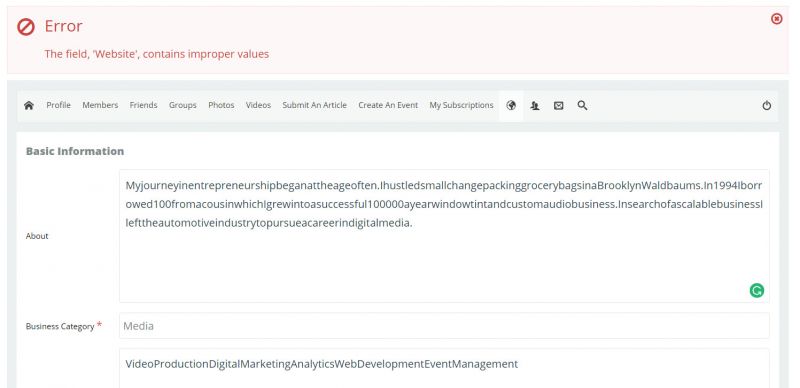
Error: Fields contains improper values.
10 years 1 month ago
  • Dexter's Avatar
    Topic Author
  • Dexter
  • Offline
  • Fresh Boarder
  • Posts: 56
  • Thank you received: 4
Licenses:
JomSocial Active

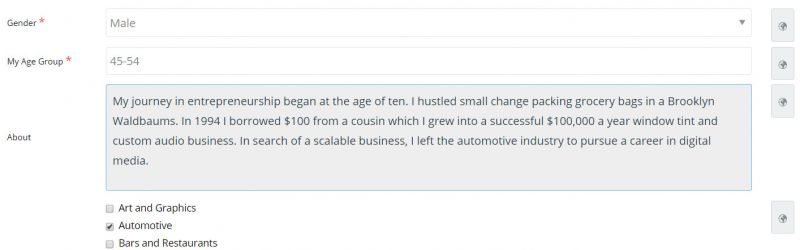
ISSUE SUMMARY: Fields are not saving due to improper display when changing profile types.


STEPS TO REPLICATE:
1Edit profile
2Your current profile type: Business Members (Change)
3
4
5
RESULT
EXPECTED RESULT
BROWSER

Attachments:
10 years 1 month ago
  • Dimas's Avatar
  • Dimas
  • Visitor
  • Thank you received: 0
Licenses:

Hi Dexter,

thank you for the steps, this is valid bug, some of user reported the same thing but didnt provide the clear steps to replicate this.

cheers!

10 years 1 month ago
  • Dexter's Avatar
    Topic Author
  • Dexter
  • Offline
  • Fresh Boarder
  • Posts: 56
  • Thank you received: 4
Licenses:
JomSocial Active

Albertus wrote: Hi,

I need FTP access detail to investigate this issue.
so far this is not bug because I cant replicate it at my test site. it seem 3rd party plugin conflict.

Regards


Hi Albertus,

I think it may have something to do with the character limit. I increased it but did not test. I just locked the multiple profile change feature.

One problem I am having is the privacy settings. Although profiles in the backend and front end are set to public, they are private. You check by clicking a new member avatar on my homepage Homepage

10 years 1 month ago
  • Dimas's Avatar
  • Dimas
  • Visitor
  • Thank you received: 0
Licenses:

Hi Dexter,

Please you wait the patch for fixing this, seems this issue related with space issue be removed after you click save.

thank you

10 years 1 month ago
Licenses:

Hi,

here the fix:
edit /components/com_community/controllers/multiprofile.php at line 176
change the code from

$postData = $jinput->post->get( 'field' . $data->id , '');
to
$postData = $jinput->post->get( 'field' . $data->id , '', 'STRING');

Regards

10 years 1 month ago
  • Dexter's Avatar
    Topic Author
  • Dexter
  • Offline
  • Fresh Boarder
  • Posts: 56
  • Thank you received: 4
Licenses:
JomSocial Active

That line of code does not exist in that file.

10 years 1 month ago
  • Dexter's Avatar
    Topic Author
  • Dexter
  • Offline
  • Fresh Boarder
  • Posts: 56
  • Thank you received: 4
Licenses:
JomSocial Active

Sorry. It's line 351.

10 years 1 month ago
  • Dexter's Avatar
    Topic Author
  • Dexter
  • Offline
  • Fresh Boarder
  • Posts: 56
  • Thank you received: 4
Licenses:
JomSocial Active

Disregard.

Attachments:
10 years 1 month ago
  • Dexter's Avatar
    Topic Author
  • Dexter
  • Offline
  • Fresh Boarder
  • Posts: 56
  • Thank you received: 4
Licenses:
JomSocial Active

Here is what I found with the text areas. If users characters exceed the limit they receive this and would not know why:

Error: The field, 'About', contains improper values

A tooltip displaying limit or character count indicator/limit would solve this.

10 years 1 month ago
Licenses:

Hi,

please wait for the fix.

Regards

10 years 1 month ago
Licenses:

Hi,

for min max message, it will included at jomsocial 4.3

Regards

Moderators: Piotr Garasiński
Powered by Kunena Forum

Join 180,000 websites creating Amazing communities

JomSocial is the most complete, easy-to-use addon that turns Joomla CMS into a
full -fledged, social networking site

TRY NOW BUY NOW