Welcome the Technical Support section. Help us in assisting you by providing us with a concise and descriptive elaboration of your issues. Be specific and if possible, provide us with a step-by-step instruction in replicating your problem.
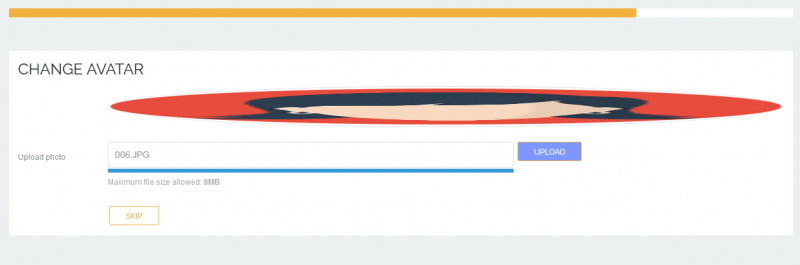
At the time of Registration Avatar image not loading

Thank you for contacting us.
Regarding stretched avatar, please add this css code:
.joms-avatar img {
width: auto !important;
}
to: ROOT/templates/gk_msocial/css/override.css
As for upload issue - I assign developer to this thread.
- Instead of saying: 'it's not working', explain the problem in detail.
- Screenshots with the URL visible in them and the problem marked are more than welcome.
- Tell us how to replicate the problem, we can't fix it if we can't find it.
- Make sure that your site/server meets JomSocial System Requirements
- Make sure to setup JomSocial Cron Job
- Always provide us with access details to the backend and ftp. We need it to debug problems.
- If you have a similar problem, but a solution you found isn't working, open a new thread instead of 'merging' with an existing one.
- Use the "Thank You" feature on any post that helped you
please set access level to Public for Alumni Network at joomla menu manager > main menu.
joomla will always use main menu item ID to check access level. because avatar upload in public, you need to set that Alumni Network to public
I dont want to make the access level Public.
I want to show the "Alumni Network" menu only when a user logs in.
What is the solution in this case, Can i remove the "Upload Avatar image" at the time of Registration?
please set "Alumni Network" as public access and you can set stream item only visible for logged in users.
and you can set module only visible to registered/logged in user from joomla module manager (access level).
so when guest user visiting "Alumni Network", they only got login form.