Notice

The forum is in read only mode.

Support Forum

Welcome! Support Forums have been reactivated
Welcome the Technical Support section. Help us in assisting you by providing us with a concise and descriptive elaboration of your issues. Be specific and if possible, provide us with a step-by-step instruction in replicating your problem.

Remove the Profile Cover photo, Group photo and Event photo

10 years 5 months ago
Licenses:
JomSocial Expired

ISSUE SUMMARY:
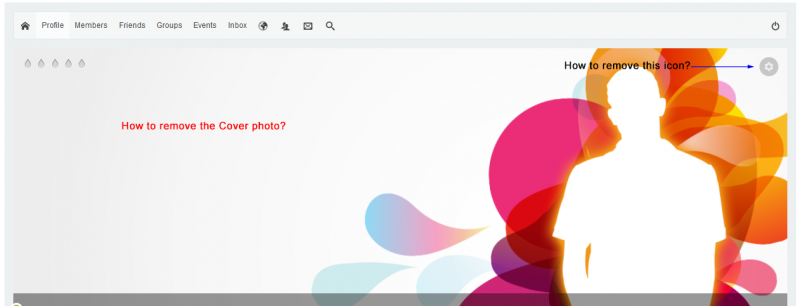
I do not want to give the facility to update the Profile Cover photo, Group Cover photo and Events Cover photo to the users as they may end up uploading heavy jpeg images.
I read about "Customizing the template" documentation but not sure which files to modify to remove the Cover photos?
Thanks!

Attachments:
10 years 5 months ago
Licenses:

Hi,

you can set max upload size at PHP configuration and at joomla backend > content > media > options

what do you think?

Regards

10 years 5 months ago
Licenses:
JomSocial Expired

Yes setting maximum image size is an option but i want to remove the Cover photos completely.
I read about "Customizing the template" documentation but not sure which files to modify to remove the Cover photos?
Thanks,

10 years 4 months ago
Licenses:

Hi,

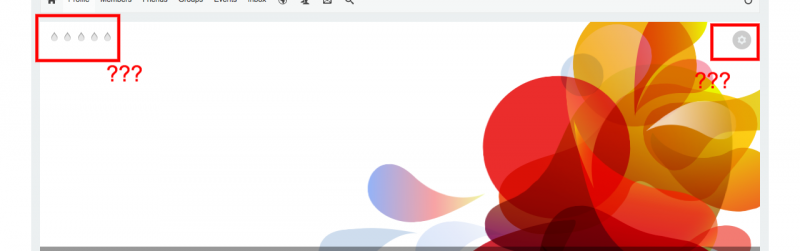
if remove the cover, do you want to remove the "cog icon", that part of cover:


if the cog icon removed, users will lost some options.

Regards

Attachments:
10 years 4 months ago
Licenses:
JomSocial Expired

What is the use of the "Cog Icon". Its just an image... am i right??It is anyway not clickable(or is it?).
I want to remove the top right icon which has options like "Change Avatar", "Reposition Cover", "Modify Cover" etc etc.
Also, how do i modify the default image of the cover?
Thanks!

10 years 4 months ago
Licenses:

Hi,

to remove the button you need to put this custom CSS code at your site template

.joms-focus__button--options--desktop, .joms-focus__badges  { display: none; }

seem your site using Gavick template, here the doc:
www.gavick.com/documentation/joomla/temp.../custom-template-css

and for cover, you need to put the override cover images at:
/templates/[your site template folder]/html/com_community/images/cover-event.png
/templates/[your site template folder]/html/com_community/images/cover-female-default.png
/templates/[your site template folder]/html/com_community/images/cover-group-default.png
/templates/[your site template folder]/html/com_community/images/cover-male-default.png
/templates/[your site template folder]/html/com_community/images/cover-undefined-default.png

Regards

Moderators: Piotr Garasiński
Powered by Kunena Forum

Join 180,000 websites creating Amazing communities

JomSocial is the most complete, easy-to-use addon that turns Joomla CMS into a
full -fledged, social networking site

TRY NOW BUY NOW