Support Forum
Remove Default name text on Profile
Greetings Pro's,
Several weeks ago you helped me remove the Group Name text from the Group Cover Image. I have the code, it works perfectly and I love it. Now, I would like to be able to do the same thing for member profile cover images. I would like to be able to hide or remove the members name from their profile cover image when needed, as shown in the green box in the attached image.
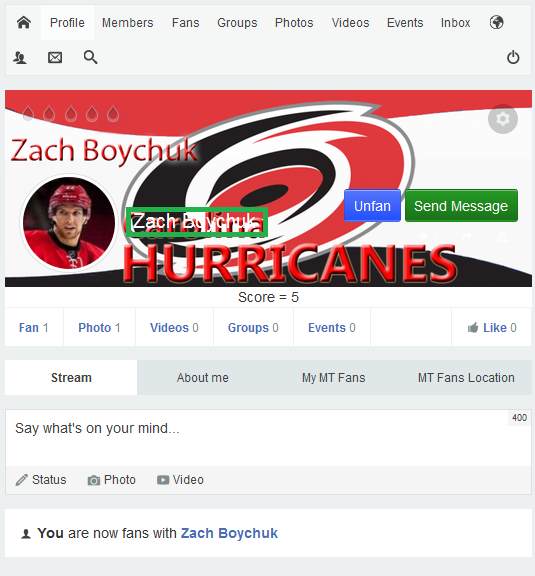
Would you mind helping me do this one as well?
Thanks,
David
-

- Dimas
- Visitor
- Thank you received: 0
Licenses:
Hi David,
Open this file components/com_community/templates/jomsocial/layouts/profile/focus.php, find this
<h2><?php echo $user->getDisplayName(); ?></h2><?php if($user->id!='ID1' || $user->id!='ID2' || $user->id!='ID3') :
<h2><?php echo $user->getDisplayName(); ?></h2>
<?php endif ?>thank you!
Dimas,
I appreciate you sharing this code with me and I am sure it's going to work just fine. If you don't mind, would you go into the file you sent me, components/com_community/templates/jomsocial/layouts/profile/focus.php and ad two of these for me. I am concerned that I will not cut and past the correct account information into that file in the correct location or get it right. I will also need to do this from time to time on different accounts and like the group modification you shared with me, I will need to add this code specifically correct to get it to work on each new member account I want to do this for. So just to make sure I am getting it perfectly correct, I would like to ask you to please set up the first two for me and then I can just add the additional ones to that same file copying what you have done. The two accounts are listed below:
Zach Boychuk
madd-talent.com/en/home-eng/1125-zach-boychuk/profile
The Sports Guy Mike
madd-talent.com/en/home-eng/sportsguymike/profile

Dimas,
I am pretty sure I have added this code exactly as you have given it to me, but the names will not hide on the front end. Is there something else that I need to do?
Thanks,
David Martin
-
- Dimas
- Visitor
- Thank you received: 0
Licenses:
Hi David,
I am sorry, the code should be like this :
<?php $arrId = array(1058,1125);?>
            <?php if(!in_array($user->id,$arrId)) :?>
                <h2><?php echo $user->getDisplayName(); ?></h2>
<?php endif?>
I changed the code on override focus.php file
thank you
Dimas,
I love you man. In a nice way mind you. LOL! It looks great and it's exactly what I wanted. Now, I will mark this as fixed so it's off you Pro's list, but if I am correct, and I want to include others on like this, I just add the one small line of code to the end of this code, (1058,1125)
-
- Dimas
- Visitor
- Thank you received: 0
Licenses:
This is the file /templates/socialize/html/com_community/layouts/profile/focus.php