Support Forum
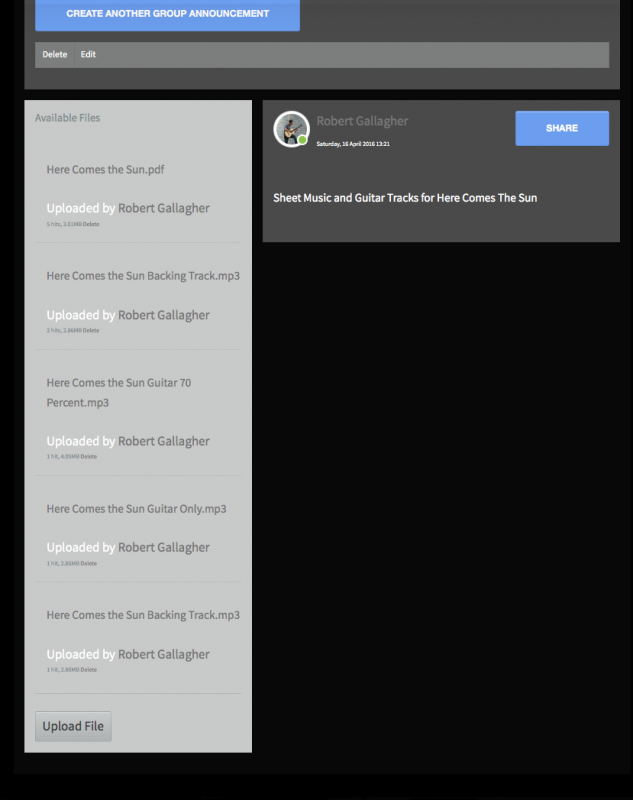
Edit files under announcement buttom dissapeared
-

- Dimas
- Visitor
- Thank you received: 0
Licenses:
Hi Robert,
The FTP and backend account is not working, I already tried it both your account from Administration and from Misc. Can you check again and provide me the correct one please?
I also need your phpmyadmin access for further debugging.
thank you!
-
- Dimas
- Visitor
- Thank you received: 0
Licenses:
Hi Robert,
If I able to access your backend, would you mind if I install extplorer? or maybe if possible you provide me cPanel access, with it I can access file manager and phpmyadmin.
just reminder please check your backend account, its not working for me.
thank you!
Hi, Robert.
I have the same issue with your SU account.
Please, send me credentials via email michael [at] ijoomla.com
- Instead of saying: 'it's not working', explain the problem in detail.
- Screenshots with the URL visible in them and the problem marked are more than welcome.
- Tell us how to replicate the problem, we can't fix it if we can't find it.
- Make sure that your site/server meets JomSocial System Requirements
- Make sure to setup JomSocial Cron Job
- Always provide us with access details to the backend and ftp. We need it to debug problems.
- If you have a similar problem, but a solution you found isn't working, open a new thread instead of 'merging' with an existing one.
- Use the "Thank You" feature on any post that helped you
Hi, Robert.
michael [at] ijoomla.com
- Instead of saying: 'it's not working', explain the problem in detail.
- Screenshots with the URL visible in them and the problem marked are more than welcome.
- Tell us how to replicate the problem, we can't fix it if we can't find it.
- Make sure that your site/server meets JomSocial System Requirements
- Make sure to setup JomSocial Cron Job
- Always provide us with access details to the backend and ftp. We need it to debug problems.
- If you have a similar problem, but a solution you found isn't working, open a new thread instead of 'merging' with an existing one.
- Use the "Thank You" feature on any post that helped you
Hi, Robert.
There is no "edit" button for uploaded files.
Or you mean button to delete files?
i.imgur.com/jo6Llav.png
You may administer files from "More" option right under cover image:
i.imgur.com/QTU2wEO.png
i.imgur.com/NQ1QHFH.png
- Instead of saying: 'it's not working', explain the problem in detail.
- Screenshots with the URL visible in them and the problem marked are more than welcome.
- Tell us how to replicate the problem, we can't fix it if we can't find it.
- Make sure that your site/server meets JomSocial System Requirements
- Make sure to setup JomSocial Cron Job
- Always provide us with access details to the backend and ftp. We need it to debug problems.
- If you have a similar problem, but a solution you found isn't working, open a new thread instead of 'merging' with an existing one.
- Use the "Thank You" feature on any post that helped you
Hi, Robert.
It's still there... it become just tiny :)
i.imgur.com/uu2oxlb.png
This is caused by your template (as well as issue with not visible field labels):
i.imgur.com/jv5pxB1.png
I recommend you to contact with your template developer and ask for fix... as it seems many things gets... altered by template. ^^
- Instead of saying: 'it's not working', explain the problem in detail.
- Screenshots with the URL visible in them and the problem marked are more than welcome.
- Tell us how to replicate the problem, we can't fix it if we can't find it.
- Make sure that your site/server meets JomSocial System Requirements
- Make sure to setup JomSocial Cron Job
- Always provide us with access details to the backend and ftp. We need it to debug problems.
- If you have a similar problem, but a solution you found isn't working, open a new thread instead of 'merging' with an existing one.
- Use the "Thank You" feature on any post that helped you