Notice

The forum is in read only mode.

Support Forum

Welcome! Support Forums have been reactivated
Welcome the Technical Support section. Help us in assisting you by providing us with a concise and descriptive elaboration of your issues. Be specific and if possible, provide us with a step-by-step instruction in replicating your problem.

Messages

10 years 7 months ago
  • Dominik's Avatar
    Topic Author
  • Dominik
  • Offline
  • Fresh Boarder
  • Posts: 3
  • Thank you received: 2
Licenses:
JomSocial Expired Socialize Expired

Hi,
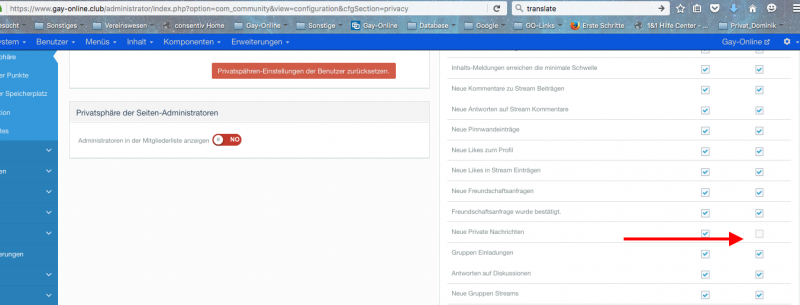
1) I want to disable the global notifications for messages at all members. ( See photo1)
and
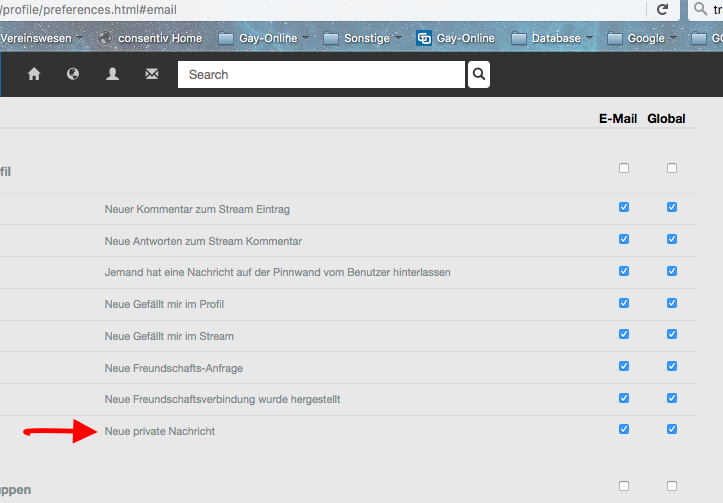
2)I want to delete the line in the notification settings for messages. (See photo2)


Regards,
Dominik

Attachments:
10 years 7 months ago
  • Dimas's Avatar
  • Dimas
  • Visitor
  • Thank you received: 0
Licenses:

Hi,

1. you can reset the existing user after you unchecked the global notif
2. Open this file components/com_community/libraries/notificationtypes.php, and remove this code :

$types[] = array('PROFILE', 'inbox_create_message', 'COM_COMMUNITY_NOTIFICATIONTYPE_OTHERS_INBOXMSG', 'COM_COMMUNITY_NOTIFICATIONTYPE_OTHERS_INBOXMSG_TIPS');
10 years 7 months ago
  • Dominik's Avatar
    Topic Author
  • Dominik
  • Offline
  • Fresh Boarder
  • Posts: 3
  • Thank you received: 2
Licenses:
JomSocial Expired Socialize Expired

Hi,

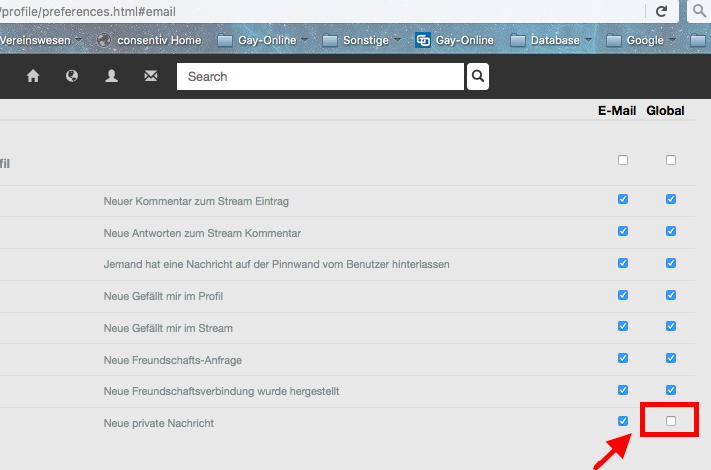
sorry i want to remove the Global settings.
the email settings should remain available.

Regards
Dominik

Attachments:
10 years 7 months ago
  • Dimas's Avatar
  • Dimas
  • Visitor
  • Thank you received: 0
Licenses:

Hi,

On your css file put this code :

input#notif_inbox_create_message {
    display: none;
}

thank you!

10 years 6 months ago
  • Dominik's Avatar
    Topic Author
  • Dominik
  • Offline
  • Fresh Boarder
  • Posts: 3
  • Thank you received: 2
Licenses:
JomSocial Expired Socialize Expired

Hi Dimas,

so the selection for choosing "global" ist now not visible for messages. but if you klick on the main "global" box you automatically enable the "global" for the message nortification although you can´t see the field.

Regards,
Dominik

10 years 6 months ago
  • Dimas's Avatar
  • Dimas
  • Visitor
  • Thank you received: 0
Licenses:

Hi,

Ehm, another solution you can do the trick from Custom code socialize with Javascript code like this :

<script>
$( document ).ready(function() {
 $('input#notif_inbox_create_message').remove();
});
</script>

10 years 6 months ago
  • Dominik's Avatar
    Topic Author
  • Dominik
  • Offline
  • Fresh Boarder
  • Posts: 3
  • Thank you received: 2
Licenses:
JomSocial Expired Socialize Expired

HI,
where should i put this code in? is it necessary to create a custom file?

Regards

10 years 6 months ago
  • Dimas's Avatar
  • Dimas
  • Visitor
  • Thank you received: 0
Licenses:

I already applied the code on custom code socalize, that configuration item is totally gone now

10 years 6 months ago
  • Dominik's Avatar
    Topic Author
  • Dominik
  • Offline
  • Fresh Boarder
  • Posts: 3
  • Thank you received: 2
Licenses:
JomSocial Expired Socialize Expired

Hi,
we tried it again, but it´s allways the same.

if you click on the main "global" button and all remove all hacks then click again for activate the global button on the top, the notification for private messages is again active, although you can not see the hack-box.

the global nortification function should be tottaly gone for private messages. it´s not nessecary to get two nortifications in message and in nortification.

Regards

10 years 6 months ago
  • Dimas's Avatar
  • Dimas
  • Visitor
  • Thank you received: 0
Licenses:

Have you reset the privacy from backend and try again?

Moderators: Piotr Garasiński
Powered by Kunena Forum

Join 180,000 websites creating Amazing communities

JomSocial is the most complete, easy-to-use addon that turns Joomla CMS into a
full -fledged, social networking site

TRY NOW BUY NOW