Support Forum
Probelm with email and notifications settings
ISSUE SUMMARY: Users don't receive emails(for certain actions) although in their personal settings, those actions, are checked and should send them an email. I have done a "Reset existing user's notification settings." from JomSocial backend but nothing changed. I should mention that when a user navigate to his/hers personal preferences settings and form there to "Email & Notification" tab and just click save(keeping his/hers checkboxes as they were) everything is back to normal and he/she starts to get emails. What's the problem here?
STEPS TO REPLICATE:
1
2
3
4
5
RESULT
EXPECTED RESULT
BROWSER
Hi, Nikos.
Users don't receive emails(for certain actions)
What actions specifically? Please, always post full details so I could test this issue.
Also, does it apply to all members? So when I create new member I'll be able to replicate this issue?
- Instead of saying: 'it's not working', explain the problem in detail.
- Screenshots with the URL visible in them and the problem marked are more than welcome.
- Tell us how to replicate the problem, we can't fix it if we can't find it.
- Make sure that your site/server meets JomSocial System Requirements
- Make sure to setup JomSocial Cron Job
- Always provide us with access details to the backend and ftp. We need it to debug problems.
- If you have a similar problem, but a solution you found isn't working, open a new thread instead of 'merging' with an existing one.
- Use the "Thank You" feature on any post that helped you
Hi, Nikos.
In Backend -> Components -> JomSocial -> Monitor -> Mail queue emails are listed?
I need access to account with such an issue.
Then I could test.
And still - what are those "certain actions"?
- Instead of saying: 'it's not working', explain the problem in detail.
- Screenshots with the URL visible in them and the problem marked are more than welcome.
- Tell us how to replicate the problem, we can't fix it if we can't find it.
- Make sure that your site/server meets JomSocial System Requirements
- Make sure to setup JomSocial Cron Job
- Always provide us with access details to the backend and ftp. We need it to debug problems.
- If you have a similar problem, but a solution you found isn't working, open a new thread instead of 'merging' with an existing one.
- Use the "Thank You" feature on any post that helped you
"certain actions" are e.g sended friend request(checkbox for email and notifications), aproved friend request(checkbox for email and notifications), likes(checkbox for email and notifications), posts(checkbox for email and notifications) etc. For the new members they are listed correctly in mail queue but for old members there is nothing there. Again I mention you that if a user with such a problem goes to his frond-end->preferences->email & notifications and just click save(without the need to check or uncheck anything) everything works ok for that user(and he starts to receive mails according to the checkboxes he has checked, as he sould be)
Hi, NIkos.
I understood you by hte first time. Now I now what actions need to be take.
I need to test on account that is old and didn't fixed it settings.
Without it I can't say what is wrong... or event - if I pass this thread to developer - be able to explain what to test.
So as the last thing I need access to such account with issue.
- Instead of saying: 'it's not working', explain the problem in detail.
- Screenshots with the URL visible in them and the problem marked are more than welcome.
- Tell us how to replicate the problem, we can't fix it if we can't find it.
- Make sure that your site/server meets JomSocial System Requirements
- Make sure to setup JomSocial Cron Job
- Always provide us with access details to the backend and ftp. We need it to debug problems.
- If you have a similar problem, but a solution you found isn't working, open a new thread instead of 'merging' with an existing one.
- Use the "Thank You" feature on any post that helped you
Hi, NIkos.
I was able to replicate this issue on your site.
I noticed that you're using JomSocial 4.1.5, could you do a safe copy and upgrade to JS 4.1.6?
- Instead of saying: 'it's not working', explain the problem in detail.
- Screenshots with the URL visible in them and the problem marked are more than welcome.
- Tell us how to replicate the problem, we can't fix it if we can't find it.
- Make sure that your site/server meets JomSocial System Requirements
- Make sure to setup JomSocial Cron Job
- Always provide us with access details to the backend and ftp. We need it to debug problems.
- If you have a similar problem, but a solution you found isn't working, open a new thread instead of 'merging' with an existing one.
- Use the "Thank You" feature on any post that helped you
Hi, NIkos.
Thank you.
I assign developer to this thread.
- Instead of saying: 'it's not working', explain the problem in detail.
- Screenshots with the URL visible in them and the problem marked are more than welcome.
- Tell us how to replicate the problem, we can't fix it if we can't find it.
- Make sure that your site/server meets JomSocial System Requirements
- Make sure to setup JomSocial Cron Job
- Always provide us with access details to the backend and ftp. We need it to debug problems.
- If you have a similar problem, but a solution you found isn't working, open a new thread instead of 'merging' with an existing one.
- Use the "Thank You" feature on any post that helped you
-

- Dimas
- Visitor
- Thank you received: 0
Licenses:
Hi Nikos,
I found the problem, when you reset the existing email notif configuration (which you reset the old user configuration) it was failed. Because time out issue.
Please you try increase the timeout configuration from php.ini and mysql configuration for fixing this, you should tweak these setting :
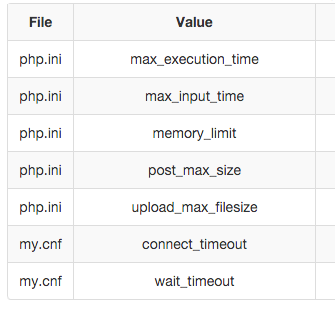
I suggest you contact your sys-admin to tweak those setting
thank you
-
- Dimas
- Visitor
- Thank you received: 0
Licenses:
Hi Nikos,
Yes it will..