Support Forum
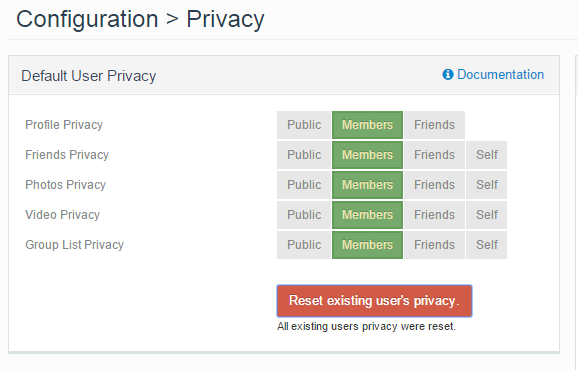
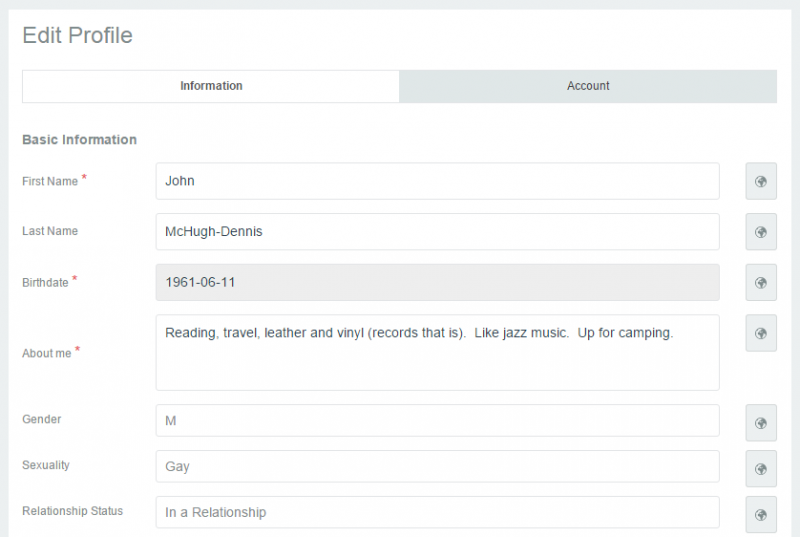
Privacy settings on Profile Fields do not reflect reset in Back End

ISSUE SUMMARY:
STEPS TO REPLICATE:
1 Go to Jomsocial > Configuration > Privacy in Back End
2 Set Profile Privacy to Members Only
3 Click Reset Existing Users Privacy
4 Login as User in front end and edit profile
5
RESULT
Fields show Globe (Public) next to fields
EXPECTED RESULT
Fields should all show Site Members
This is mis-leading; user thinks that public can see all fields.
BROWSER
Hi,
please try this steps:
1. Go to Jomsocial > Configuration > Privacy in Back End
2. Set Profile Privacy to Members Only
3. click save button first (on top right)
4. Click Reset Existing Users Privacy
5. Login as User in front end and edit profile
Regards
Hi John,
your perception for default privacy not correct.
the fields not respected default privacy. default privacy only for profile > privacy:
profile privacy (not fields)
photos privacy
videos privacy
friends and groups
ref:
documentation.jomsocial.com/wiki/Profile_Preferences
we cant changing fields default privacy. the default value always public. but if you set profile privacy as members, non site members cannot read that profile fields, because profile privacy as higher level of privacy.
Regards
Hi John,
please try this:
1. set all fields as public
2. set profile privacy as members
3. as guest user, try to open that user profile
result:
it cant. because the user profile as site member already
fields privacy will respected if only user profile set as public.
Regards
I know this will probably work, but how does the member know?
The icon should indicate members next to the fields or there should be some message that tells the user. The user does not know that public cannot see their profile because the icon says that they can.
I believe that it probably does work, but there is nothing in the interface to tell the member that privacy is not set to public.
Hi, John.
The only way to change profile field privacy is during registration or editing profile details:
i.imgur.com/ytIypi5.png
Settings you mentioned doesn't apply to profile fields but rather "objects" or JS parts like profile or friends list.
Users need to learn... or guess, use their intuition what is this globe for. I'm sorry but that's the way it is: when you create account on Facebook you also need to learn how to use FB or how to set privacy properly. The same goes for YouTube or Google+. Globe icon is quite obvious I guess - it's used very often to indicate public access. Interface - I mean the one for channel/profile/page doesn't say anything about privacy - all this is dug in settings/configuration. That's why all sites like FB, G+, YT have documentation that explains how privacy works there.
Also, even profile fields are marked with globe as public and profile has privacy settings "Members" - then fields are visible only for community members as fields are part of profile. Privacy settings for profile are applied for whole profile - also for profile details/fields.
- Instead of saying: 'it's not working', explain the problem in detail.
- Screenshots with the URL visible in them and the problem marked are more than welcome.
- Tell us how to replicate the problem, we can't fix it if we can't find it.
- Make sure that your site/server meets JomSocial System Requirements
- Make sure to setup JomSocial Cron Job
- Always provide us with access details to the backend and ftp. We need it to debug problems.
- If you have a similar problem, but a solution you found isn't working, open a new thread instead of 'merging' with an existing one.
- Use the "Thank You" feature on any post that helped you