Welcome the Technical Support section. Help us in assisting you by providing us with a concise and descriptive elaboration of your issues. Be specific and if possible, provide us with a step-by-step instruction in replicating your problem.
Notification pop up change color of role hyperlinks

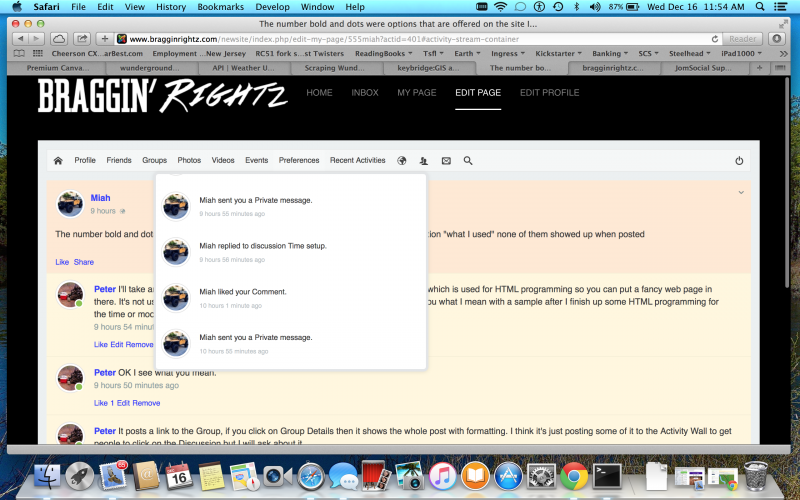
When clicking on Notifications Icon, the Pop Up window lists the Notifications but Role links for the User and actual activity (Comment, Private Message, etc.) are the same color as the rest of the text. I would like to change the color of the Role Links to make it more obvious to the user that they can Click on the Role Link to open the message or comment.
I am hoping this is a simple Theme change performed through the JomSocial Dashboard but I must be overlooking which option would solve this.
STEPS TO REPLICATE:
1 login as user
2 click notifications
3 view list of notifications
4
5
RESULT Notification display including username and activity (message, comment, etc)
EXPECTED RESULT Notification display with username and activity in highlighted or different color
BROWSER any, Chrome, Safari, IE
For quick fix this, edit this file /components/com_community/templates/jomsocial/assets/css/style.css, find this code :
.joms-dropdown li a, .joms-popover li a {
color: #424242; }
.joms-dropdown li a:hover, .joms-popover li a:hover {
color: #424242;
text-decoration: none; }
replace to :
.joms-dropdown li a, .joms-popover li a {
color: #3838FF; }
.joms-dropdown li a:hover, .joms-popover li a:hover {
color: #8238FF;
text-decoration: none; }