Support Forum
Avatars stretched
ISSUE SUMMARY:
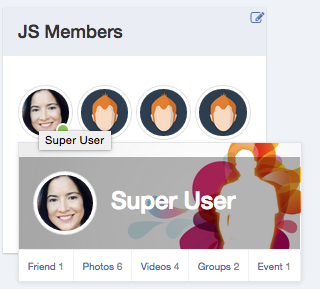
Avatars in the popovers are stretched and they should not be. They should respect the aspect ratio of the original image like the module does. In the attached screenshot you can see that the avatar looks normal in the module, but when you hover over it, the version shown in the popover is stretched wide.
Attachment ScreenShot2015-10-11at4.21.55PM.png not found
STEPS TO REPLICATE:
1 Hover over avatar.
RESULT
Avatar has a different aspect ratio as in the module.
EXPECTED RESULT
Avatar has the same aspect ratio as in the module.
BROWSER
Chrome


-

- Dimas
- Visitor
- Thank you received: 0
Licenses:
Hi Ron,
Would you mind provide me backend access, please? will inspect this into depth.. your current backend account is not working for me.
thank you!
-
- Dimas
- Visitor
- Thank you received: 0
Licenses:
Hi Ron,
Thank you, I will discuss this with our designer, and hope they will improve this.
thank you!
-
- Dimas
- Visitor
- Thank you received: 0
Licenses:
will discuss with our developer.. cheers!
-
- Dimas
- Visitor
- Thank you received: 0
Licenses:
Hi,
This is the patch:
1. open this file components/com_community/templates/jomsocial/layouts/profile/hovercard.php
- find this code :
<a href="<?php echo CUrlHelper::userLink($user->id); ?>"><img src="<?php echo $user->getAvatar(); ?>" alt="<?php echo $user->getDisplayName(); ?>"></a><a href="<?php echo CUrlHelper::userLink($user->id); ?>"><img src="<?php echo $user->getThumbAvatar(); ?>" alt="<?php echo $user->getDisplayName(); ?>"></a>2. open this file modules/mod_community_hellome/tmpl/default.php
- find this code :
<a href="<?php echo CUrlHelper::userLink($user->id); ?>"><img src="<?php echo $user->getAvatar(); ?>" alt="<?php echo $user->getDisplayName(); ?>"></a><a href="<?php echo CUrlHelper::userLink($user->id); ?>"><img src="<?php echo $user->getThumbAvatar(); ?>" alt="<?php echo $user->getDisplayName(); ?>"></a>thank you!