Support Forum
open uploaded document in message

hi,
it´s not possible to open an document which is uploaded in a message.
the user who is sending can´t open it and also the receiver can´t.
when the sender want to open the document there is opening fatal error, see on the screenshot.
when the receiver want to open the document it turns back to the wall.
thank you,
dominik

Hi, Dominik.
What kind of document it was? PDF? XLS? DOC?
- Instead of saying: 'it's not working', explain the problem in detail.
- Screenshots with the URL visible in them and the problem marked are more than welcome.
- Tell us how to replicate the problem, we can't fix it if we can't find it.
- Make sure that your site/server meets JomSocial System Requirements
- Make sure to setup JomSocial Cron Job
- Always provide us with access details to the backend and ftp. We need it to debug problems.
- If you have a similar problem, but a solution you found isn't working, open a new thread instead of 'merging' with an existing one.
- Use the "Thank You" feature on any post that helped you
HI, Dominik.
I'm sorry but I can't replicate your issue.
I just send PM to user Dominik with pdf file and I'm able to open file in "Send" box:
prntscr.com/8l30l5
- Instead of saying: 'it's not working', explain the problem in detail.
- Screenshots with the URL visible in them and the problem marked are more than welcome.
- Tell us how to replicate the problem, we can't fix it if we can't find it.
- Make sure that your site/server meets JomSocial System Requirements
- Make sure to setup JomSocial Cron Job
- Always provide us with access details to the backend and ftp. We need it to debug problems.
- If you have a similar problem, but a solution you found isn't working, open a new thread instead of 'merging' with an existing one.
- Use the "Thank You" feature on any post that helped you
Hi, Dominik.
Me neither. You mean that you downloaded my file and uploaded it again?
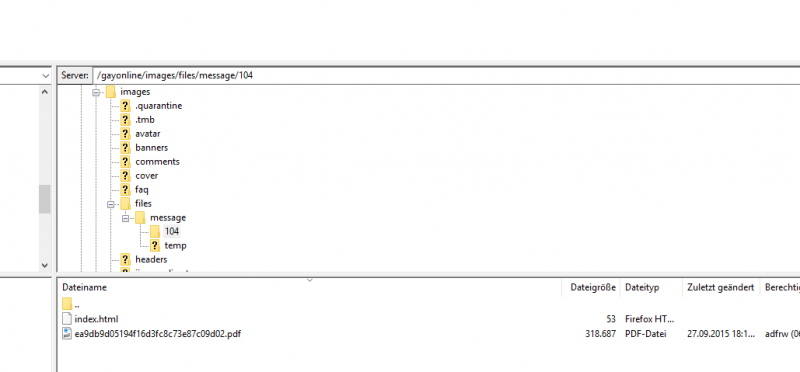
Could you check if this file exist: ROOT/images/files/message/104/ec152fa3d39c809df6d227cb793e4846.pdf ?
gay-online.club/images/files/message/104...3fc8c73e87c09d02.pdf
- this file exist
gay-online.club/images/files/message/104...f6d227cb793e4846.pdf
- this... probably not. If it exist, download it from server and try to open.
- Instead of saying: 'it's not working', explain the problem in detail.
- Screenshots with the URL visible in them and the problem marked are more than welcome.
- Tell us how to replicate the problem, we can't fix it if we can't find it.
- Make sure that your site/server meets JomSocial System Requirements
- Make sure to setup JomSocial Cron Job
- Always provide us with access details to the backend and ftp. We need it to debug problems.
- If you have a similar problem, but a solution you found isn't working, open a new thread instead of 'merging' with an existing one.
- Use the "Thank You" feature on any post that helped you
Hi, Dominik.
Does it happen with every document you sent (pdf) or with only this one?
You attached new document to PM or you downloaded mine and attached it again or it is different document?
- Instead of saying: 'it's not working', explain the problem in detail.
- Screenshots with the URL visible in them and the problem marked are more than welcome.
- Tell us how to replicate the problem, we can't fix it if we can't find it.
- Make sure that your site/server meets JomSocial System Requirements
- Make sure to setup JomSocial Cron Job
- Always provide us with access details to the backend and ftp. We need it to debug problems.
- If you have a similar problem, but a solution you found isn't working, open a new thread instead of 'merging' with an existing one.
- Use the "Thank You" feature on any post that helped you
Hi, Dominik.
Second user reported the same issue.
It seems to be a bug.
I'll report it to our developers.
- Instead of saying: 'it's not working', explain the problem in detail.
- Screenshots with the URL visible in them and the problem marked are more than welcome.
- Tell us how to replicate the problem, we can't fix it if we can't find it.
- Make sure that your site/server meets JomSocial System Requirements
- Make sure to setup JomSocial Cron Job
- Always provide us with access details to the backend and ftp. We need it to debug problems.
- If you have a similar problem, but a solution you found isn't working, open a new thread instead of 'merging' with an existing one.
- Use the "Thank You" feature on any post that helped you
Hi, Dominik.
Please, do safe copy of this file:
ROOT/components/com_community/controllers/files.php
Then replace original with patched file from package.
- Instead of saying: 'it's not working', explain the problem in detail.
- Screenshots with the URL visible in them and the problem marked are more than welcome.
- Tell us how to replicate the problem, we can't fix it if we can't find it.
- Make sure that your site/server meets JomSocial System Requirements
- Make sure to setup JomSocial Cron Job
- Always provide us with access details to the backend and ftp. We need it to debug problems.
- If you have a similar problem, but a solution you found isn't working, open a new thread instead of 'merging' with an existing one.
- Use the "Thank You" feature on any post that helped you
This message has an attachment file.
Please log in or register to see it.
hi michal,
nothing changes. when i upload the document, i cant open it. but when i refresh after the upload i can open it sometimes, not everytimes. nobody will check to refresh the page to see his own uploaded document.
regards,
dominik
HI, Dominik.
I was able to open document you attached:
prntscr.com/8mgfrn
prntscr.com/8mgf58
Could you try to send me another one?
- Instead of saying: 'it's not working', explain the problem in detail.
- Screenshots with the URL visible in them and the problem marked are more than welcome.
- Tell us how to replicate the problem, we can't fix it if we can't find it.
- Make sure that your site/server meets JomSocial System Requirements
- Make sure to setup JomSocial Cron Job
- Always provide us with access details to the backend and ftp. We need it to debug problems.
- If you have a similar problem, but a solution you found isn't working, open a new thread instead of 'merging' with an existing one.
- Use the "Thank You" feature on any post that helped you
Hi,
after i uploaded the last document i tried to open it. on the screenshot you´ll see the opening error. so i closed it an refreshed the page where the message was opend. after it loaded new i klicked on the attachement and it worked.
why is it necessary to refresh the page to open the document? nobody will check to refresh the page to see his own uploaded document.
regards,
dominik
