Support Forum
can not upload pic in profiles JomSocial 4.1

ISSUE SUMMARY:
Upgrade to JomSocial 4.1
As a user I want to edit my profile and add a pic, but there is no button to select a pic (there is a field, but no way to access my file browser or to drag and drop).
I tried with safari or with chrome. same problem
Version of Joomla: 3.4.3
How can I add pics?
Thanks
yves
Hi, Yves.
How can I access your community?
I don't see any URL to it.
- Instead of saying: 'it's not working', explain the problem in detail.
- Screenshots with the URL visible in them and the problem marked are more than welcome.
- Tell us how to replicate the problem, we can't fix it if we can't find it.
- Make sure that your site/server meets JomSocial System Requirements
- Make sure to setup JomSocial Cron Job
- Always provide us with access details to the backend and ftp. We need it to debug problems.
- If you have a similar problem, but a solution you found isn't working, open a new thread instead of 'merging' with an existing one.
- Use the "Thank You" feature on any post that helped you
HI, Yves.
I was able to change photo:
prntscr.com/8kti9m
Browse to your profile, click on avatar, then on big blue button, choose photo from your hd and confirm. File will be uploaded:
prntscr.com/8ktitt
- Instead of saying: 'it's not working', explain the problem in detail.
- Screenshots with the URL visible in them and the problem marked are more than welcome.
- Tell us how to replicate the problem, we can't fix it if we can't find it.
- Make sure that your site/server meets JomSocial System Requirements
- Make sure to setup JomSocial Cron Job
- Always provide us with access details to the backend and ftp. We need it to debug problems.
- If you have a similar problem, but a solution you found isn't working, open a new thread instead of 'merging' with an existing one.
- Use the "Thank You" feature on any post that helped you
Hi Michal,
I found that I can also do it if I click directly on the pic in the profile.
But I can not do it if I go via the menu: Profile / change the pic. When I click on the blue button "Change" of on the field to select the pic, nothing happens. (see the pic
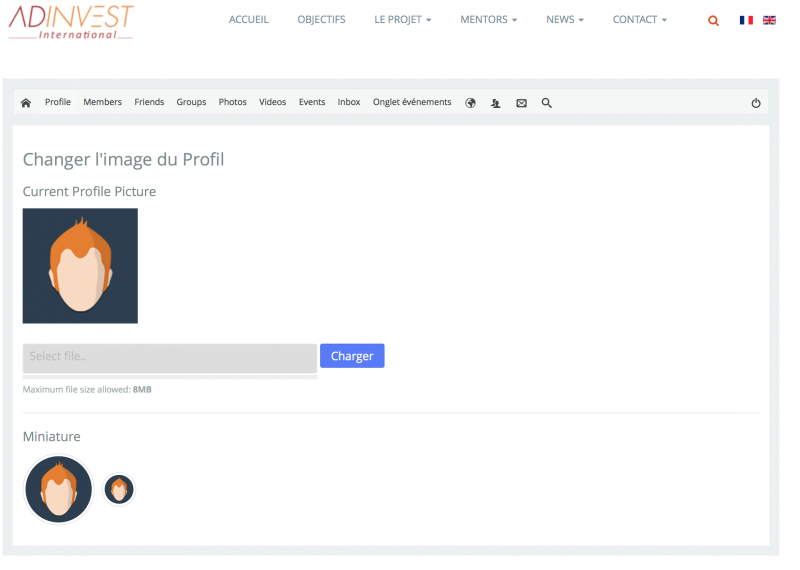
).
(use the French version of the site, as I have problem with the JomSocial of the English version).
thanks
yves
Hi, Yves.
I was able to replicate your issue:
prntscr.com/8l34oe
I assign developer to this thread.
- Instead of saying: 'it's not working', explain the problem in detail.
- Screenshots with the URL visible in them and the problem marked are more than welcome.
- Tell us how to replicate the problem, we can't fix it if we can't find it.
- Make sure that your site/server meets JomSocial System Requirements
- Make sure to setup JomSocial Cron Job
- Always provide us with access details to the backend and ftp. We need it to debug problems.
- If you have a similar problem, but a solution you found isn't working, open a new thread instead of 'merging' with an existing one.
- Use the "Thank You" feature on any post that helped you