Notice

The forum is in read only mode.

Support Forum

Welcome! Support Forums have been reactivated
Welcome the Technical Support section. Help us in assisting you by providing us with a concise and descriptive elaboration of your issues. Be specific and if possible, provide us with a step-by-step instruction in replicating your problem.

I have aissue with joms-postbox

11 years 1 month ago
  • lazer's Avatar
    Topic Author
  • lazer
  • Offline
  • Fresh Boarder
  • Posts: 22
  • Thank you received: 0
Licenses:
JomSocial Active GURU Active Publisher Active AdAgency Active iSEO Active Socialize Active

ISSUE SUMMARY:
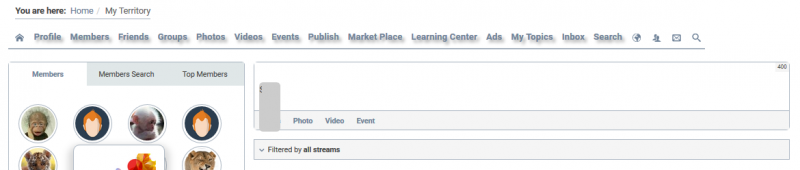
After the update to Jomsosial 4.1 in "joms-postbox" appeared " joms-textarea__wrapper .joms-textarea "(I specially colored him background to #ccc to better view) that hiding at ".inputbox textarea.input"
All attempts to streamline are have not been successful, so I ask your help.
PHP:

<div class="joms-postbox-tabs">
    <div class="joms-postbox-status" style="">
    <div class="joms-postbox-fetched">
        <div class="joms-textarea__wrapper" style="">
              <div class="joms-textarea joms-textarea__beautifier"></div>
<textarea class="input input-status" style="min-height: 1.4em; height: 24px;" placeholder="Say what's on your mind..."></textarea>
<input class="joms-textarea__hidden" type="hidden" value=""></input>
<div class="joms-textarea__tag-ct"></div>
        </div>
               <div></div>
      </div>
<div style="position:relative">
    <div class="joms-postbox-input joms-inputbox">
        <div class="inputbox">
            <div style="position:relative">
                <div style="position:relative"></div>
            </div>
        </div>
    </div>
    <div class="charcount joms-postbox-charcount">  400    </div>
</div>
<nav class="joms-postbox-tab selected" style="display: none;"></nav>
<div style="display: none;"></div>
 </div>
 </div>

CSS:
.joms-textarea__wrapper .joms-textarea {
    	font-size: 13px;
    	line-height: 14px;
    	margin: 0px;
    	padding-right: 25px;
	background: #ccc; /*my rule for best view*/
}
.inputbox textarea.input {
    background: transparent none repeat scroll 0% 0%;
    outline: medium none;
    overflow: hidden;
    position: absolute;
    top: 0px;
    left: 0px;
    resize: none;
    width: 100%;
    color: #424242;
}


STEPS TO REPLICATE:
1
2
3
4
5
RESULT
EXPECTED RESULT
BROWSER

Attachments:
11 years 1 month ago
Licenses:

HI.

This is caused by your outdated css override file:
ROOT/com/templates/ja_techzone/local/html/com_community/assets/css/style.css

Remove it and issue should be gone. if you have own custom code there. Use new css file from here:

ROOT/components/com_community/templates/jomsocial/assets/css/style.css and add you custom code.


- Instead of saying: 'it's not working', explain the problem in detail.
- Screenshots with the URL visible in them and the problem marked are more than welcome.
- Tell us how to replicate the problem, we can't fix it if we can't find it.
- Make sure that your site/server meets JomSocial System Requirements
- Make sure to setup JomSocial Cron Job
- Always provide us with access details to the backend and ftp. We need it to debug problems.
- If you have a similar problem, but a solution you found isn't working, open a new thread instead of 'merging' with an existing one.

- Use the "Thank You" feature on any post that helped you
Moderators: Piotr Garasiński
Powered by Kunena Forum

Join 180,000 websites creating Amazing communities

JomSocial is the most complete, easy-to-use addon that turns Joomla CMS into a
full -fledged, social networking site

TRY NOW BUY NOW