Support Forum
Community Toolbar moving down screen when you use dropdown menu iphone 4s

ISSUE SUMMARY:
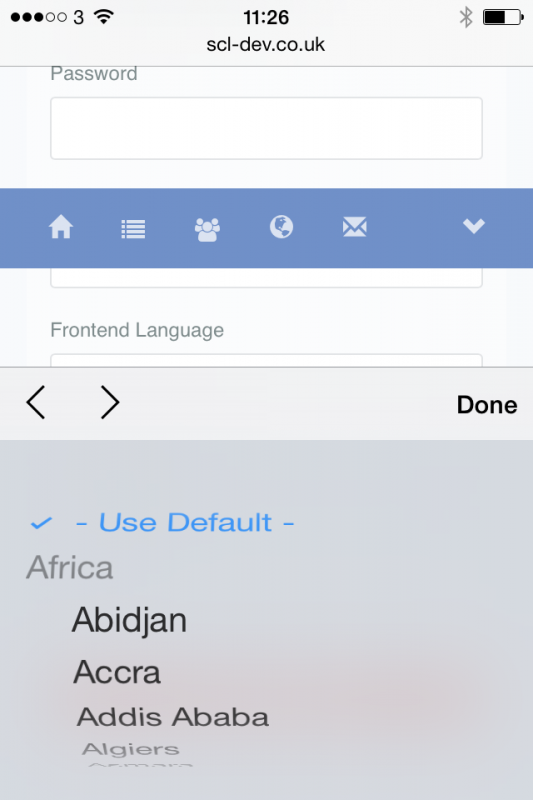
On the iphone 4s if you try to edit fields using dropdown menus (eg on profile), and whilst you have the dropdown 'open' if you scroll above,then the Community Toolbar scrolls down the screen and sits on top of a profile field
STEPS TO REPLICATE:
1 Using an Iphone 4s go to Edit My Profile
2 go to a field that has a dropdown eg Frontend Language and click on it so the list of languages appears as a pop up
3 Whilst you have that pop up list showing, scroll on the screen above to check your email address.
4 The community Toolbar is appearing across the screen on top of the Password field, and it moves down the screen when you move the screen
5Now move the phone to Landscape view and the Toolbar stays on top of the Password field, and also does not resize for the wider screen
Now move back to portrait view and the toolbar is still on top, but has shifted to the right
I have found this happens if you use various different dropdown menus on the iPhone
RESULT
EXPECTED RESULT Community Toolbar to stay in position
BROWSER Safari on iPhone 4S
Hi, Susan.
I guess that what you did was to select a dropdown on your phone then while the selection list is open scroll the screen to another field. Because the dropdown selection is still open the menu moves down with the page. To be honest this is not a situation that a user would normally do. Will rather scroll list than page...
Nevertheless I'll ask our template developer if there we could something to prevent this.
- Instead of saying: 'it's not working', explain the problem in detail.
- Screenshots with the URL visible in them and the problem marked are more than welcome.
- Tell us how to replicate the problem, we can't fix it if we can't find it.
- Make sure that your site/server meets JomSocial System Requirements
- Make sure to setup JomSocial Cron Job
- Always provide us with access details to the backend and ftp. We need it to debug problems.
- If you have a similar problem, but a solution you found isn't working, open a new thread instead of 'merging' with an existing one.
- Use the "Thank You" feature on any post that helped you
Yes, that is what I did. If I do it, then others will too. I agree that it might be unusual, but if you are filling out your profile and want to check what you put in a field above, then you might scroll up again. As I say, I did it myself, which is how I found the bug.
Thanks
Please, what is the status on this. This is a bug! It is not that unusual to look in a different field when you are filling out a form, so it needs to be fixed please.
Hi, Susan.
Could you try to replicate that issue on our demo site or our community?
- Instead of saying: 'it's not working', explain the problem in detail.
- Screenshots with the URL visible in them and the problem marked are more than welcome.
- Tell us how to replicate the problem, we can't fix it if we can't find it.
- Make sure that your site/server meets JomSocial System Requirements
- Make sure to setup JomSocial Cron Job
- Always provide us with access details to the backend and ftp. We need it to debug problems.
- If you have a similar problem, but a solution you found isn't working, open a new thread instead of 'merging' with an existing one.
- Use the "Thank You" feature on any post that helped you
Hi Michal,
Your community and demo are set up differently unfortunately, so I can't replicate the issue. The Community Toolbar is fixed at the top on our site, whereas on your sites the Black banner is on the top and then you have the Jomsocial Menu, and that menu scrolls with the site.
The issue is still occurring for us (it is not as uncommon as you think to try to look further up the page when you are filling out a form), so we do need to find a solution.
By the way, I just tried to register on the Jomsocial site using iPhone 4S and failed!!! When I came to the Date of Birth field the calendar popped very large, covering the whole screen, and I couldn't get it to close despite quite a few attempts to scroll it away!
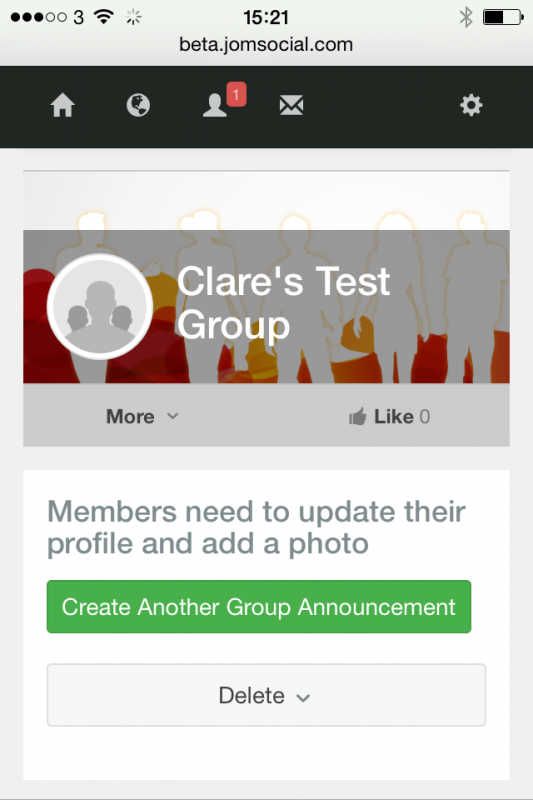
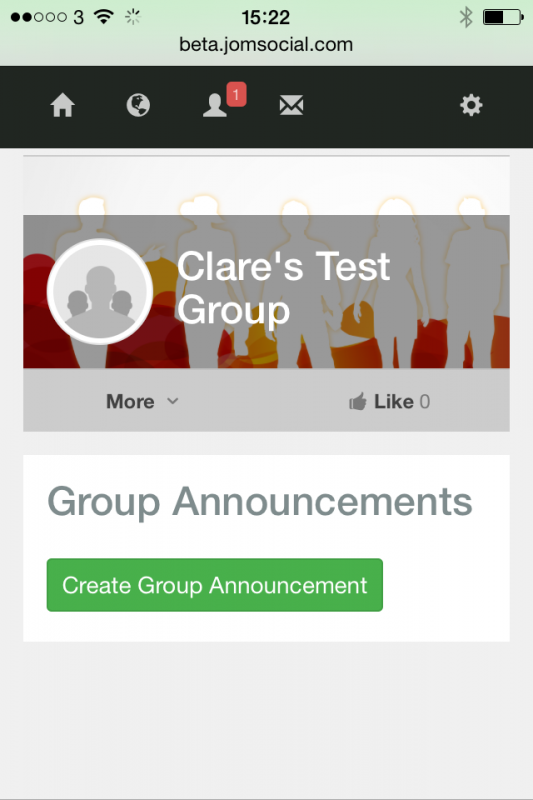
Then when I eventually did close it, and clicked register at the end I came back to the Joomla registration screen looking like this:
I got the registration email from the Joomla registration, but never got the the second email confirming my registration.
So the Jomsocial Community definitely isn't ideal on iPhone 4S :-)
Please can you ask someone to look at this Toolbar problem as it has been a while?
Thanks a lot
Hi, Susan.
Ah, then it's your template issue - not JomSocial. This issue depends on template design.
If so - we can't do anthing about it as fix need to be made in your template.
A good practice is to "free" menu toolbar if you have it fixed for desktop view.
Fixed menu cause display issues on mobiles as when it contains sub positions, they will not fit on the screen. And fixed menu doesn't allow to scroll menu.
I ask Paul to check registration issue on jomsocial.com.
- Instead of saying: 'it's not working', explain the problem in detail.
- Screenshots with the URL visible in them and the problem marked are more than welcome.
- Tell us how to replicate the problem, we can't fix it if we can't find it.
- Make sure that your site/server meets JomSocial System Requirements
- Make sure to setup JomSocial Cron Job
- Always provide us with access details to the backend and ftp. We need it to debug problems.
- If you have a similar problem, but a solution you found isn't working, open a new thread instead of 'merging' with an existing one.
- Use the "Thank You" feature on any post that helped you