Support Forum
Adding menu item to menu floating over main profile image

ISSUE SUMMARY:
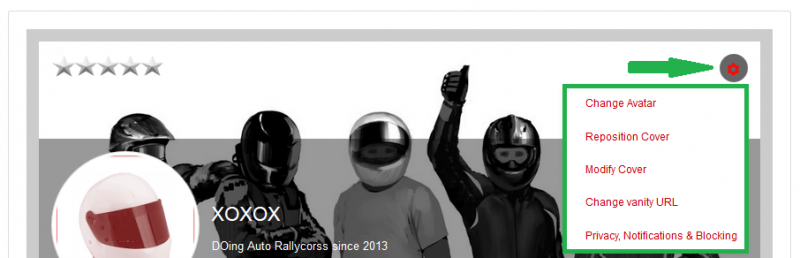
I would like to add another item to the menu in green which is displayed after clicking the little setting icon (arrow).
The menu is great, but is missing the most important link - Edit Profile.
I want to add it.
How do I do that?
STEPS TO REPLICATE:
1 Log into any user
2 Go to user profile.
3 Click on setting icon on upper right corner of profile image
4 Observe menu does not have a link to Edit Profile.
5
RESULT
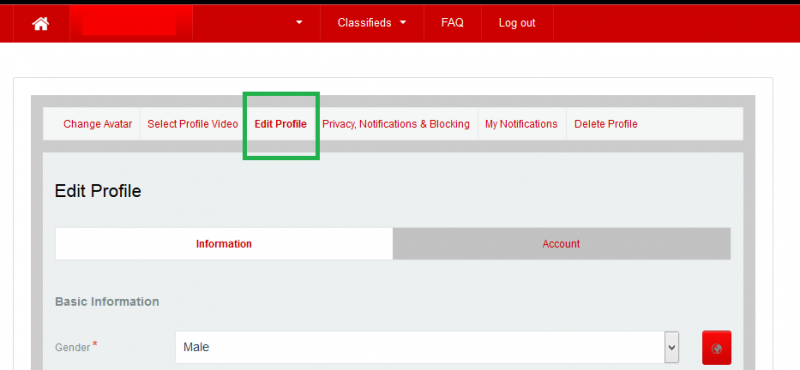
Edit profile needs to be an option in the JomSocial menu or user cannot get there. I want to eliminate the option on the JomSocial menu.
EXPECTED RESULT
The expected result is in the TARGET image. I want the new link to take the user to edit profile tab on his profile. From there, user can find anything else in his/her profile.
BROWSER Any
Hi, Ofer.
It's because "Edit Profile" is a menu item type and could be added in menu. Also user could edit ONLY OWN profile (even SU can't edit other profiles in frontend).
Nevertheless you could add new item there. Copy this file:
ROOT/components/com_community/templates/jomsocial/layouts/profile/focus.php
to:
ROOT/templates/your-template/html/com_community/layouts/profile/ (if you don't have any of those folders, feel free to create them)
Then edit file and add new item wrapped in <li></li> after line 303. Just copy edit profile URL when you're on edit page and paste it to the file I mentioned.
- Instead of saying: 'it's not working', explain the problem in detail.
- Screenshots with the URL visible in them and the problem marked are more than welcome.
- Tell us how to replicate the problem, we can't fix it if we can't find it.
- Make sure that your site/server meets JomSocial System Requirements
- Make sure to setup JomSocial Cron Job
- Always provide us with access details to the backend and ftp. We need it to debug problems.
- If you have a similar problem, but a solution you found isn't working, open a new thread instead of 'merging' with an existing one.
- Use the "Thank You" feature on any post that helped you
i followed your instructions and it did not work.
I created a new file called focus.php in the following path:
/templates/your-template/html/com_community/layouts/Profile
Inside the file, after line 303 I added the following:
<li>
domotorsports.com/domotorsports-2/my-profile/edit-my-profile
</li>
Loaded to FTP, saved, log out, log in, went to profile page and no new option on the menu.
I am not sure you understand what I want to do. Let me try again. I am just trying to create a link from the User Picture to the same user "Edit Profile" page.
The same user to his OWN profile edit page.
This "edit profile" exists, just from a JomSocial menu. I want to eliminate another option on my menu. Want it in this "over the picture" menu right before change avatar.
Thank you.
Hi, Ofer.
Hmm, you did something wrong...
I followed my own instructions and result is as expected:
prntscr.com/6t86wd
(notice xxx at the end of cog menu)>
- Instead of saying: 'it's not working', explain the problem in detail.
- Screenshots with the URL visible in them and the problem marked are more than welcome.
- Tell us how to replicate the problem, we can't fix it if we can't find it.
- Make sure that your site/server meets JomSocial System Requirements
- Make sure to setup JomSocial Cron Job
- Always provide us with access details to the backend and ftp. We need it to debug problems.
- If you have a similar problem, but a solution you found isn't working, open a new thread instead of 'merging' with an existing one.
- Use the "Thank You" feature on any post that helped you