Notice

The forum is in read only mode.

Support Forum

Welcome! Support Forums have been reactivated
Welcome the Technical Support section. Help us in assisting you by providing us with a concise and descriptive elaboration of your issues. Be specific and if possible, provide us with a step-by-step instruction in replicating your problem.

Groups label override

11 years 6 months ago
  • Andy's Avatar
    Topic Author
  • Andy
  • Visitor
  • Thank you received: 0
Licenses:

ISSUE SUMMARY:
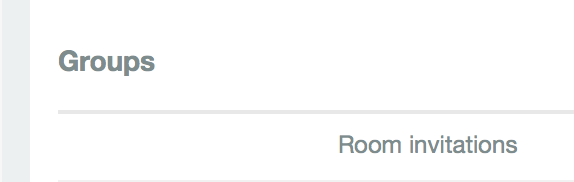
I have overridden 'Groups' to 'Rooms' but when I login as user and edit my preferences, in the Email&Notification tab the list of rooms comes under a category heading 'Groups' . Where do I find this label in order to override it please? I tried all that I can find and it is still there (see attached image).

STEPS TO REPLICATE:
1 Login as user
2 Go to Profile>Preferences>Emails & Notifications
3 Scroll down to Section > Groups
4 All references to Groups are changed to Rooms except for the section heading
5
RESULT
EXPECTED RESULT
BROWSER

Attachments:
11 years 6 months ago
  • Dimas's Avatar
  • Dimas
  • Visitor
  • Thank you received: 0
Licenses:

Hi Andy,

Please you override this string "COM_COMMUNITY_NOTIFICATIONGROUP_GROUPS"

thank you

Moderators: Piotr Garasiński
Powered by Kunena Forum

Join 180,000 websites creating Amazing communities

JomSocial is the most complete, easy-to-use addon that turns Joomla CMS into a
full -fledged, social networking site

TRY NOW BUY NOW