Notice

The forum is in read only mode.

Support Forum

Welcome! Support Forums have been reactivated
Welcome the Technical Support section. Help us in assisting you by providing us with a concise and descriptive elaboration of your issues. Be specific and if possible, provide us with a step-by-step instruction in replicating your problem.

frontpage image is not showing if log in is off

11 years 7 months ago
  • Ofer's Avatar
    Topic Author
  • Ofer
  • Offline
  • Fresh Boarder
  • Posts: 4
  • Thank you received: 4
Licenses:
JomSocial Expired Socialize Expired

ISSUE SUMMARY:
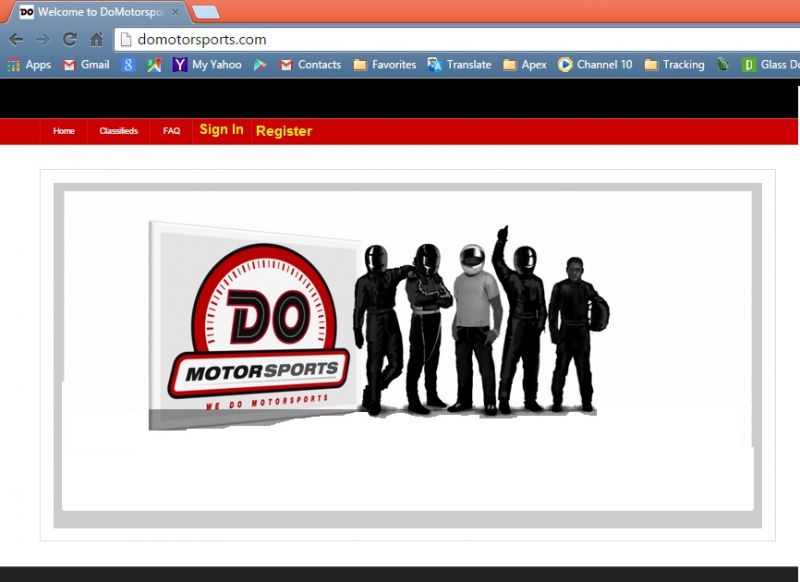
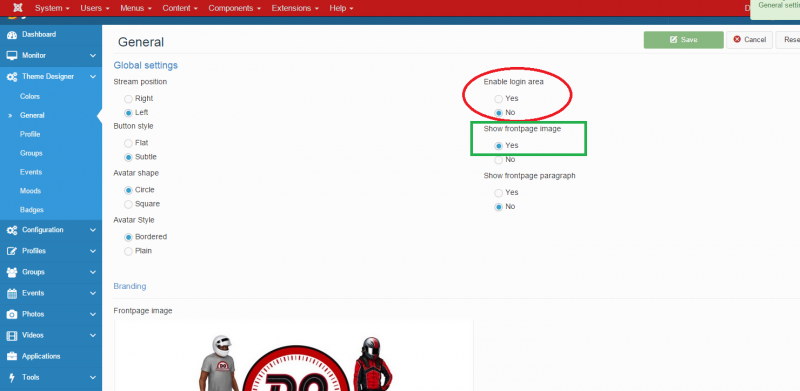
On the Theme designer->General screen, we have Enable login area = No and Show frontpage image = Yes +we have an image.
We were hoping to see the image, without the register and log in functionality.

Instead, the register, log in AND image are not showing.
I believe this is a bug.

STEPS TO REPLICATE:
1 Go into our control panel and change the setting to Enable login area = No and Show frontpage image = Yes + make sure we have an image.
2 hit save.
3 Refresh home page www.domotorsports.com
4 Observe no main image.

BROWSER Any.
Attachments:
11 years 7 months ago
  • Dimas's Avatar
  • Dimas
  • Visitor
  • Thank you received: 0
Licenses:

Hi Ofer,

I need discuss this issue with our project manager, to make sure this is default behavior or bug..

Thank you

11 years 7 months ago
  • Ofer's Avatar
    Topic Author
  • Ofer
  • Offline
  • Fresh Boarder
  • Posts: 4
  • Thank you received: 4
Licenses:
JomSocial Expired Socialize Expired

OK, thank you.

11 years 7 months ago
  • Dimas's Avatar
  • Dimas
  • Visitor
  • Thank you received: 0
Licenses:

Hi Ofer,

Our Project Manager said, this is deafult bahavior, sorry :(

thank you
11 years 6 months ago
  • Ofer's Avatar
    Topic Author
  • Ofer
  • Offline
  • Fresh Boarder
  • Posts: 4
  • Thank you received: 4
Licenses:
JomSocial Expired Socialize Expired

So there is no way for me to remove the ugly register button + the gray frame of the main site image?

11 years 6 months ago
  • Dimas's Avatar
  • Dimas
  • Visitor
  • Thank you received: 0
Licenses:

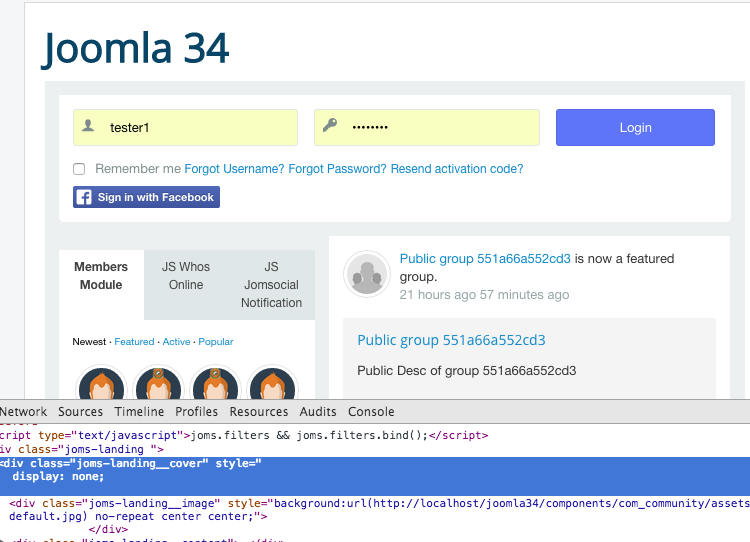
do you want to show like this, right ?


possible by adding simple css code like this :
.joms-landing__cover{display:none !important}

Attachments:
11 years 6 months ago
  • Ofer's Avatar
    Topic Author
  • Ofer
  • Offline
  • Fresh Boarder
  • Posts: 4
  • Thank you received: 4
Licenses:
JomSocial Expired Socialize Expired

I want to show it like this.
1. Remove the log in and register boxes.
2. Add log in and register at the top menu (yellow).
3. Keep the main image right where it is without the gray area at the bottom of the image.
simple and clean :)

Attachments:
11 years 6 months ago
  • Dimas's Avatar
  • Dimas
  • Visitor
  • Thank you received: 0
Licenses:

Hi,

#1 You can add it from Joomla menu manager and put it on Main Menu
#2 & #3 add this css code on your css file :

.joms-landing__action, .joms-landing__content{ display : none !important}

11 years 6 months ago
  • Ofer's Avatar
    Topic Author
  • Ofer
  • Offline
  • Fresh Boarder
  • Posts: 4
  • Thank you received: 4
Licenses:
JomSocial Expired Socialize Expired

OK, I will let my developer do this... I do not know how to change the CSS. Thank you. for now, I will close this ticket :)
Appreciate the help.

11 years 6 months ago
  • Dimas's Avatar
  • Dimas
  • Visitor
  • Thank you received: 0
Licenses:

You're welcome :)

Moderators: Piotr Garasiński
Powered by Kunena Forum

Join 180,000 websites creating Amazing communities

JomSocial is the most complete, easy-to-use addon that turns Joomla CMS into a
full -fledged, social networking site

TRY NOW BUY NOW