Support Forum
Changine Profile & Group Photo

Greetings,
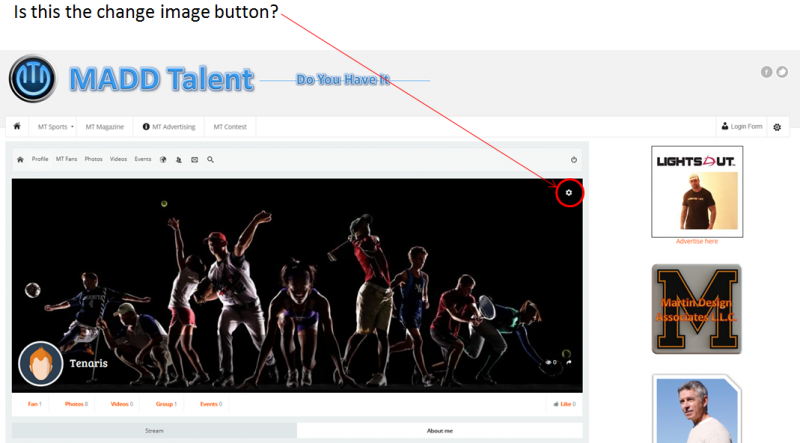
I just upgraded to the new version of JomSocial and all looks very nice, but I have one question at this point. When you go to a group or member profile page, where is the button that changes the background image? Please see the attached screen shot. In this image I have indicated what I think is the button I am looking for. If this is the button to change the background image, why is mine not working?
Thanks,
David
Hi, David.
Your issue is caused by your current template.
Please, do a test. Switch current template to Joomla! default one - protostar.
And check if issue persists:
prntscr.com/6fvtqe
Please, contact with template developer and report that issue.
- Instead of saying: 'it's not working', explain the problem in detail.
- Screenshots with the URL visible in them and the problem marked are more than welcome.
- Tell us how to replicate the problem, we can't fix it if we can't find it.
- Make sure that your site/server meets JomSocial System Requirements
- Make sure to setup JomSocial Cron Job
- Always provide us with access details to the backend and ftp. We need it to debug problems.
- If you have a similar problem, but a solution you found isn't working, open a new thread instead of 'merging' with an existing one.
- Use the "Thank You" feature on any post that helped you
Michal,
i did just as you suggested and changed my template to a Joomla default template and the issue still continues. What can we do from here. When I got the notice that JomSocial 4 was ready for release, it also said that all bugs have been fixed. I don't know enough about all this to know why this is happeneing, but I can tell you I followed the installation instructions to a T. Please look into this and do what you can to get this fixed. This is a live site.
Thanks,
DAvid
Hi, David.
I've made screencast for you showing that when template is switched to Joomla! default one - changing cover works. So issue is caused by template.
screencast-o-matic.com/watch/coeIj9eKa
- Instead of saying: 'it's not working', explain the problem in detail.
- Screenshots with the URL visible in them and the problem marked are more than welcome.
- Tell us how to replicate the problem, we can't fix it if we can't find it.
- Make sure that your site/server meets JomSocial System Requirements
- Make sure to setup JomSocial Cron Job
- Always provide us with access details to the backend and ftp. We need it to debug problems.
- If you have a similar problem, but a solution you found isn't working, open a new thread instead of 'merging' with an existing one.
- Use the "Thank You" feature on any post that helped you
Michal,
I am sorry to tell you but when I click on this link, it tells me that this screen cast does not exist or has been deleted. Can we please get this resolved.
Thanks,
David
Hi, David.
I'm sorry.. please, go here:
www.youtube.com/watch?v=1S-NDWkBVzE
(this is non-public video).
- Instead of saying: 'it's not working', explain the problem in detail.
- Screenshots with the URL visible in them and the problem marked are more than welcome.
- Tell us how to replicate the problem, we can't fix it if we can't find it.
- Make sure that your site/server meets JomSocial System Requirements
- Make sure to setup JomSocial Cron Job
- Always provide us with access details to the backend and ftp. We need it to debug problems.
- If you have a similar problem, but a solution you found isn't working, open a new thread instead of 'merging' with an existing one.
- Use the "Thank You" feature on any post that helped you
Michal,
Thank you for looking at this so closely and I do appreciate all your efforts in this. I watched the video and what you did is exactly what I did as well and we are both getting the same outcome. So it looks like the issue is with the JoomlaShine Template that I am using as I believe you were trying to tell me. This may in fact be the same problem I am having with the other issues as well. So at this point, what are my options? I will assume the only thing I can do is contact JoomlaShine and ask them to look into this, or find a template that will work. Correct?
Thansk,
David
HI, David.
Yes, you're right. Please, contact with JoomlaShine Template developers, report all your issues to them, you may also show my video.
They should investigate this issue and provide a solution...
Please, ask them to contact us directly if they will need some help from our side.
- Instead of saying: 'it's not working', explain the problem in detail.
- Screenshots with the URL visible in them and the problem marked are more than welcome.
- Tell us how to replicate the problem, we can't fix it if we can't find it.
- Make sure that your site/server meets JomSocial System Requirements
- Make sure to setup JomSocial Cron Job
- Always provide us with access details to the backend and ftp. We need it to debug problems.
- If you have a similar problem, but a solution you found isn't working, open a new thread instead of 'merging' with an existing one.
- Use the "Thank You" feature on any post that helped you