Notice

The forum is in read only mode.

Support Forum

Welcome! Support Forums have been reactivated
Welcome the Technical Support section. Help us in assisting you by providing us with a concise and descriptive elaboration of your issues. Be specific and if possible, provide us with a step-by-step instruction in replicating your problem.

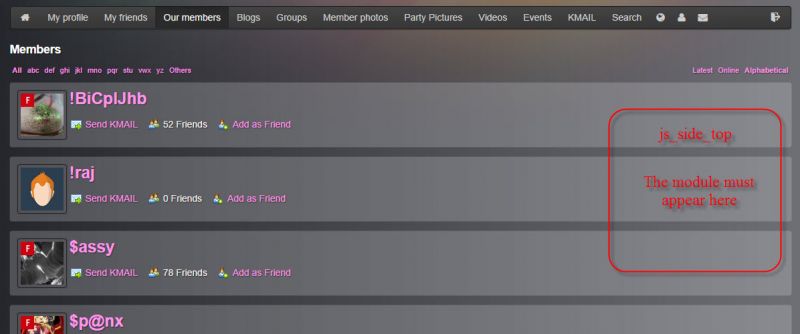
js_side_top on members search page

12 years 2 weeks ago
  • Marc's Avatar
    Topic Author
  • Marc
  • Offline
  • Fresh Boarder
  • Posts: 23
  • Thank you received: 5
Licenses:
JomSocial Expired

As per the Jomsocial wike, js_side_top only works on some pages:
js_side_top - Placed on top of the side column (sidebar) of Frontpage, Profile, Groups and Events Pages.
How do I get it to appear on other jomsocial pages?

Example
I have a menu item which displays a lsit of ALL community members: index.php?option=com_community&view=search&task=browse

I want to be able to add a (non Jomsocial) member search module on the right hand side of the page.
I don't want to use a Joomla position for this but rather have the module show up like normal Jomsocial modules in the JS component page. (ie using js_side_top or equivalent)

Attachments:
12 years 2 weeks ago
Licenses:

Hi Marc,

here the custom file that I made for you. extract it at put it under /templates/rt_oculus/html/com_community/ (create the folder if not exist) this is override method, so it will not disappear at upgrade process. documentation.jomsocial.com/wiki/Customizing_Template

Regards,
Albert

This message has an attachment file.
Please log in or register to see it.

The following user(s) said Thank You: Marc
12 years 2 weeks ago
  • Marc's Avatar
    Topic Author
  • Marc
  • Offline
  • Fresh Boarder
  • Posts: 23
  • Thank you received: 5
Licenses:
JomSocial Expired

Thank you.
I was on the same track but I missed the first div to show listings in the span8 class.

As an aside: As per the documentation, js_side-top is a global position, so it will show up on all of the other js_pages too (profiles, events, frontpage, groups)
If you want your module to ONLY to show on a specific page, you can use an Itemid in your menu/link URL.
However, this creates other problems with direct linking, ajax switches etc

I found the best solution was simply to create a new JS custom position eg $this->renderModules( 'js_new _position' ) and then assign the modules to this position

The following user(s) said Thank You: Albertus
Moderators: Piotr Garasiński
Powered by Kunena Forum

Join 180,000 websites creating Amazing communities

JomSocial is the most complete, easy-to-use addon that turns Joomla CMS into a
full -fledged, social networking site

TRY NOW BUY NOW