Support Forum
Link problems and icon change , pls help me out :)

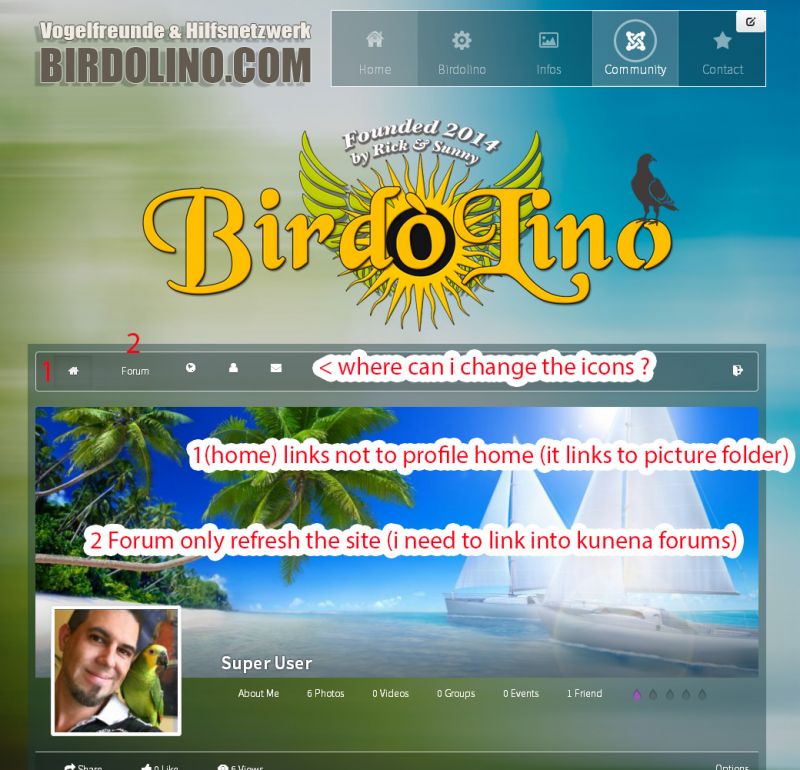
Hello, i have attached 2 pictures where explain my problems i need to be solved.
Menubar icon change, some links are wrong .
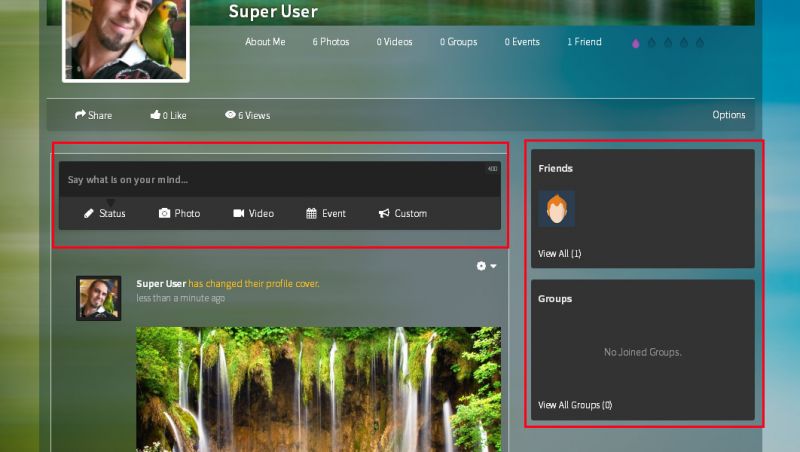
2nd Picture problem , i need to change the backgrounds (colors) from the marked boxes.
I was checking out with firebug but i dont find anything where to change it.
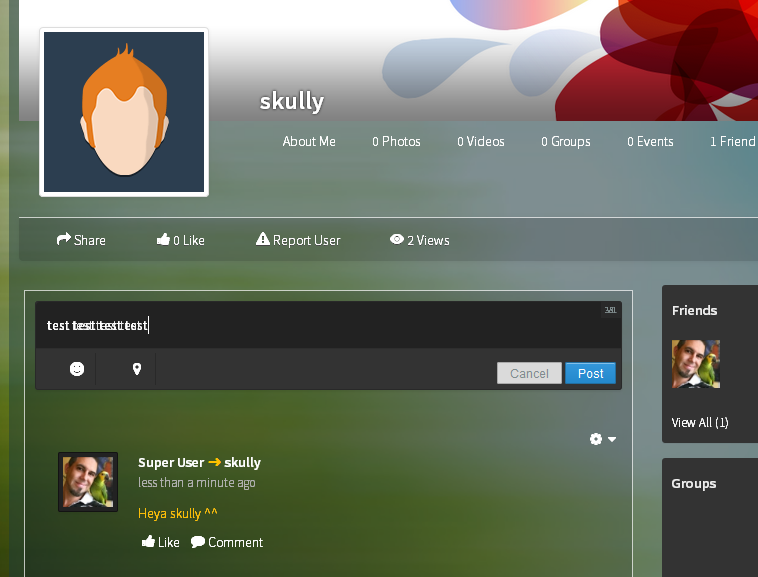
a 3rd problem i found, see picture 3 textfield, if i write a message , the letters overlayerd not readable.
Greets and many thanks
have a nice day;
Tom;
Hi, Thomas.
1. You can change icons by editing this file:
ROOT/components/com_community/templates/default/toolbar.index.php
Copy it to:
ROOT/templates/your-template/html/com_community (if you don't have "html" or "com_community" folders, feel free to create them)
Then look for icons, they look like this:
<i class="joms-icon-globe"></i>
You can replace then with your own images or implement
fortawesome.github.io/Font-Awesome/
2. Yes, home icon links to Photos because you has menu misconfiguration.
- you removed content of JomSocial toolbar menu. This menu is used for internal navigation and you'll experience a lot of issues without it. So you need to recover it.
- you MUST have link to JomSocial frontpage/home somewhere outside JomSocial toolbar (it doesn't have to be visible so you could create hidden menu - menu that is nowhere displayed). This item will be PARENT element for other JomSocial related menu items.
- if you want to link to JomSocial pages, you should create menu item aliases instead of linking directly. Menu aliases should point to particular link in JomSocial menu.
3. menu misconfiguration also applies to Kunena Froum and their menu. You rather shouldn't touch internal menus. Now you have to recreate it. And create menu item alias to Forum index.
4. You last issue with text is related with your template. It uses custom font, when I disabled that font, shadow is gone:
prntscr.com/4ufoe2
prntscr.com/4ufofy
Please, contact with template developer for assistance.
- Instead of saying: 'it's not working', explain the problem in detail.
- Screenshots with the URL visible in them and the problem marked are more than welcome.
- Tell us how to replicate the problem, we can't fix it if we can't find it.
- Make sure that your site/server meets JomSocial System Requirements
- Make sure to setup JomSocial Cron Job
- Always provide us with access details to the backend and ftp. We need it to debug problems.
- If you have a similar problem, but a solution you found isn't working, open a new thread instead of 'merging' with an existing one.
- Use the "Thank You" feature on any post that helped you
Hi, Thomas.
You have gray boxes because you choose dark style for JomSocial.
Browse to Backend -> Components -> JomSocial -> Configuration -> Template -> Default -> Change Color theme to light.
- Instead of saying: 'it's not working', explain the problem in detail.
- Screenshots with the URL visible in them and the problem marked are more than welcome.
- Tell us how to replicate the problem, we can't fix it if we can't find it.
- Make sure that your site/server meets JomSocial System Requirements
- Make sure to setup JomSocial Cron Job
- Always provide us with access details to the backend and ftp. We need it to debug problems.
- If you have a similar problem, but a solution you found isn't working, open a new thread instead of 'merging' with an existing one.
- Use the "Thank You" feature on any post that helped you
I know this, but i like to change it with custom colors, not the light and dark style,
i need background images or transparent colors as backgrounds.
i was searching and seaching with inspector and firebug, but i dont found it <.<
Hi, Thomas.
No problem add this code to your current template main css file:
#community-wrap .cSidebar .app-box {
background: blue;
}

#community-wrap .cMain .joms-postbox {
background: red;
border: 1px solid green;
}

#community-wrap cMain .joms-postbox-input {
border: none;
border-bottom: 1px solid #2e2e2e;
background: #222222;
color: #707d7e;
}
Just change to colors that will fit you ;)
- Instead of saying: 'it's not working', explain the problem in detail.
- Screenshots with the URL visible in them and the problem marked are more than welcome.
- Tell us how to replicate the problem, we can't fix it if we can't find it.
- Make sure that your site/server meets JomSocial System Requirements
- Make sure to setup JomSocial Cron Job
- Always provide us with access details to the backend and ftp. We need it to debug problems.
- If you have a similar problem, but a solution you found isn't working, open a new thread instead of 'merging' with an existing one.
- Use the "Thank You" feature on any post that helped you