Support Forum
Default avatar not showing up in registration

Hey Guys,
i'm sorry for bothering you with this but I can't find a solution by myself.
Here's my problem:
There is no default avatar showing up when a user is registering (/register/registerAvatar). So when he click's on "Skip"/"Next" (without uploading an avatar) he has no avatar at all!!!
I thought this might have something to do with my template overrides so I disabled them all - still no change!
You mind taking a quick look?
Thanks in advance
Hi, Philipp.
First try to upgrade JomSocial to current version -> 3.1.0.4.
Then check if issue persist.
Post results here.
- Instead of saying: 'it's not working', explain the problem in detail.
- Screenshots with the URL visible in them and the problem marked are more than welcome.
- Tell us how to replicate the problem, we can't fix it if we can't find it.
- Make sure that your site/server meets JomSocial System Requirements
- Make sure to setup JomSocial Cron Job
- Always provide us with access details to the backend and ftp. We need it to debug problems.
- If you have a similar problem, but a solution you found isn't working, open a new thread instead of 'merging' with an existing one.
- Use the "Thank You" feature on any post that helped you
hi Michal,
thanks for your advice.
Although JS says it's running 3.1.0.2 I already had done the update some time ago. I don't know why it still says 3.1.0.2
However I ran the update patch again, still saying 3.1.0.2, but the new files are definitely on the server updated.
Hi, Philipp.
As I see issue occur only when user chooses "Parents" profile type.
In "Social Institutions" everything is fine (see att.).
Try to instal iJoomla-Installer-Updater (via Joomla! installer) and then check what it says... if there will be upgrade, then upgrade via iJoomla Updater.
- Instead of saying: 'it's not working', explain the problem in detail.
- Screenshots with the URL visible in them and the problem marked are more than welcome.
- Tell us how to replicate the problem, we can't fix it if we can't find it.
- Make sure that your site/server meets JomSocial System Requirements
- Make sure to setup JomSocial Cron Job
- Always provide us with access details to the backend and ftp. We need it to debug problems.
- If you have a similar problem, but a solution you found isn't working, open a new thread instead of 'merging' with an existing one.
- Use the "Thank You" feature on any post that helped you
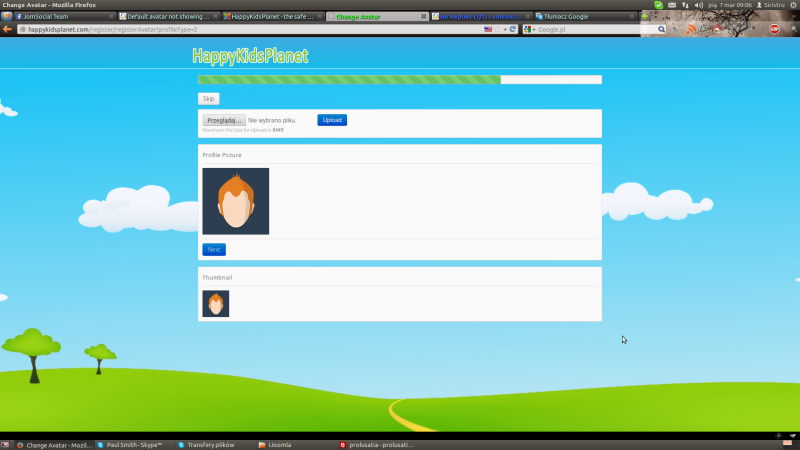
Thanks Michal,
just installed IJommla Installer and updated joomla - pretty cool extension!!! However this had no effect on the default avatars.
But this helped: I deleted both profile types and recreated them - works just fine.
Not a very nice solution but helped. Just one little thing: Now when a look at the table in the database (_community_profiles) the 2 profiletypes have higher ID's. Bevor IDs were 1 & 2. Now it's 3 & 4, although I had deleted the originals bevore. Are 1 & 2 still somewhere hiding?
Hi, Philipp.
So you figured out my next suggestion for you - to recreate profiles. Good :)
There is no problem with ids :) Db just uses next numbers and never goes back in counting. This is for performance reason: system just check las number... in other case it had to recount and recalculate all ids to fill gaps... it will kill your server :)
- Instead of saying: 'it's not working', explain the problem in detail.
- Screenshots with the URL visible in them and the problem marked are more than welcome.
- Tell us how to replicate the problem, we can't fix it if we can't find it.
- Make sure that your site/server meets JomSocial System Requirements
- Make sure to setup JomSocial Cron Job
- Always provide us with access details to the backend and ftp. We need it to debug problems.
- If you have a similar problem, but a solution you found isn't working, open a new thread instead of 'merging' with an existing one.
- Use the "Thank You" feature on any post that helped you
thanks alot!
Last question(s):
1.) is there a way to select a specific avatar for every profiletype?
2. ) If I want to change the avatar, I'll just change the "user-Male.png" or is there a uni-sex avatar as well (since there is no gender selection on the site).