Support Forum
Edit email formatting and content
-

Topic Author - Cannection
- Offline
- Fresh Boarder
- Posts: 33
- Thank you received: 0
Licenses:
JomSocial Active
Hi there,
I've just realized that I need to edit the formatting of heading colors, link colors, and other cosmetic elements of the automatic emails sent by the system, and I need to tweak the content.
Where would I do that? I've had a look at the email files in the template assets, but it seems as though there should be a simpler way to make universal changes?
Please advise.
Thanks!
Tamara
-
- Dimas
- Visitor
- Thank you received: 0
Licenses:
Hi Tamara,
For email style, you need modify html file directly, please modify this file components/com_community/templates/jomsocial/email.html.php
thank you!
-
Topic Author - Cannection
- Offline
- Fresh Boarder
- Posts: 33
- Thank you received: 0
Licenses:
JomSocial Active
That allowed me to change the header color and the Accept Invitation link color, but I still need to change the background color. Then there's the link in the footer... THEN, I assume that ALL the other emails will need to be edited too? Really not ideal...
Is there not an easier way to make the emails sent from my site match my site? Seems like that would be a fairly common request.
-
- Dimas
- Visitor
- Thank you received: 0
Licenses:
actually all style element can be modify on that file, so please provide me the screenshot which section you want to be modified?
-
Topic Author - Cannection
- Offline
- Fresh Boarder
- Posts: 33
- Thank you received: 0
Licenses:
JomSocial Active
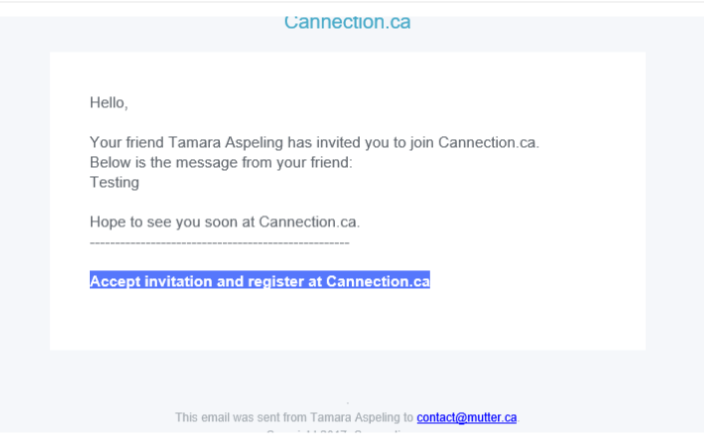
Okay. Here's a screen cap.. you can just make out the heading. That part I know how to change.
Then there's the blue background around the link to Accept Invite. I can't find that hex code anywhere on the page you mentioned.
There's also no color or reference for the link.
Then the question is, is this a master file, that will update all email templates, or do I need to manually edit each one? Either way, you may want to consider adding some sort of functionality for this in future. It is something most people will want to do.
-
Topic Author - Cannection
- Offline
- Fresh Boarder
- Posts: 33
- Thank you received: 0
Licenses:
JomSocial Active
Hello? Any updates?
I don't think EVERYTHING to edit all the email templates is in the file you mention.
Please advise.
It seems like a minor detail, I am sure, but branding is CRITICAL, and when things don't match, that's not good for branding.
-
- Dimas
- Visitor
- Thank you received: 0
Licenses:
Hi,
I am sorry for delay answer,
to change button color, please modify this components/com_community/templates/jomsocial/email.friends.invite.html.php, you can see this code there
style="padding: 5px 8px; width: 100%; background: #5677fc; color: #fff; border-radius: 3px; display: block; text-align: center;"thank you!
-
Topic Author - Cannection
- Offline
- Fresh Boarder
- Posts: 33
- Thank you received: 0
Licenses:
JomSocial Active
So there is no central place to make changes? We have to edit every single email template manually, from the backend?
I can do that, but it's very time consuming, and there are many other users of your product who will not want to do that... definitely something you need to find a fix for!
The new Jomsocial is great... but I am still working my way around it, and that email issue will probably be mentioned in my Joomla Extensions review. It's not a deal breaker, but it's a big deal!
-
- Dimas
- Visitor
- Thank you received: 0
Licenses:
Some of them can be styled on each template file, but some of them can be override the css code from this file email.html.php..
THis is depend the content email itself :)
-
Topic Author - Cannection
- Offline
- Fresh Boarder
- Posts: 33
- Thank you received: 0
Licenses:
JomSocial Active
Again, this is a LOT of work for your customers to do.
It is entirely reasonable (obvious even) that your customers will want their email templates to match their site design.
I am going to take the time to edit every one now, but I would STRONGLY recommend that you fix this in future. It's definitely going in the Joomla Extensions review.
-
- Dimas
- Visitor
- Thank you received: 0
Licenses:
Hi,
Actaully you can change the css file from this file components/com_community/templates/jomsocial/email.html.php, most all email content is styled there, so you can follow the email design like you site design from that file, except if you find some different style on some email content just let me know.. I will give you some tips.
thank you!