Notice

The forum is in read only mode.

Support Forum

Welcome! Support Forums have been reactivated
Welcome the Technical Support section. Help us in assisting you by providing us with a concise and descriptive elaboration of your issues. Be specific and if possible, provide us with a step-by-step instruction in replicating your problem.

How to remove Photos and Videos menu from the Profile page

10 years 5 months ago
Licenses:
JomSocial Expired

ISSUE SUMMARY:
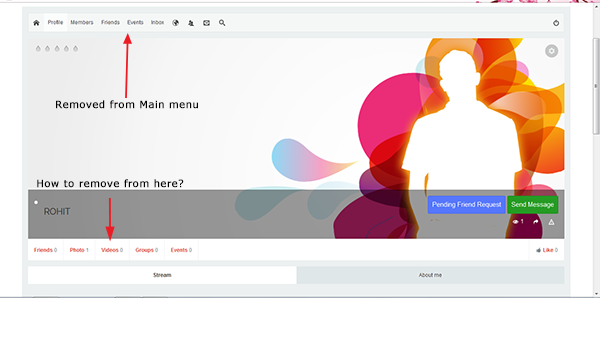
My Client does not need Photos and Videos capability for his site.
For the top menu, it is possible to hide the "Photos" and "Videos" link from the administrator backend.
However, removing "Photos" and "Videos" from the Top menu does not disable them from the Profile page.
(See image attachment)

STEPS TO REPLICATE:
1 Login to the site
2 Click on "Profile"
3 Compare the Top Menu and the menu on the Profile page
RESULT
EXPECTED RESULT If menu item is removed from Top Menu, it should not be seen in the Profile menu
BROWSER

Regards,

Attachments:
10 years 5 months ago
  • Dimas's Avatar
  • Dimas
  • Visitor
  • Thank you received: 0
Licenses:

Hi,

You need modify this file components/com_community/templates/layouts/profile/focus.php and remove this code :

<?php if($photoEnabled) {?>
        <li class="half"><a href="<?php echo CRoute::_('index.php?option=com_community&view=photos&task=myphotos&userid='.$profile->id); ?>"><?php echo ($profile->_photos == 1) ? JText::_('COM_COMMUNITY_PHOTOS_COUNT_SINGULAR') . ' <span class="joms-text--light">' . $profile->_photos . '</span>' :  JText::_('COM_COMMUNITY_PHOTOS_COUNT') . ' <span class="joms-text--light">' . $profile->_photos . '</span>' ?></a></li>
        <?php }?>

        <?php if($videoEnabled) {?>
        <li class="half"><a href="<?php echo CRoute::_('index.php?option=com_community&view=videos&task=myvideos&userid='.$profile->id); ?>"><?php echo ($profile->_videos == 1) ?  JText::_('COM_COMMUNITY_VIDEOS_COUNT') . ' <span class="joms-text--light">' . $profile->_videos . '</span>' : JText::_('COM_COMMUNITY_VIDEOS_COUNT_MANY') . ' <span class="joms-text--light">' . $profile->_videos . '</span>' ?></a></li>
        <?php }?>

cheers!

10 years 5 months ago
Licenses:
JomSocial Expired

Thanks for the solution, it worked.
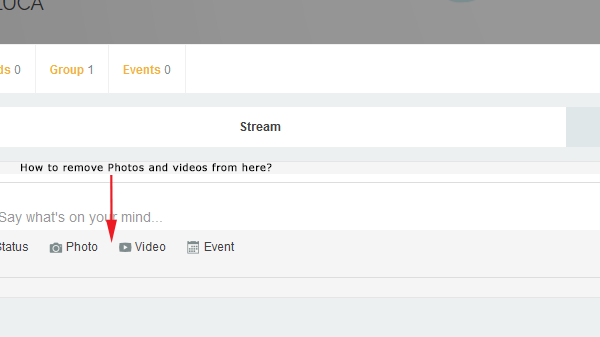
However, i also want to remove the "Photos" and "Videos" from "Say Whats on Your Mind"(See the attachment pic).
Thanks,

Attachments:
10 years 4 months ago
  • Dimas's Avatar
  • Dimas
  • Visitor
  • Thank you received: 0
Licenses:

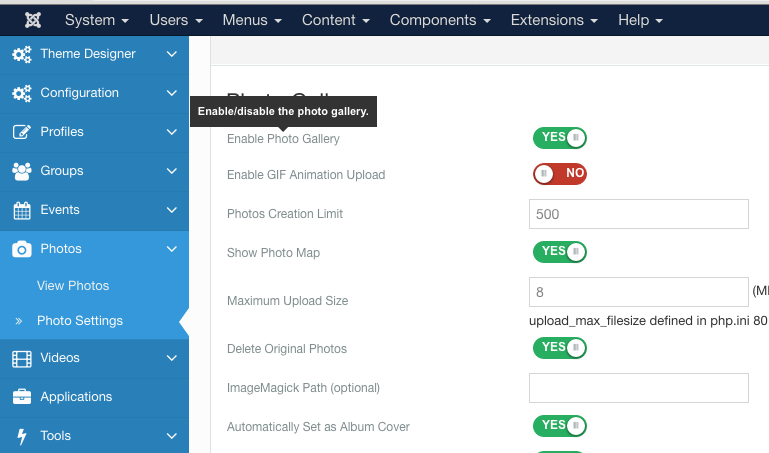
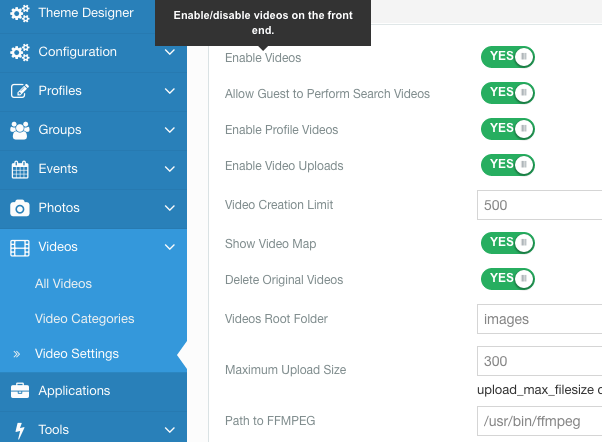
If you wanna totally remove the photos and video feature you can go to Photos and videos setting from jomsocial backend, you can disable photo and video from there

10 years 4 months ago
Licenses:
JomSocial Expired

Where is the setting for disabling the "Photos" and the "Videos" at the backend?
Thanks in advance!

10 years 4 months ago
  • Dimas's Avatar
  • Dimas
  • Visitor
  • Thank you received: 0
Licenses:

see my screenshoot :)


Attachments:
Moderators: Piotr Garasiński
Powered by Kunena Forum

Join 180,000 websites creating Amazing communities

JomSocial is the most complete, easy-to-use addon that turns Joomla CMS into a
full -fledged, social networking site

TRY NOW BUY NOW