Support Forum
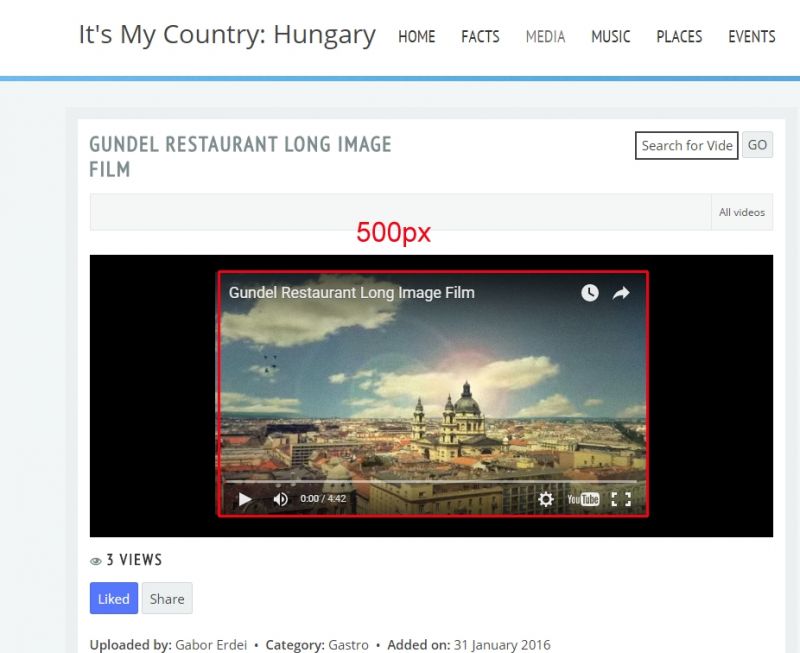
All videos 500 px wide

ISSUE SUMMARY:
Hi, all my videos are 500 px wide, though it is 800x?? set in the admin.
STEPS TO REPLICATE:
1 go here:
itsmycountry.net/hungary/some-media/comm...video/46-unicum.html
2 press play
3 video is very small in a big black box (all of them)
We need much bigger videos, at least 800, or 960px wide.
please help :-)
Thanks!
Hi, thanks for the reply :-)
It is not working because images are good, I mean, the thumbnail size is good.
The video itself is too small. The video embed code is:
<iframe width="500" height="281" src="
www.youtube.com/embed/vf1VeWgqcio
" frameborder="0" allowfullscreen></iframe>
You can see the fix width derived from the JomSocial. Please take a look at the attachment :-)
Thanks for your help!
Sorry, no change!
But I have found the original 3.2.1.6 backup, so I put a test here:
proba.itsmycountry.net/some-media/commun...long-image-film.html
it's with JomSocial 4.0.7 and it is working!!
So the problem can be found somewhere between 4.0.7 and 4.0.15
Thanks!
Hi,
please goto jomsocial backend > videos > setting > and set Video player on activity stream into "Use media element"
FYI: I cant see new CSS code at your site. you can provide me FTP access detail.
by using CSS you can use "Native Player" instead of "Use media element"
Regards
Yes, half problem solved, wrong css has been modified, sorry :-)
Now last issue: thumbanil image is toooo small (video is okay now):
itsmycountry.net/hungary/some-media/comm...long-image-film.html
Thanks so much!!!
Css is here:
itsmycountry.net/hungary/templates/yoo_v...s/blue/css/theme.css
Thanks!
Hi,
about thumbnail, that the maximum size from Youtube. but you can remove this CSS:
/templates/yoo_venice/css/custom.css at line 7
.cVideo-Screen img {
  width: auto;
}.cVideo-Screen img {
width: 500px;
}but the image will "pixelize"
Regards
Thanks guys, you are fantastic!!
And the very last question, I promise :-)
If I want to use another template, some js are missing, so that videos cannot be played.
itsmycountry.net/hungary/some-media/comm...y,-training-day.html
What is missing? Which javascript?
Thanks again!!
Hi,
seem the issue from template it self, here the error message:
itsmycountry.net/hungary/cache/widgetkit/uikit-2ee267b2.js
not sure still caching, even has been disabled and cleared.
I suggest you to asking that template provider for support
Regards