Support Forum
Can't load mp4 videos and other formats loaded are not processed
ISSUE SUMMARY:
Installed FFMPEG.
Trying to load a mp4 file size 20MB. Changed limited to 175MB to make sure size is not an issue.
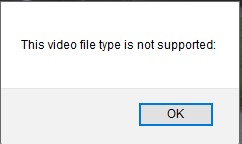
Got an error "Video file type not supported" (see attached).
Second issue:
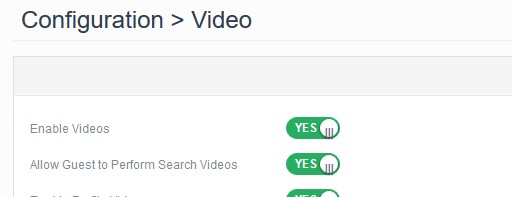
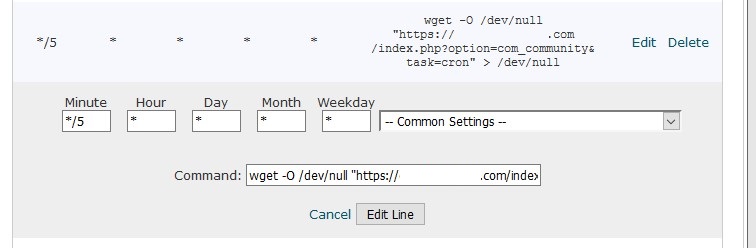
File that did load (see attached image showing 2 loaded), are not getting processed although Cron job is set up (see attached)
I did some research on this forum and saw a lot of people had these issues, but could not straight forward solution.
Sorry for re-posting.
STEPS TO REPLICATE:
1 log in (use the first user name I provided in the details below) ***This was enabled in production only, not test ***
2 try to load a mp4 video
3 Receive error
Second issue
4 try to load a .vmw video. See it is loading but not processed.
5
RESULT - Can't load mp4 videos or those loaded are not processed
EXPECTED RESULT
BROWSER Chrome

-

- Dimas
- Visitor
- Thank you received: 0
Licenses:
Hi Ofer,
1. To enabled the vmw, you should modify this file components/com_community/helpers/videos.php, and add the "vmw" paramater there
2. I get this error "/usr/local/bin/ffmpeg: No such file or directory" can you check again the FFMPEG path is correct?
thank you
I had someone look into this today and this is his response:
It is installed and running:
root@s97-74-234-13 [~]# which ffmpeg
/usr/bin/ffmpeg
root@s97-74-234-13 [~]#
root@s97-74-234-13 [~]# ffmpeg -version
FFmpeg version 0.6.5, Copyright (c) 2000-2010 the FFmpeg developers
built on Jan 29 2012 17:52:15 with gcc 4.4.5 20110214 (Red Hat 4.4.5-6)
configuration: --prefix=/usr --libdir=/usr/lib64 --shlibdir=/usr/lib64 --mandir=/usr/share/man --incdir=/usr/include --disable-avisynth --extra-cflags='-O2 -g -pipe -Wall -Wp,-D_FORTIFY_SOURCE=2 -fexceptions -fstack-protector --param=ssp-buffer-size=4 -m64 -mtune=generic -fPIC' --enable-avfilter --enable-avfilter-lavf --enable-libdc1394 --enable-libdirac --enable-libfaac --enable-libfaad --enable-libfaadbin --enable-libgsm --enable-libmp3lame --enable-libopencore-amrnb --enable-libopencore-amrwb --enable-librtmp --enable-libschroedinger --enable-libspeex --enable-libtheora --enable-libx264 --enable-gpl --enable-nonfree --enable-postproc --enable-pthreads --enable-shared --enable-swscale --enable-vdpau --enable-version3 --enable-x11grab
libavutil 50.15. 1 / 50.15. 1
libavcodec 52.72. 2 / 52.72. 2
libavformat 52.64. 2 / 52.64. 2
libavdevice 52. 2. 0 / 52. 2. 0
libavfilter 1.19. 0 / 1.19. 0
libswscale 0.11. 0 / 0.11. 0
libpostproc 51. 2. 0 / 51. 2. 0
FFmpeg 0.6.5
libavutil 50.15. 1 / 50.15. 1
libavcodec 52.72. 2 / 52.72. 2
libavformat 52.64. 2 / 52.64. 2
libavdevice 52. 2. 0 / 52. 2. 0
libavfilter 1.19. 0 / 1.19. 0
libswscale 0.11. 0 / 0.11. 0
libpostproc 51. 2. 0 / 51. 2. 0
root@s97-74-234-13 [~]#
It all looks god to me. Can you contact jomsocial with what I have posted to see what may be wrong?
please take a look into this...what is going on??
-
- Dimas
- Visitor
- Thank you received: 0
Licenses:
Hi Ofer,
Please you run this command one by one, and let me know how it goes
/usr/bin/ffmpeg -y -i /home/doms4929/public_html/images/originalvideos/514/iTyutfjT4Ko.3gp -vcodec libx264 -strict -2 -crf 23 -s 800x600 /home/doms4929/public_html/images/videos/514/GWUdLEUMZcu.mp4

/usr/bin/ffmpeg -y -i /home/doms4929/public_html/images/originalvideos/514/11RVWcEfoWy.mp4 -vcodec libx264 -acodec aac -ab 64k -strict -2 -crf 23 -s 800x600 /home/doms4929/public_html/images/videos/514/uJWvAHzwQgt.mp4

/usr/bin/ffmpeg -y -i /home/doms4929/public_html/images/originalvideos/575/MglERb3wYe1.wmv -vcodec libx264 -acodec aac -ab 64k -strict -2 -crf 23 -s 800x600 /home/doms4929/public_html/images/videos/575/kGDn0efvQ9n.mp4

/usr/bin/ffmpeg -y -i /home/doms4929/public_html/images/originalvideos/575/4KlVeM0YBP0.mp4 -vcodec libx264 -acodec aac -ab 64k -strict -2 -crf 23 -s 800x600 /home/doms4929/public_html/images/videos/575/wn2ld66CsGD.mp4

/usr/bin/ffmpeg -y -i /home/doms4929/public_html/images/originalvideos/575/8MnmWKHbe1D.wmv -vcodec libx264 -acodec aac -ab 64k -strict -2 -crf 23 -s 800x600 /home/doms4929/public_html/images/videos/575/LpthPz15PLI.mp4
We tried. Didn't work.
there is some mismatched version
x26 with is .mp4 is gving an error to ffmpeg
x264
We keep getting this >> WARNING: using libx264 without pkg-config even tho it is installed
It seems it is some kind of a server side issue, looks like it was reported Jan 1, 2015,
ffmpeg.org/pipermail/ffmpeg-devel/2015-January/167199.html
Then we tried rebuilding it all
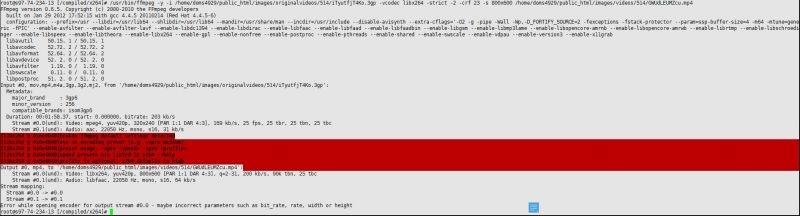
See image attached
See below
root@s97-74-234-13 [/compiled/x264]# /usr/bin/ffmpeg -y -i /home/doms4929/public_html/images/originalvideos/514/iTyutfjT4Ko.3gp -vcodec libx264 -strict -2 -crf 23 -s 800x600 /home/doms4929/public_html/images/videos/514/GWUdLEUMZcu.mp4
FFmpeg version 0.6.5, Copyright (c) 2000-2010 the FFmpeg developers
built on Jan 29 2012 17:52:15 with gcc 4.4.5 20110214 (Red Hat 4.4.5-6)
configuration: --prefix=/usr --libdir=/usr/lib64 --shlibdir=/usr/lib64 --mandir=/usr/share/man --incdir=/usr/include --disable-avisynth --extra-cflags='-O2 -g -pipe -Wall -Wp,-D_FORTIFY_SOURCE=2 -fexceptions -fstack-protector --param=ssp-buffer-size=4 -m64 -mtune=generic -fPIC' --enable-avfilter --enable-avfilter-lavf --enable-libdc1394 --enable-libdirac --enable-libfaac --enable-libfaad --enable-libfaadbin --enable-libgsm --enable-libmp3lame --enable-libopencore-amrnb --enable-libopencore-amrwb --enable-librtmp --enable-libschroedinger --enable-libspeex --enable-libtheora --enable-libx264 --enable-gpl --enable-nonfree --enable-postproc --enable-pthreads --enable-shared --enable-swscale --enable-vdpau --enable-version3 --enable-x11grab
libavutil 50.15. 1 / 50.15. 1
libavcodec 52.72. 2 / 52.72. 2
libavformat 52.64. 2 / 52.64. 2
libavdevice 52. 2. 0 / 52. 2. 0
libavfilter 1.19. 0 / 1.19. 0
libswscale 0.11. 0 / 0.11. 0
libpostproc 51. 2. 0 / 51. 2. 0
Input #0, mov,mp4,m4a,3gp,3g2,mj2, from '/home/doms4929/public_html/images/originalvideos/514/iTyutfjT4Ko.3gp':
Metadata:
major_brand : 3gp6
minor_version : 256
compatible_brands: isom3gp6
Duration: 00:01:58.37, start: 0.000000, bitrate: 203 kb/s
Stream #0.0(und): Video: mpeg4, yuv420p, 320x240 [PAR 1:1 DAR 4:3], 169 kb/s, 25 fps, 25 tbr, 25 tbn, 25 tbc
Stream #0.1(und): Audio: aac, 22050 Hz, mono, s16, 31 kb/s
[libx264 @ 0x6e4040]broken ffmpeg default settings detected
[libx264 @ 0x6e4040]use an encoding preset (e.g. -vpre medium)
[libx264 @ 0x6e4040]preset usage: -vpre <speed> -vpre <profile>
[libx264 @ 0x6e4040]speed presets are listed in x264 --help
[libx264 @ 0x6e4040]profile is optional; x264 defaults to high
Output #0, mp4, to '/home/doms4929/public_html/images/videos/514/GWUdLEUMZcu.mp4':
Stream #0.0(und): Video: libx264, yuv420p, 800x600 [PAR 1:1 DAR 4:3], q=2-31, 200 kb/s, 90k tbn, 25 tbc
Stream #0.1(und): Audio: libfaac, 22050 Hz, mono, s16, 64 kb/s
Stream mapping:
Stream #0.0 -> #0.0
Stream #0.1 -> #0.1
Error while opening encoder for output stream #0.0 - maybe incorrect parameters such as bit_rate, rate, width or height
-
- Dimas
- Visitor
- Thank you received: 0
Licenses:
yes, this is server issue configuration on your FFMPEG stuff, can you ask your sys-admin for this one ? are you using centos server?