Notice

The forum is in read only mode.

Support Forum

Welcome! Support Forums have been reactivated
Welcome the Technical Support section. Help us in assisting you by providing us with a concise and descriptive elaboration of your issues. Be specific and if possible, provide us with a step-by-step instruction in replicating your problem.

Design commet area

10 years 10 months ago
  • Saovry's Avatar
    Topic Author
  • Saovry
  • Offline
  • Fresh Boarder
  • Posts: 83
  • Thank you received: 9
Licenses:
JomSocial Expired iSEO Expired Socialize Expired


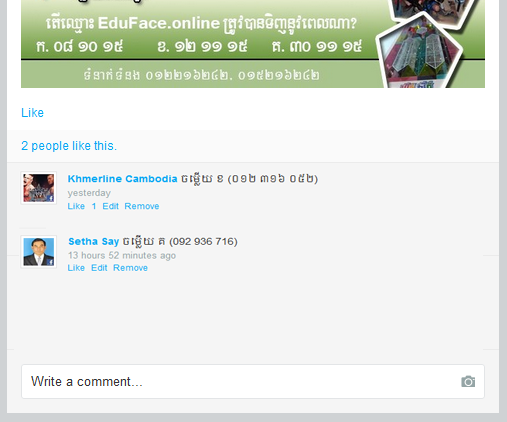
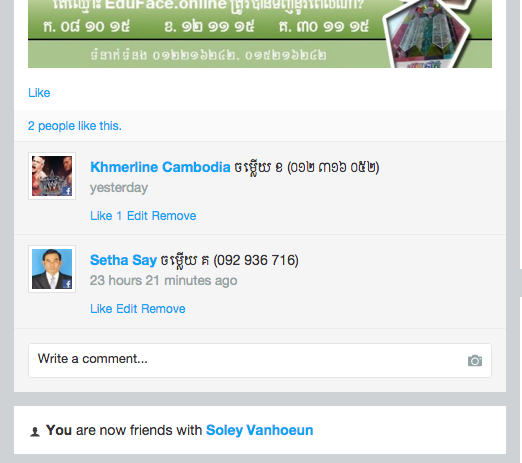
I tried to find css to design my comment area to look like my pictures but I don't know.
Could you tell me, how could I can design my comment area look like my picture?
thank?

Attachments:
10 years 10 months ago
  • Dimas's Avatar
  • Dimas
  • Visitor
  • Thank you received: 0
Licenses:

Hi,

Its fine here, what browser are you using ?


thank you!

Attachments:
10 years 10 months ago
  • Saovry's Avatar
    Topic Author
  • Saovry
  • Offline
  • Fresh Boarder
  • Posts: 83
  • Thank you received: 9
Licenses:
JomSocial Expired iSEO Expired Socialize Expired

It is not like your mean. maybe I explained you a wrong way.

I want my photos, comment, like, share and very thing to become smaller at my comment area. I want them small like my attachment file.

10 years 10 months ago
  • Dimas's Avatar
  • Dimas
  • Visitor
  • Thank you received: 0
Licenses:

add this css on your css file :

.joms-comment{font-size:11px}

10 years 10 months ago
  • Saovry's Avatar
    Topic Author
  • Saovry
  • Offline
  • Fresh Boarder
  • Posts: 83
  • Thank you received: 9
Licenses:
JomSocial Expired iSEO Expired Socialize Expired

This code makes letter smaller, thank

1 How could I can user profile photos comment smaller because comment is small but the user photo file not yet, this code correct
.joms-avatar--comment img {max-width: 32px;}

2 How could I put the those letter (comment area) to the top of this picture at( like my first picture)

3 how could I make the user online with green color to become smaller.

thank

10 years 10 months ago
  • Dimas's Avatar
  • Dimas
  • Visitor
  • Thank you received: 0
Licenses:

Hi,

1. use this code :

.joms-avatar--stream img, .joms-avatar--comment img, .joms-avatar--focus img{width:30px !important} 
.joms-comment__body {
    padding: 0px 0px 0px 5px !important;
}

2. I dont understand this.

3. use this code :
.joms-avatar--focus.joms-online a:after {
    right: 6px;
    top: 6px;
    width: 10px;
    height: 10px;
    border: 2px solid white;
}

.joms-online a:after {
    width: 10px;
    height: 10px;
}

Moderators: Piotr Garasiński
Powered by Kunena Forum

Join 180,000 websites creating Amazing communities

JomSocial is the most complete, easy-to-use addon that turns Joomla CMS into a
full -fledged, social networking site

TRY NOW BUY NOW