Notice

The forum is in read only mode.

Support Forum

Welcome! Support Forums have been reactivated
Welcome the Technical Support section. Help us in assisting you by providing us with a concise and descriptive elaboration of your issues. Be specific and if possible, provide us with a step-by-step instruction in replicating your problem.

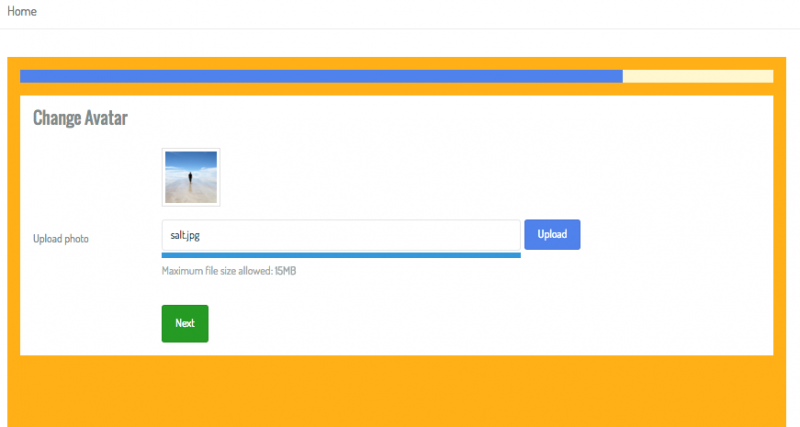
Unable to upload Avatar during registration or after registration

10 years 11 months ago
  • Arthur's Avatar
    Topic Author
  • Arthur
  • Offline
  • Fresh Boarder
  • Posts: 70
  • Thank you received: 7
Licenses:
JomSocial Expired AdAgency Expired iSEO Expired

ISSUE SUMMARY:
Unable to upload Avatar during registration or after registration

STEPS TO REPLICATE:
1 Register a new account. Complete registration process until you reach the avatar portion.
2 Choose an image to upload

RESULT:
Screen sits there. Have to click on skip to cont.

EXPECTED RESULT
Screen asking to crop thumbnail should be next.

BROWSER
Chrome.

This also happens for users already registered. If I try to upload an avatar to my admin account, it never appears.

10 years 11 months ago
  • Dimas's Avatar
  • Dimas
  • Visitor
  • Thank you received: 0
Licenses:

Hi Arthur,

You should set menu "My Photos" as public for fixing this, or you create new menu and set it to "All photos" page give access for public.

I hope it will help.

cheers!

10 years 11 months ago
  • Arthur's Avatar
    Topic Author
  • Arthur
  • Offline
  • Fresh Boarder
  • Posts: 70
  • Thank you received: 7
Licenses:
JomSocial Expired AdAgency Expired iSEO Expired

I don't understand that one. Did something change in the newer versions? If the user isn't logged in, why would I want "My Photos" to show?

So if I create a new menu and called it All Photos. Make it public. What photos will be shown? And can I hide this without messing with permissions?
10 years 11 months ago
  • Arthur's Avatar
    Topic Author
  • Arthur
  • Offline
  • Fresh Boarder
  • Posts: 70
  • Thank you received: 7
Licenses:
JomSocial Expired AdAgency Expired iSEO Expired

I just changed 'My Photos' to public but I still can not change my avatar photo.

10 years 11 months ago
  • Dimas's Avatar
  • Dimas
  • Visitor
  • Thank you received: 0
Licenses:

Hi Arthur,

I just test it and its fine..


thank you

Attachments:
10 years 11 months ago
  • Arthur's Avatar
    Topic Author
  • Arthur
  • Offline
  • Fresh Boarder
  • Posts: 70
  • Thank you received: 7
Licenses:
JomSocial Expired AdAgency Expired iSEO Expired

Try as a registered user. Does not work for me. Can you also answer what I asked concerning the menu? Can it be hidden and this still works?

10 years 11 months ago
  • Arthur's Avatar
    Topic Author
  • Arthur
  • Offline
  • Fresh Boarder
  • Posts: 70
  • Thank you received: 7
Licenses:
JomSocial Expired AdAgency Expired iSEO Expired

Ok this seems to be an issue using Chrome. I tried with FF and it worked for me too. Did you try with Chrome?

10 years 11 months ago
  • Dimas's Avatar
  • Dimas
  • Visitor
  • Thank you received: 0
Licenses:

i am using with chrome, bit slow there, you need wait a bit

10 years 11 months ago
  • Arthur's Avatar
    Topic Author
  • Arthur
  • Offline
  • Fresh Boarder
  • Posts: 70
  • Thank you received: 7
Licenses:
JomSocial Expired AdAgency Expired iSEO Expired

I waited for 5mins, nothing. I have version Version 46.0.2490.86. Which are you using?

10 years 11 months ago
  • Dimas's Avatar
  • Dimas
  • Visitor
  • Thank you received: 0
Licenses:

using the latest version 46.0.2490.86 (64-bit), please you try on another PC

Moderators: Piotr Garasiński
Powered by Kunena Forum

Join 180,000 websites creating Amazing communities

JomSocial is the most complete, easy-to-use addon that turns Joomla CMS into a
full -fledged, social networking site

TRY NOW BUY NOW
