Support Forum
Semi-Translucent Image Screen

Greetings Pro's,
I hope this is a simple setting change somewhere within Jomsocial and that you will be able to tell me where to simply change this. On my index page,
www.madd-talent.com
there is a photo. This photo has some kind of semi-translucent screen filter in front of the bottom half of the image. I know it's not a part of the image as I created this image myself and if I go to a member profile page, this same filter appears on the member image as well along with any group images that the site contains.
There are aspects of this filter that I do like. I like how a members or group avatar will appear on this filter, but i don't like the translucent level of this filter. I would like to change this translucent level to 100% if possible or as close to that as I can get. Is this possible and if so, where and how do I do this?
.
Thanks,
David

Hi, David.
This is background defined in rgba (alpha channel = opacity):
.joms-landing__content {
    background: rgba(0, 0, 0, 0.4) none repeat scroll 0 0;
    bottom: 0;
    color: #ffffff;
    left: 0;
    padding: 14px;
    position: absolute;
    right: 0;
}
0.4 = 40%. If you change it to 1 = 100% it means that there will be NO opacity and this part will be just black: i.imgur.com/h8mhVd1.png
- Instead of saying: 'it's not working', explain the problem in detail.
- Screenshots with the URL visible in them and the problem marked are more than welcome.
- Tell us how to replicate the problem, we can't fix it if we can't find it.
- Make sure that your site/server meets JomSocial System Requirements
- Make sure to setup JomSocial Cron Job
- Always provide us with access details to the backend and ftp. We need it to debug problems.
- If you have a similar problem, but a solution you found isn't working, open a new thread instead of 'merging' with an existing one.
- Use the "Thank You" feature on any post that helped you
Hi, David.
Just add it to;
ROOT/templates/socialize/css/custom.css (if you don't have this file - feel free to create it)
Copy my previous post code and change:
background: rgba(0, 0, 0, 0.4) none repeat scroll 0 0;
to:
background: rgba(0, 0, 0, 1) none repeat scroll 0 0 !important;
- Instead of saying: 'it's not working', explain the problem in detail.
- Screenshots with the URL visible in them and the problem marked are more than welcome.
- Tell us how to replicate the problem, we can't fix it if we can't find it.
- Make sure that your site/server meets JomSocial System Requirements
- Make sure to setup JomSocial Cron Job
- Always provide us with access details to the backend and ftp. We need it to debug problems.
- If you have a similar problem, but a solution you found isn't working, open a new thread instead of 'merging' with an existing one.
- Use the "Thank You" feature on any post that helped you
Michal,
Using your code, I was able to make the changes to the file you told me to modify. The file, custom.css in the ROOT/templates/socialize/css directory now looks like this:
.joms-postbox {
display: none;
}
.joms-landing__content {
background: rgba(0, 0, 0, .01) none repeat scroll 0 0 !important;
bottom: 0;
color: #ffffff;
left: 0;
padding: 14px;
position: absolute;
right: 0;
}
This gives me the exact look that I was after. Now I would like to do the same thing for the member profile background and the group background. I want this shaded translucent filter to appear 100% translucent like the one you just helped me with. Can you tell me exactly what code to add and where to add it as far as the file path?
Thanks,
David
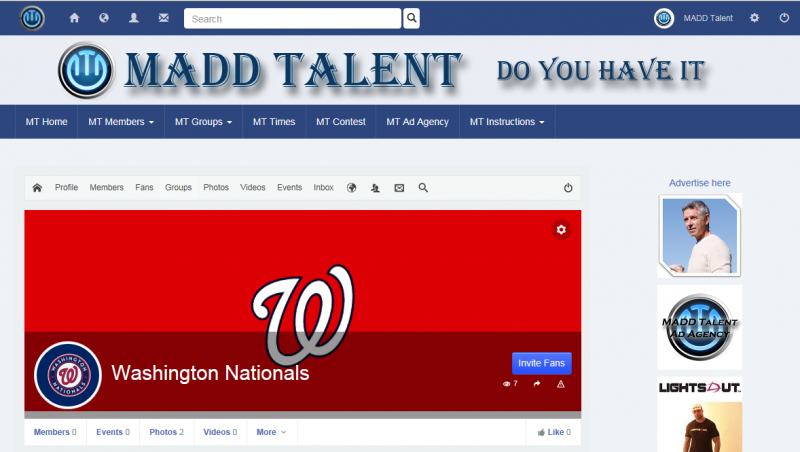

Hi, David.
Take a closer look on highlighted parts:
i.prntscr.com/fda7e5278d5a4be98b360a9f1b362573.png
:)
Use this code in custom.css:
.joms-focus__header {
    background: rgba(0, 0, 0, 1) none repeat scroll 0 0 !important;
}
- Instead of saying: 'it's not working', explain the problem in detail.
- Screenshots with the URL visible in them and the problem marked are more than welcome.
- Tell us how to replicate the problem, we can't fix it if we can't find it.
- Make sure that your site/server meets JomSocial System Requirements
- Make sure to setup JomSocial Cron Job
- Always provide us with access details to the backend and ftp. We need it to debug problems.
- If you have a similar problem, but a solution you found isn't working, open a new thread instead of 'merging' with an existing one.
- Use the "Thank You" feature on any post that helped you