Support Forum
Disabling "Taken at" & "More from this group" modules

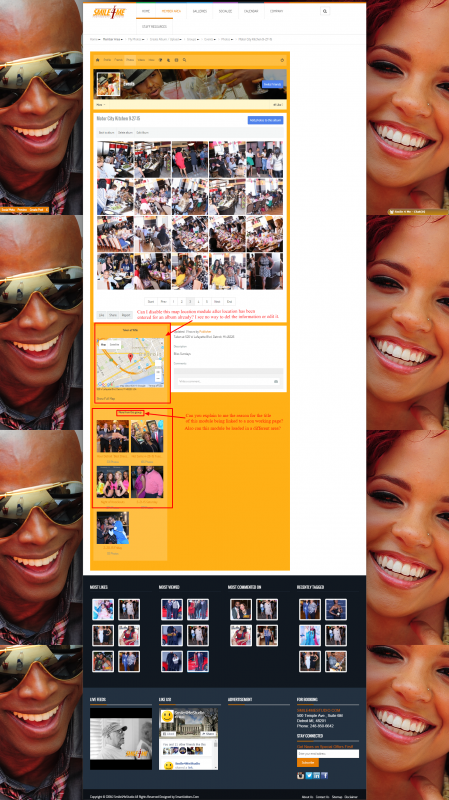
The load time on the location module is pretty slow and really isn't needed for my site. Is it a way to disable it once galleries are made using using it? I didn't see the option to edit or del the information.
Also the "More from this group" module is weird. Have you noticed that the title is clickable but leads to nothing? When I clicked on the title it goes to a page stating, "You are not allowed to access this section." even though I'm logged in as an admin.
The module itself is very useful but I don't want it rendered where it is. Can I make it show in a different position?
Hi, Arthur.
1. You can disable photo location here: Backend -> Components -> JomSocial -> Photos -> Photo configuration:
prntscr.com/8m3l0d
2. No, you can't move this box around, it's fixed... unless you customize album template.
3. This is a valid bug and I'll report it to our developers.
- Instead of saying: 'it's not working', explain the problem in detail.
- Screenshots with the URL visible in them and the problem marked are more than welcome.
- Tell us how to replicate the problem, we can't fix it if we can't find it.
- Make sure that your site/server meets JomSocial System Requirements
- Make sure to setup JomSocial Cron Job
- Always provide us with access details to the backend and ftp. We need it to debug problems.
- If you have a similar problem, but a solution you found isn't working, open a new thread instead of 'merging' with an existing one.
- Use the "Thank You" feature on any post that helped you
Hi, Arthur.
Photo location enables location field in photo upload. And location is displayed as text under photos as "Taken at".
Show Photo Map enables map with location as additional box.
I agree that when "Photo location" is disabled then "taken at" words should be hidden. I'll report this as a bug.
- Instead of saying: 'it's not working', explain the problem in detail.
- Screenshots with the URL visible in them and the problem marked are more than welcome.
- Tell us how to replicate the problem, we can't fix it if we can't find it.
- Make sure that your site/server meets JomSocial System Requirements
- Make sure to setup JomSocial Cron Job
- Always provide us with access details to the backend and ftp. We need it to debug problems.
- If you have a similar problem, but a solution you found isn't working, open a new thread instead of 'merging' with an existing one.
- Use the "Thank You" feature on any post that helped you
Hi, Arthur.
Do a safe copy of this file:
ROOT/components/com_community/templates/jomsocial/layouts/photos/list.php
Then replace original file with patched one from package.
- Instead of saying: 'it's not working', explain the problem in detail.
- Screenshots with the URL visible in them and the problem marked are more than welcome.
- Tell us how to replicate the problem, we can't fix it if we can't find it.
- Make sure that your site/server meets JomSocial System Requirements
- Make sure to setup JomSocial Cron Job
- Always provide us with access details to the backend and ftp. We need it to debug problems.
- If you have a similar problem, but a solution you found isn't working, open a new thread instead of 'merging' with an existing one.
- Use the "Thank You" feature on any post that helped you