Support Forum
Photo upload error with IE9
-

Topic Author - Francisco Javier Cantais
- Offline
- Fresh Boarder
- Thank you received: 0
Licenses:
JomSocial Active
ISSUE SUMMARY:
Unable to upload photos with IE9
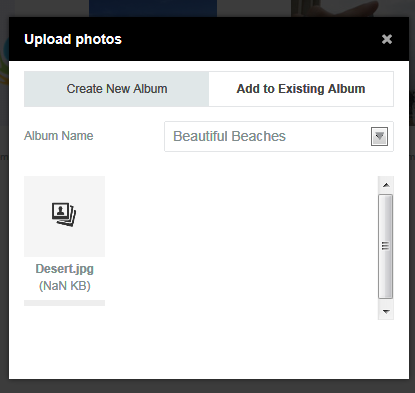
STEPS TO REPLICATE:
1. Log into JomSocial Demo Site with demo account
2. Go to "Photos" on the main menu
3. Click the "Upload photos" button
4. Select the "Add to Existing Album" tab, choose any album
5. Javascript error: SCRIPT5 Access Denied plupload.min.js, Line 2 Character 33108
RESULT
Photo not uploaded
EXPECTED RESULT
Photo upload progress, then photo uploaded
BROWSER
Internet Explorer 9. Tested on different computers
Hi, Francisco.
Did you tried with other browsers?
- Instead of saying: 'it's not working', explain the problem in detail.
- Screenshots with the URL visible in them and the problem marked are more than welcome.
- Tell us how to replicate the problem, we can't fix it if we can't find it.
- Make sure that your site/server meets JomSocial System Requirements
- Make sure to setup JomSocial Cron Job
- Always provide us with access details to the backend and ftp. We need it to debug problems.
- If you have a similar problem, but a solution you found isn't working, open a new thread instead of 'merging' with an existing one.
- Use the "Thank You" feature on any post that helped you
-
Topic Author - Francisco Javier Cantais
- Offline
- Fresh Boarder
- Thank you received: 0
Licenses:
JomSocial Active
Yes, uploads work with Chrome, Firefox, IE10 and IE11. The problem seems to be with IE9 only.
Tried from different computers, with different picture files and different logged-in users.
Hi, Francisco.
I'll ask other support members to test it on IE9.
I'll update you soon.
- Instead of saying: 'it's not working', explain the problem in detail.
- Screenshots with the URL visible in them and the problem marked are more than welcome.
- Tell us how to replicate the problem, we can't fix it if we can't find it.
- Make sure that your site/server meets JomSocial System Requirements
- Make sure to setup JomSocial Cron Job
- Always provide us with access details to the backend and ftp. We need it to debug problems.
- If you have a similar problem, but a solution you found isn't working, open a new thread instead of 'merging' with an existing one.
- Use the "Thank You" feature on any post that helped you
-
Topic Author - Francisco Javier Cantais
- Offline
- Fresh Boarder
- Thank you received: 0
Licenses:
JomSocial Active
Hi, Michal. Any news? It's been a couple of weeks since your last reply.
Kind regards.
Hi, Francisco.
I was talking with developers.
Please, amek sure that you have installed ALL released patches for IE9 including Silverlight to support HTML5 elements.
- Instead of saying: 'it's not working', explain the problem in detail.
- Screenshots with the URL visible in them and the problem marked are more than welcome.
- Tell us how to replicate the problem, we can't fix it if we can't find it.
- Make sure that your site/server meets JomSocial System Requirements
- Make sure to setup JomSocial Cron Job
- Always provide us with access details to the backend and ftp. We need it to debug problems.
- If you have a similar problem, but a solution you found isn't working, open a new thread instead of 'merging' with an existing one.
- Use the "Thank You" feature on any post that helped you
-
Topic Author - Francisco Javier Cantais
- Offline
- Fresh Boarder
- Thank you received: 0
Licenses:
JomSocial Active
I am currently using Internet Explorer 9.0.8112.16421 with Microsoft Silverlight plugin 5.1.40728
Is the uploading of photos working for your technicians using IE9?
Hi, Francisco.
That's the final release of IE9 - I'm asking about installed patches:
www.manageengine.com/products/desktop-ce...lorer-9-updates.html
- Instead of saying: 'it's not working', explain the problem in detail.
- Screenshots with the URL visible in them and the problem marked are more than welcome.
- Tell us how to replicate the problem, we can't fix it if we can't find it.
- Make sure that your site/server meets JomSocial System Requirements
- Make sure to setup JomSocial Cron Job
- Always provide us with access details to the backend and ftp. We need it to debug problems.
- If you have a similar problem, but a solution you found isn't working, open a new thread instead of 'merging' with an existing one.
- Use the "Thank You" feature on any post that helped you