Support Forum
Upload video from local doesn't work


Hi, Saovry.
I can't access your site backend - I'm redirected to frontend.
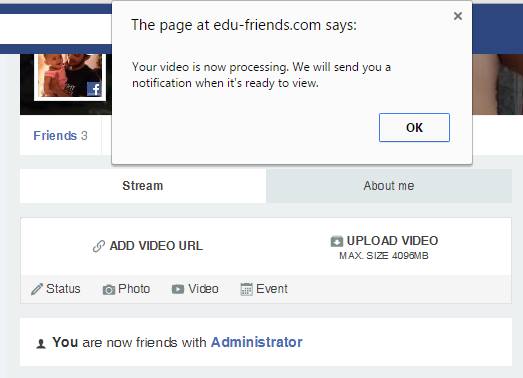
Also, you should receive notification - it doesn't say anything about email.
- Instead of saying: 'it's not working', explain the problem in detail.
- Screenshots with the URL visible in them and the problem marked are more than welcome.
- Tell us how to replicate the problem, we can't fix it if we can't find it.
- Make sure that your site/server meets JomSocial System Requirements
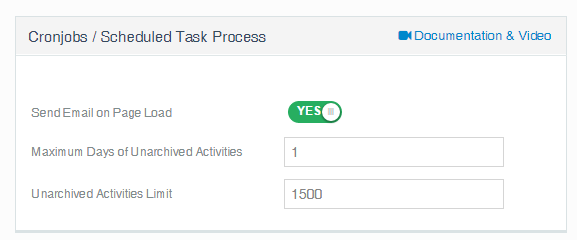
- Make sure to setup JomSocial Cron Job
- Always provide us with access details to the backend and ftp. We need it to debug problems.
- If you have a similar problem, but a solution you found isn't working, open a new thread instead of 'merging' with an existing one.
- Use the "Thank You" feature on any post that helped you
Hi, Saovry.
No, no. I don't need access to cpanel... but to your Joomla! backend. now when i pass extra protection and type in URL: your-domain.com/administrator I'm redirected to frontend.
- Instead of saying: 'it's not working', explain the problem in detail.
- Screenshots with the URL visible in them and the problem marked are more than welcome.
- Tell us how to replicate the problem, we can't fix it if we can't find it.
- Make sure that your site/server meets JomSocial System Requirements
- Make sure to setup JomSocial Cron Job
- Always provide us with access details to the backend and ftp. We need it to debug problems.
- If you have a similar problem, but a solution you found isn't working, open a new thread instead of 'merging' with an existing one.
- Use the "Thank You" feature on any post that helped you
Login my administrator page
go this link
mysite.com/administrator/index.php?Edu-admin
and then use password. And username of admin and password again.
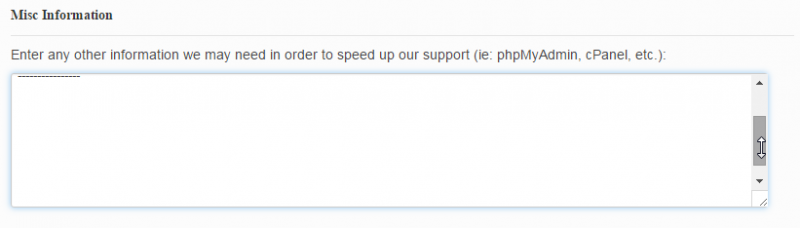
To login at my administrator page, please use the Misc information, you can find it at my first post. I guide everything in here even though my administrator and cpanel
Please use the information in this area.
sorry to make you trouble.
Thank for helping
Hi, Saovry.
Video couldn't be converted:
prntscr.com/8j7shz
1. Make sure that FFMPEG library is installed on your server.
2. Make sure that FFMPEG is up to date
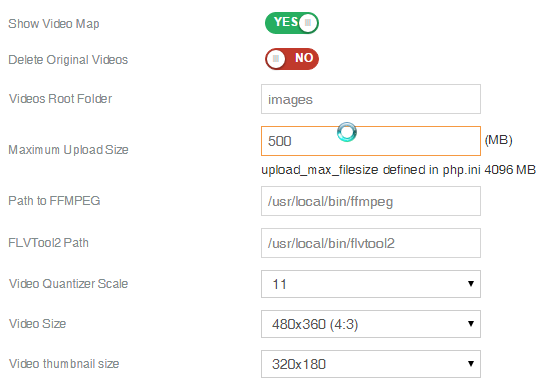
3. Make sure you provided correct path to library in Components -> JomSocial -> Video -> Video configuration
- Instead of saying: 'it's not working', explain the problem in detail.
- Screenshots with the URL visible in them and the problem marked are more than welcome.
- Tell us how to replicate the problem, we can't fix it if we can't find it.
- Make sure that your site/server meets JomSocial System Requirements
- Make sure to setup JomSocial Cron Job
- Always provide us with access details to the backend and ftp. We need it to debug problems.
- If you have a similar problem, but a solution you found isn't working, open a new thread instead of 'merging' with an existing one.
- Use the "Thank You" feature on any post that helped you
I contacted with my hosting and they told like below. Now what should I do the next?
You may like to review the following article regarding video conversion issues on our servers:
support.pacifichost.com/index.php?/Knowl...o-conversion-problem
Your account resides on the beast.pacifichost.com server, the FFMPEG version presently installed is as follows:
FFmpeg version SVN-r26402, Copyright (c) 2000-2011 the FFmpeg developers
built on May 6 2013 08:15:49 with gcc 4.1.2 20080704 (Red Hat 4.1.2-54)
configuration: --disable-avisynth --extra-cflags='-O2 -g -pipe -Wall -Wp,-D_FORTIFY_SOURCE=2 -fexceptions -fstack-protector --param=ssp-buffer-size=4 -m64 -mtune=generic -fPIC' --enable-avfilter --enable-libfaac --enable-libmp3lame --enable-libopencore-amrnb --enable-libopencore-amrwb --enable-libx264 --enable-gpl --enable-nonfree --enable-postproc --enable-pthreads --enable-shared --enable-swscale --enable-vdpau --enable-version3 --enable-x11grab --enable-libxvid --enable-libvorbis --enable-libtheora
libavutil 50.36. 0 / 50.36. 0
libavcore 0.16. 1 / 0.16. 1
libavcodec 52.108. 0 / 52.108. 0
libavformat 52.93. 0 / 52.93. 0
libavdevice 52. 2. 3 / 52. 2. 3
libavfilter 1.74. 0 / 1.74. 0
libswscale 0.12. 0 / 0.12. 0
libpostproc 51. 2. 0 / 51. 2. 0
The server paths are as follows:
FFMPEG
/usr/bin/ffmpeg
/usr/local/bin/ffmpeg
FLVTool2
/usr/bin/flvtool2
/usr/local/bin/flvtool2
Hi, Saovry.
That explains a lot :)
SVN is ancient and the last revision was r26402 committed on 2011-01-19
As your hosting provider to upload FFMPEG to most recent version.
Now your library version is too old to work with JomSocial.
- Instead of saying: 'it's not working', explain the problem in detail.
- Screenshots with the URL visible in them and the problem marked are more than welcome.
- Tell us how to replicate the problem, we can't fix it if we can't find it.
- Make sure that your site/server meets JomSocial System Requirements
- Make sure to setup JomSocial Cron Job
- Always provide us with access details to the backend and ftp. We need it to debug problems.
- If you have a similar problem, but a solution you found isn't working, open a new thread instead of 'merging' with an existing one.
- Use the "Thank You" feature on any post that helped you
Hi, Saovry.
You mistake two separated things
- video file upload (this works fine, each file is uploaded and stored on your server)
- video file conversion (this where you have issue, file CAN'T be converted as your hosting provider uses very very old FFMPEG version).
You need ask your hosting provider to update FFMPEG library, after that you'll be able to convert videos.
- Instead of saying: 'it's not working', explain the problem in detail.
- Screenshots with the URL visible in them and the problem marked are more than welcome.
- Tell us how to replicate the problem, we can't fix it if we can't find it.
- Make sure that your site/server meets JomSocial System Requirements
- Make sure to setup JomSocial Cron Job
- Always provide us with access details to the backend and ftp. We need it to debug problems.
- If you have a similar problem, but a solution you found isn't working, open a new thread instead of 'merging' with an existing one.
- Use the "Thank You" feature on any post that helped you
I contact my hosting already and they can't upgrade FFMPEG to the latest version for me because I am using the share hosting
Do you know the good FFMPEG site that allow us to use FFMPEG free with my site?
Hi, Saovry.
I'm afraid that you're stuck... you can't use external FFMPEG library... unless you use Zencoder + Amazon S3 (both paid services).
- Instead of saying: 'it's not working', explain the problem in detail.
- Screenshots with the URL visible in them and the problem marked are more than welcome.
- Tell us how to replicate the problem, we can't fix it if we can't find it.
- Make sure that your site/server meets JomSocial System Requirements
- Make sure to setup JomSocial Cron Job
- Always provide us with access details to the backend and ftp. We need it to debug problems.
- If you have a similar problem, but a solution you found isn't working, open a new thread instead of 'merging' with an existing one.
- Use the "Thank You" feature on any post that helped you