Support Forum
Video file type .MOV is not supported

Hi Support,
Yes, you are right, but this point "bigger than 2.8 MB. Anyway Maximum file size for video upload is 8 MB in your system" I do not know what the size is , which one I sent you it is around 6 MB.
Regards
Hi, Tim.
That point is result of my tests.When trying to upload more than 8MB I get notice about upload limit. And get negative results for any mov file bigger than 2.5 to 2.8 MB.
I think we need a developer here. I assign one to this thread.
- Instead of saying: 'it's not working', explain the problem in detail.
- Screenshots with the URL visible in them and the problem marked are more than welcome.
- Tell us how to replicate the problem, we can't fix it if we can't find it.
- Make sure that your site/server meets JomSocial System Requirements
- Make sure to setup JomSocial Cron Job
- Always provide us with access details to the backend and ftp. We need it to debug problems.
- If you have a similar problem, but a solution you found isn't working, open a new thread instead of 'merging' with an existing one.
- Use the "Thank You" feature on any post that helped you
Hi Support,
Did you delete my last message ? Regarding to your questions , see below:
- you CAN upload some mov files e.g download.wavetlan.com/SVV/Media/HTTP/H26...head_mov_480x360.mov => yes
- you CAN upload some mov files from mobile only if they are small => yes
- you CAN'T upload big mov files from mobile (bigger than 2.8 MB. Anyway Maximum file size for video upload is 8 MB in your system) => I'm not sure about this one, please check with the file I sent you above, we need to fix this issue.
Regards
Hi,
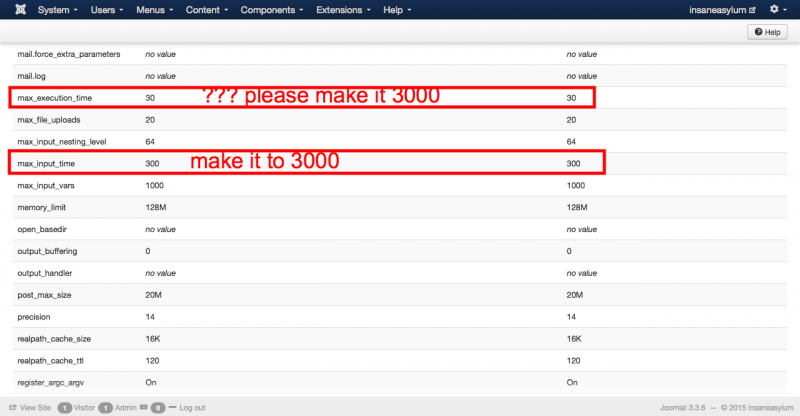
I forgot to tell you I'm using 2 php.ini files at root and in administrator folder to control those php settings. You can not see the new value because I changed for php.ini at root only. just updated for both files now . and still not working.
insaneasylum.com.au/info.php
Regards
Hi,
insaneasylum.com.au/info.php is showing the default php settings of the cpanel, I told you above we are using php.ini files in public_html and administrator to inscrease all these settings when the system runs. I do not know why it is taking too long for you to check this issue. Do you need to have FTP details for checking source code ?
Regards
Hi,
you said: "You can not see the new value because I changed for php.ini at root only"
not sure why you do that. can you try changing all php.ini at any places at your site
set:
upload_max_filesize
post_max_size
max_input_time
max_file_uploads
max_execution_time
memory_limit
the issue becuase the php still detecting upload_max_filesize 2M
Regards